Pattrn-AI Review for Stained Glass Patterns
Check whether Pattrn-AI turns photos and sketches into editable, printable stained glass patterns, and where manual pattern work remains.

This Pattrn-AI review for stained glass patterns finds that the tool is worth the $5 monthly entry price if you want a faster route from a photo or paper sketch to editable centerlines and a tiled pattern, but it is not an automatic cutability checker. Its current public demo produces a clean 156-path SVG; you still have to repair difficult geometry, set the intended finished size, and measure the print before glass meets cutter.
Pattrn-AI Review for Stained Glass Patterns: The Short Verdict
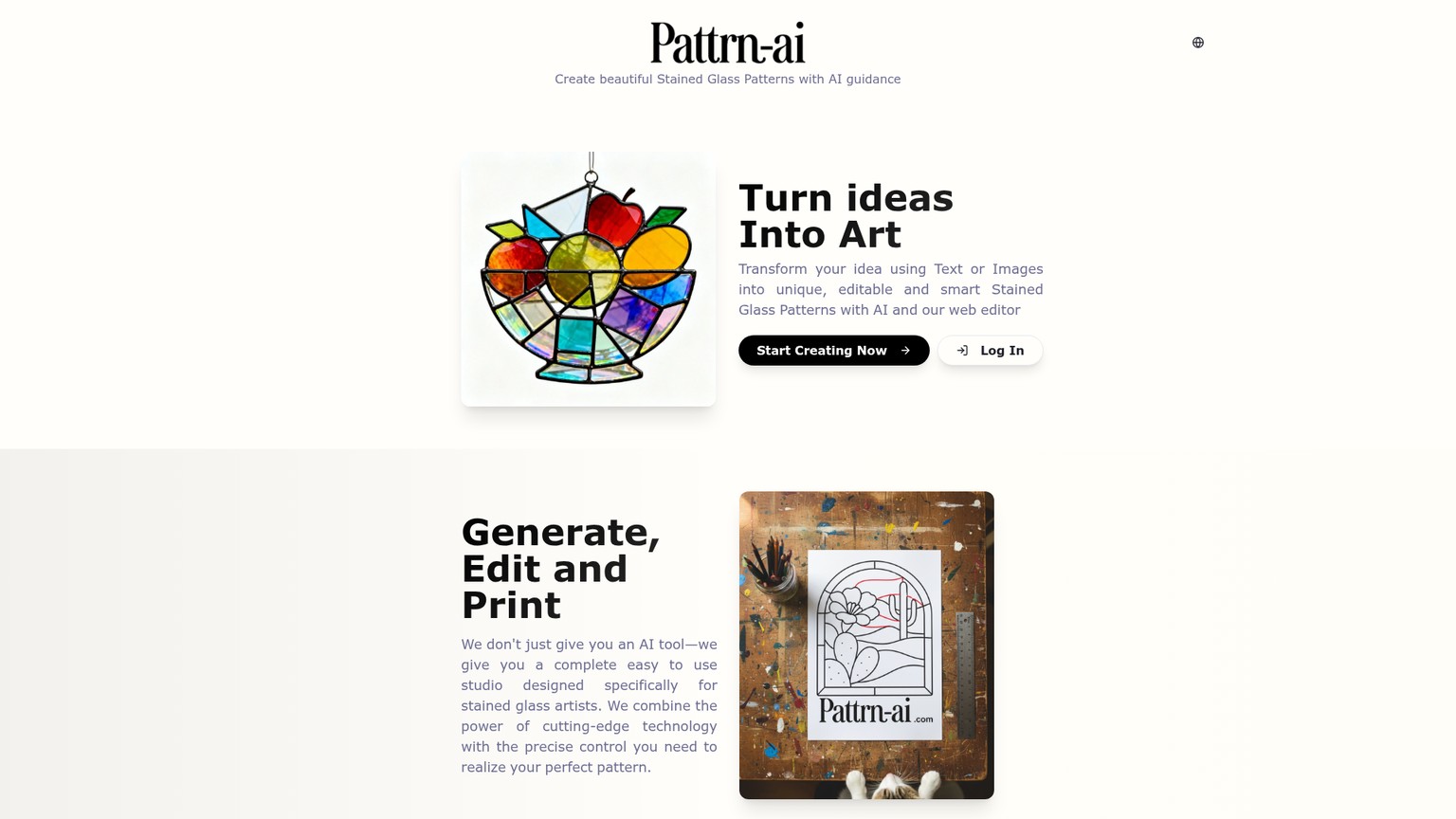
Pattrn-AI is a browser-based set of stained-glass pattern tools that cleans photographed drawings, turns linework into editable centerlines, previews colored glass, and tiles a design into a full-size PDF. That is a useful chain. It shortens the distance between a customer photo, a pencil cartoon, and a file you can correct.
It does not remove the correction step. A clean line drawing can still contain a deep inside curve that will not break cleanly, a sliver that is too narrow to grind and foil, a crowded junction, or a seam that only appears connected because two strokes overlap. A pattern is ship-ready only after those conditions are checked at its final physical size.
The short buying call is simple. Choose Pattrn-AI when the slow part is tracing and cleanup, and when you are comfortable editing nodes and judging cuts. Skip it when you expect one click to certify a photograph as a buildable cartoon.
What Pattrn-AI Actually Is
Pattrn-AI is not one generator. It is a linked workspace with separate jobs: Image to Pattern makes an artistic interpretation, a black-and-white draft, and a vector; Pattern Digitizer cleans an existing drawing; Pattern to Vector creates editable centerlines; Color Simulator fills enclosed regions with glass-like textures; and Pattern Resizer prepares a multi-page print.
Those boundaries matter. Digitizer returns a cleaner raster image, meaning a grid of pixels. Pattern to Vector returns SVG paths that can be moved node by node. The same vector-versus-raster distinction that decides whether a logo can be professionally edited decides whether a stained-glass seam can be reshaped without retracing it.
Pattrn-AI's value is therefore not “AI makes the finished pattern.” Its value is a narrower, more credible claim: it can automate several tedious transformations and leave the maker with editable material. The maker remains responsible for fabrication judgment, dimensions, joining method, and final print verification. The current Terms reinforce that split by permitting users to sell patterns they create while requiring them to review and validate the output.
Here is the closest shortlist for the same purchase:
Prices and interfaces were verified on September 12, 2026. Pattrn-AI is the speed option in this group, not the most complete production system.
Who Pattrn-AI Is For, and Who Should Skip It
Pattrn-AI fits a hobbyist or commission designer who already knows what a viable piece of glass looks like. It is particularly useful when a customer supplies a phone photo, an old paper cartoon has shadows and wrinkles, or a hand sketch needs to become an SVG before it can be resized.
It also fits a pattern seller who wants to reduce tracing time but will perform a proper craft pass before listing the file. Commercial permission is helpful, but permission is not quality control. A buyer cannot see whether a beautiful thumbnail contains a cut that fails on glass.
Skip Pattrn-AI for a first-ever pattern if you want the software to teach cutability. VArtGlass is a better bridge into deliberate manual drawing because it keeps the reference beneath editable lines and adds exact dimensions, materials calculations, and full-size printing. It still requires craft judgment, but the workflow makes that judgment central instead of presenting generation first.
Skip it for a mature Windows shop that needs piece numbering, a bill of materials, printer calibration, or cutter support. Glass Eye 2000 is expensive by comparison, but those production features are the point.
Skip every paid tool if the requirement is only to correct a few paths and you already understand SVG. Inkscape gives you Bezier curves and broad format support for free. It will not tell you what makes a cut practical, but neither will a generic vector editor pretend to.
- Turns a photo, sketch, or dirty scan into material that can continue through one connected workflow
- Uses editable centerlines instead of locking the final seam network into pixels
- Exports SVG, PNG, and PDF from the vectorizer, with DXF also listed among the suite's formats
- Handles exact dimensions and tiled A4, A3, or Letter PDF output
- Starts at $5 per month for a paid allowance
- Does not document an automatic cutability or structural-validation pass
- A public demo can prove interface behavior, but not how the tool handles your hardest original drawing
- The pricing page says generations while the tools meter credits, which makes outcome capacity less clear than it should be
- Credits expire at the monthly reset instead of rolling over
- Guest access exposes samples, but a custom vector job requires sign-in and credits
Capability 1: From Photo or Sketch to a Pattern Draft
Pattrn-AI's Image to Pattern page shows the fastest route into the system. A source image becomes an artistic stained-glass interpretation, then a black-and-white line drawing, then an editable vector. The current interface meters those stages separately at 1 credit each, so the full displayed sequence costs 3 credits.
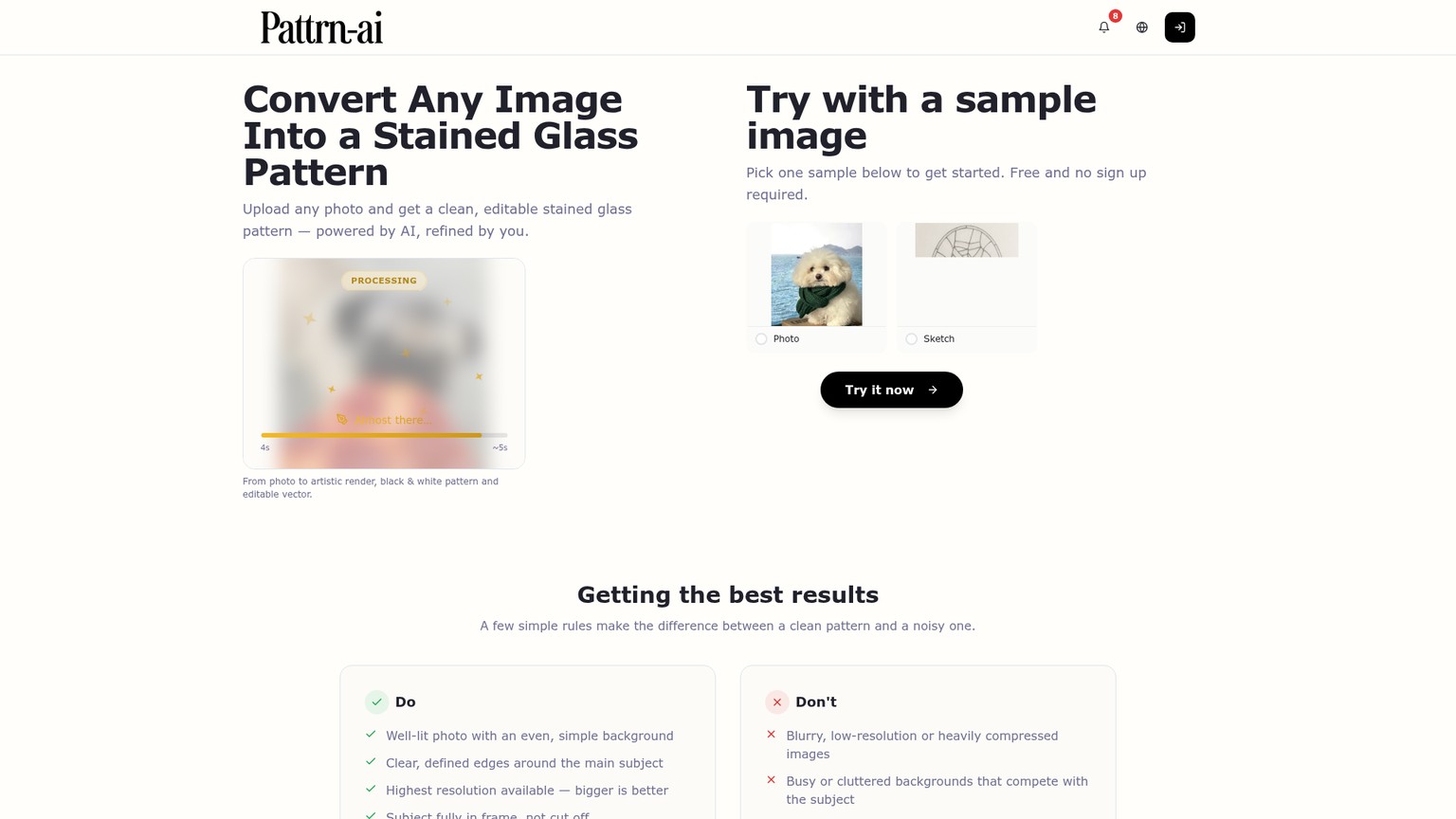
The input advice is sensible: use a well-lit, high-resolution image, keep the background simple, preserve clear edges, show the entire subject, and avoid extreme shadows. Those conditions reduce ambiguity, but they do not solve the core design problem. A camera records tonal boundaries, reflections, texture, and background edges. A stained-glass cartoon needs intentional seams that divide feasible pieces.
The current pencil-sketch sample makes that difference visible. The rough drawing becomes clean black-and-white artwork, and the supplied SVG is genuinely structured as vector paths rather than a flat image. That is meaningful progress. It moves the file from “reference” to “editor-ready.”
It is still vendor-supplied evidence. The source does not declare an intended fixture width, construction method, minimum acceptable piece width, or target seam allowance. An original stress fixture with a deliberately open seam, acute points, and narrow regions was prepared for this review, but the guest vectorizer showed 0 credits and required sign-in, so no independent generated result is claimed. The public sample assets, live controls, and file geometry are the evidence available without inventing a test.
The best use of Image to Pattern is ideation followed by reduction. Keep the subject broad and the background quiet. Reject unnecessary detail. Convert only the direction worth developing, then perform the geometry pass in the vector editor. This is the same accepted-output logic used for AI product-image workflows: the useful metric is not how impressive the first preview looks, but whether the output survives the next handoff.
Capability 2: Cleaning a Paper Cartoon With Pattern Digitizer
Pattrn-AI Pattern Digitizer is the cleaner starting point when the design already exists on paper. It is built to reduce shadows, paper texture, uneven lighting, faint pencil marks, and background noise from scans, photographs, sketches, and screenshots.
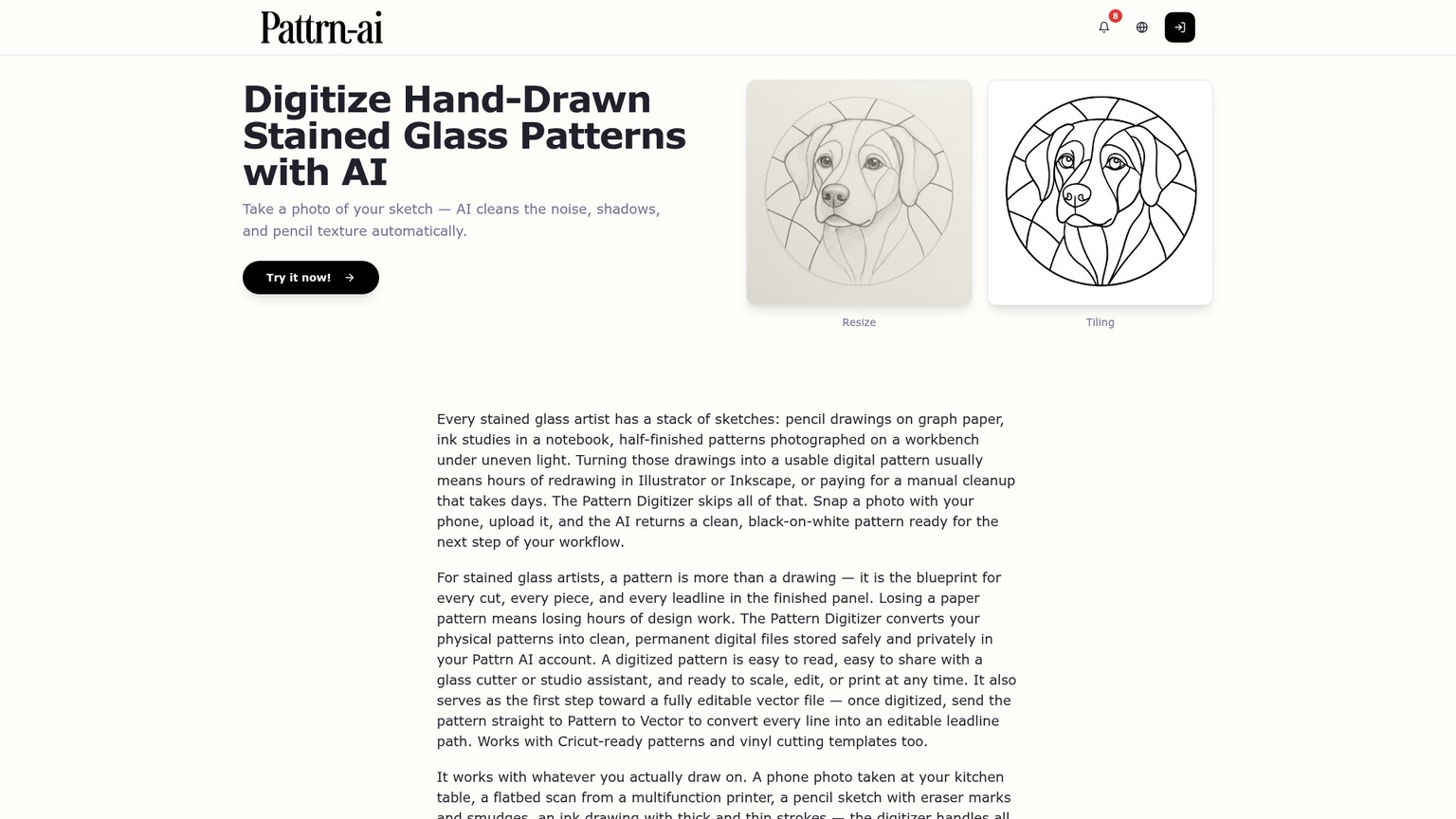
The key boundary is output type. Digitizer returns cleaned raster linework, not editable centerlines. That makes it a preparation stage. It can rescue a photograph that would trace poorly, but moving one junction or smoothing one curve still requires the vectorizer afterward.
A practical paper-cartoon workflow is to photograph the sheet square-on in even light, crop away the table, run Digitizer, and inspect the cleaned image at high zoom. Restore any faint intentional seam that disappeared and erase every crease or shadow that survived. Only then send the black-on-white result to Pattern to Vector.
This two-step route is slower than feeding the photograph directly into a generator, but it gives you a useful checkpoint. You can separate “the scan is dirty” from “the geometry is difficult.” That distinction makes correction faster because each failure has one likely cause.
Capability 3: Editable Centerlines and the Cutability Check
Pattrn-AI Pattern to Vector carries the strongest feature in the product: true centerline tracing. An ordinary outline trace tends to draw both sides of a thick black seam. A centerline trace turns that seam into one path, which is the editable structure a pattern maker needs.
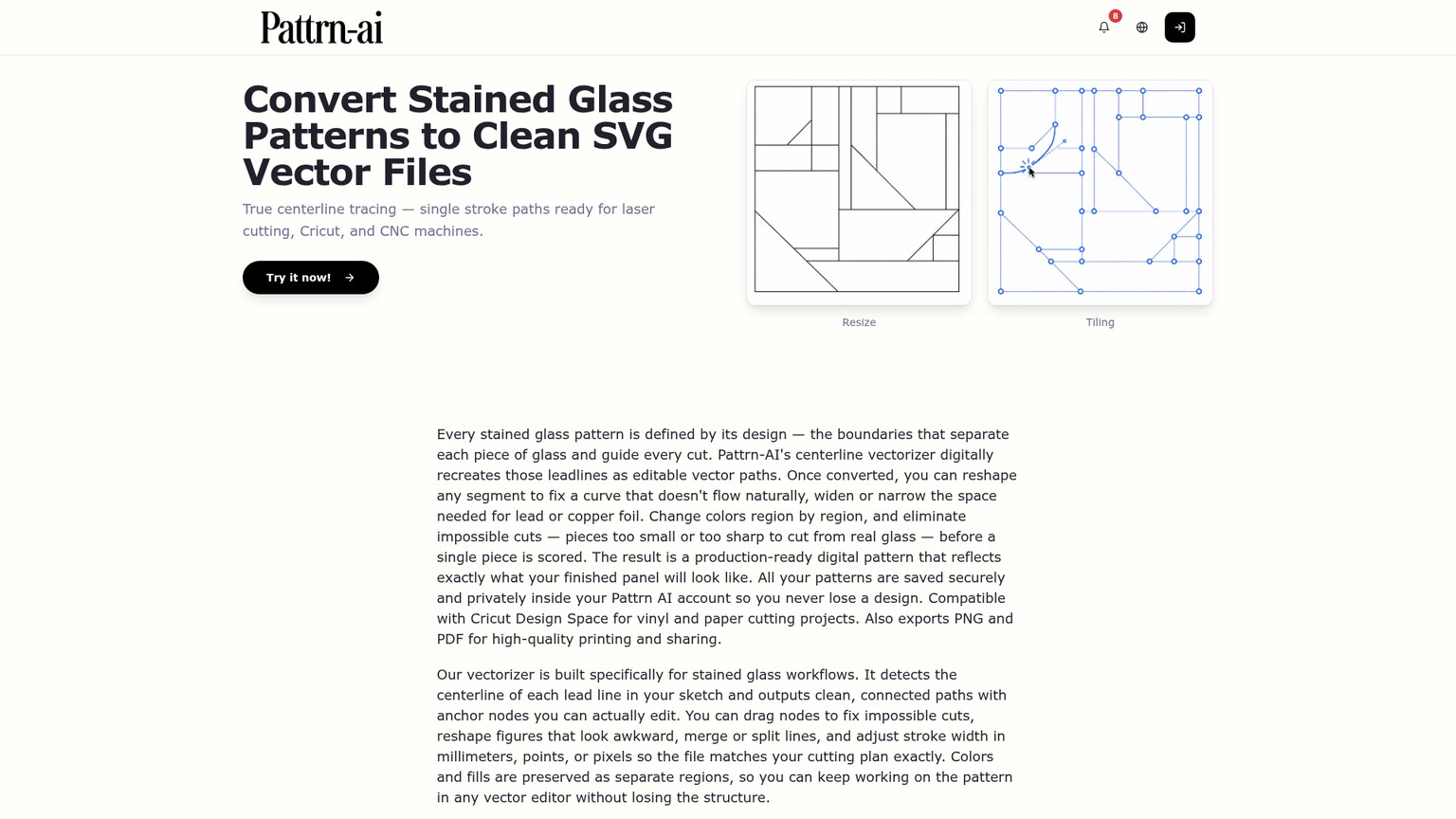
The editor supports the right categories of correction. You can move anchor nodes, reshape curves, merge or split lines, repair impossible cuts, alter stroke width in millimeters, points, or pixels, and manage stroke and fill colors separately. SVG is the best master export because its paths remain editable. PNG is useful for a preview, while PDF is useful for a fixed handoff.
The public pencil-sketch demo survives an initial connectivity audit better than a decorative AI image would. Its SVG contains 156 separate paths and 312 open endpoints. When each endpoint is compared with the other path geometry, the median gap is 0 viewBox units. Only 5 endpoints sit more than 0.05 unit away, and 1 sits more than 0.1 unit away; the maximum is 0.1209 against a 0.1720-unit stroke width. In plain language, the sample largely looks joined at the rendered stroke width.
That is evidence of competent tracing, not proof that every piece can be cut. Separate centerline paths can visually touch without sharing one node. A deep concave curve can be perfectly connected and still be impractical. A narrow neck can form a closed region and still break during scoring or grinding. The craft bar is geometry, not merely connectivity.
Pattrn-AI's live vectorizer also shows the operating settings a buyer will encounter. It accepts JPG, PNG, and WebP files up to 20 MB, recommends at least 600 pixels on the long edge, and asks for at least 800 by 800 pixels for best results. The visible default has AI Enhancement on, Medium quality, Auto size, and Stained glass mode, with an estimate of 20 to 40 seconds and a total of 2 credits.
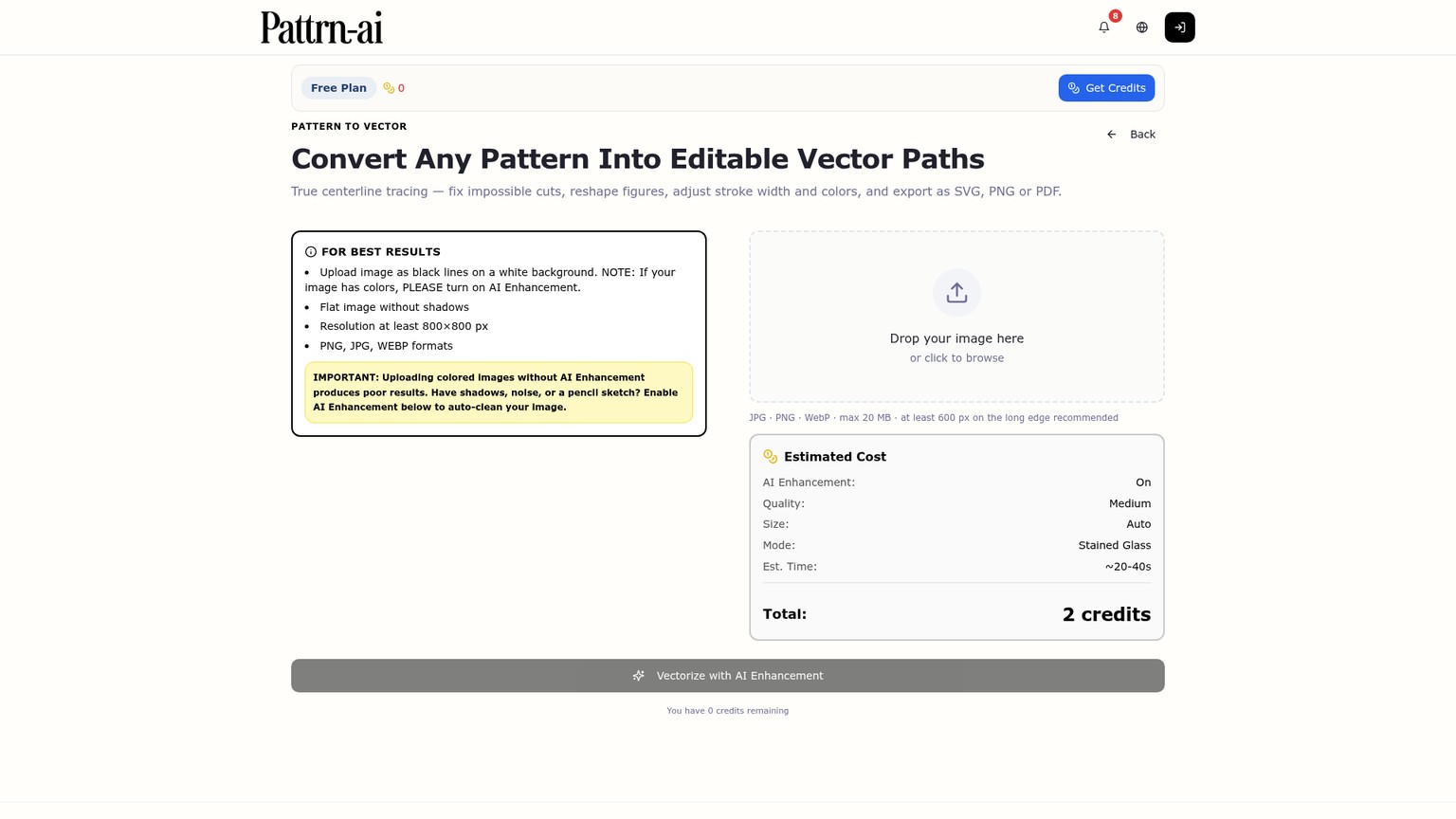
The current deployed interface charges 1 credit without AI Enhancement and 2 credits with it. An older May release note described 2 and 4 credits, but the live tool state is the current purchasing fact. Use enhancement for colored images, pencil noise, shadows, or dirty scans. Turn it off for a clean black-on-white line drawing when preserving the original geometry matters more than another interpretation step.
The correction recipe is mechanical enough to repeat:
1. Remove image noise first
Prepare a square, sharp, black-on-white source. If the input carries shadows, color, or paper texture, clean it with Pattern Digitizer or enable AI Enhancement. Do not ask the vector stage to solve avoidable photography problems.
2. Vectorize conservatively
Use Stained glass mode. Start with Medium quality and Auto size, then export SVG. Pattrn-AI does not publish a model name or model version on these live pages, so record the date and visible settings instead of inventing one.
3. Inspect every junction
Zoom past the rendered stroke. Join endpoints that should be one node, split lines that cross incorrectly, close regions that should take a fill, and delete duplicate or floating fragments.
4. Mark impossible cuts
Circle deep inside curves, acute inward corners, long narrow pieces, tiny inserts, and crowded junctions. Simplify the seam, divide the region differently, or redesign the silhouette. Clean vector paths do not make those cuts safe.
5. Test the color fill
Send the corrected SVG to Color Simulator. A region that will not fill is a clue that its boundary may be open. A successful fill proves enclosure, not cutability, so keep the geometry check separate.
6. Preserve an editable master
Save the corrected SVG before producing PNG, PDF, or DXF handoffs. Keep the source image, cleaned raster, first vector, corrected vector, intended dimensions, and print check together so a later revision does not restart the trace.
This is where Pattrn-AI earns its subscription. It gives the maker access to the seam structure instead of hiding the result behind a preview. It is also where the product stops being automatic. The final quality depends on whether someone performs these decisions well.
Capability 4: Printing the Pattern at the Intended Size
Pattrn-AI Pattern Resizer handles the step most image generators ignore: turning a file into a physical working cartoon. It accepts SVG, PNG, JPG, and PDF, takes an exact width and height, and tiles the result across A4, A3, or Letter sheets with controls for orientation, margins, overlap, and page numbering.
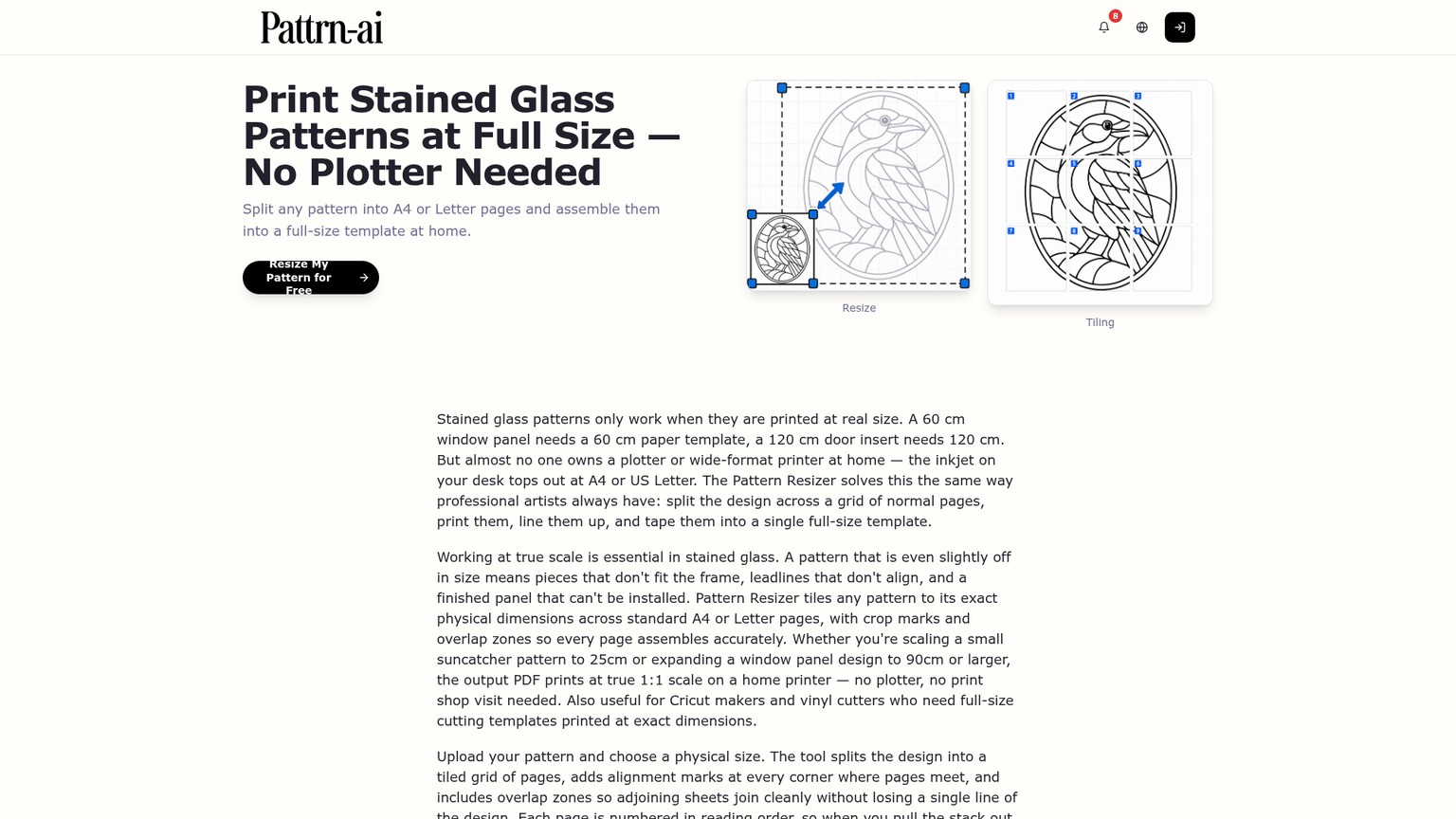
The resizer solves page layout, not intent. The public pencil-sketch SVG declares a 1024 mm by 1024 mm physical canvas even though its viewBox is about 94.4139 by 117.4482 and the original sketch supplies no fixture dimension. The file has units, but those units cannot prove how large the artist meant the piece to be.
Set the dimension from the physical job. For a replacement transom, measure the opening and define the required finished width and height. For an existing paper cartoon, measure two distant reference points on the original, not only one short line. For a free-standing panel, decide the finished size before judging whether its smallest shapes remain practical.
Then use this print gate:
- Enter the finished dimension in Pattern Resizer.
- Choose the actual paper size, orientation, overlap, and margins.
- Export the multi-page PDF.
- Print at 100% or Actual Size. Disable Fit, Shrink, or Scale to Page.
- Assemble enough adjacent sheets to cross a known calibration span.
- Measure that span with a physical ruler.
- Check the overall width and height, then recheck the narrowest pieces and deepest curves at the new scale.
The vendor says a 60 cm panel entered into its workflow arrives in the export as 60 cm. The physical ruler remains the authority because printer drivers can add scaling after Pattrn-AI has done its job correctly.
The output should include at least one intact assembly layout and another working copy for templates. Page numbering and overlap help align a tiled print, but registration still deserves a visual and measured check before the cartoon is transferred to glass.
Pattrn-AI Pricing: Every Current Plan and the Cost per Finished Draft
Pattrn-AI pricing is inexpensive at the entry point and slightly opaque at the unit level. The live plan page labels allowances as image generations, while the actual tools display costs in credits. The math below assumes those units map one-for-one, which is how the current interface presents capacity but not a relationship the pricing copy explains explicitly.
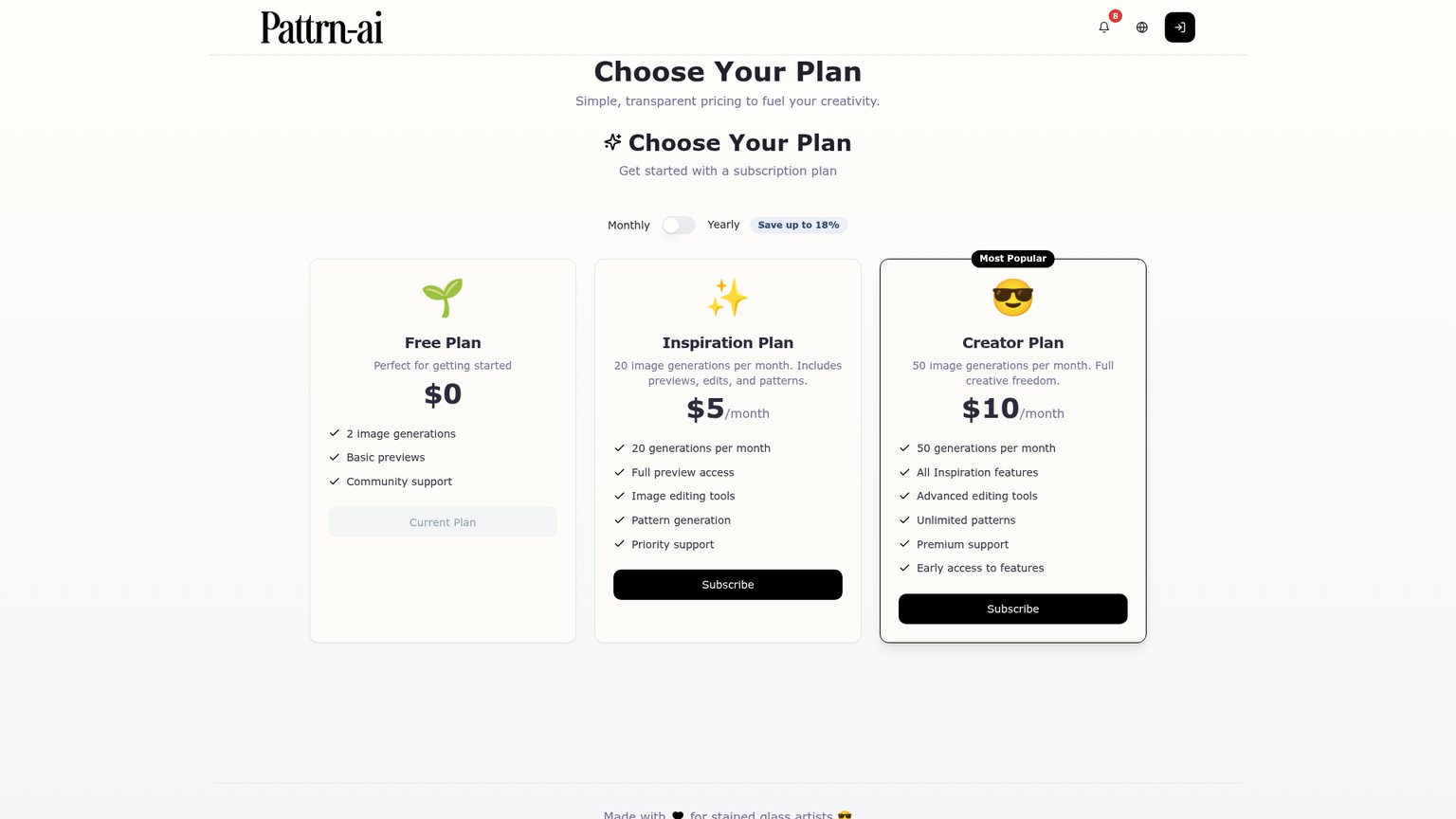
The annual selector advertises savings of up to 18%. On nominal allowance, Inspiration costs $0.25 per generation monthly or $0.204 on the annual plan. Creator costs $0.20 monthly or $0.165 annually. Those are useful comparison numbers only if the allowance is consumed, because subscription credits expire at the monthly reset and do not roll over.
The outcome cost is more revealing. Image to Pattern currently displays 1 credit for the artistic stage, 1 for the black-and-white stage, and 1 for the vector stage. Under the one-for-one assumption, Inspiration's 20-unit monthly allowance covers 6 complete sequences with 2 credits left. Counting only the complete sequences, that is $0.83 each. Creator's 50 units cover 16 complete sequences with 2 credits left, or $0.63 each.
The Free plan has 2 image generations while the full three-stage path displays a 3-credit total. It can show whether the environment makes sense, but its stated allowance does not visibly cover every stage of that full route under the same one-for-one assumption.
The Terms say subscriptions recur until canceled, payments are generally non-refundable, and prices may change with 30 days' notice. Download the editable master and production PDF for every accepted pattern instead of treating the account as the project archive.
The Limitations That Matter Before You Cut Glass
Pattrn-AI has five limits that affect a purchase more than the quality of its hero examples.
First, it does not document an automatic cutability validator. The product gives you tools to “fix impossible cuts,” which is useful, but that wording puts detection and judgment on the user. A joined SVG is not a guarantee that the glass can survive the score and break.
Second, physical units are not the same as intended scale. The public sketch SVG carries a 1024 mm square canvas without a corresponding real-world dimension in its source. Pattern Resizer lets you correct the size, but it cannot infer the customer's opening, lamp form, or frame.
Third, the public evidence is curated. Samples are available without sign-up, while a custom vector job shows a guest with 0 credits. That prevents a fair anonymous stress test of the hardest geometry. It is not evidence that the tool fails such a test; it is a reason not to call this review tested.
Fourth, the allowance language needs work. Plans sell generations, individual operations charge credits, and the site does not explain the mapping on the pricing page. The cost-per-outcome calculation therefore needs the explicit one-for-one caveat used above.
Fifth, the public Pattrn-AI pages reviewed here do not document automatic piece numbering, a bill of materials, glass-area calculation, printer calibration, registration marks, or construction allowances for foil or came. Pattern Resizer handles tiling and page numbers, but the production record still needs manual additions or another tool.
Independent craft guidance supports a stricter gate. Manageable stained-glass geometry favors broad sections, straight cuts or gentle arcs, few deep inside curves, no fragile narrow strips or tiny inserts, and a clear finished size. Apply that standard after generation, not before it, because the final scale changes the difficulty of every small region.
Pattrn-AI Alternatives for More Control
Pattrn-AI alternatives divide by the work you want to keep manual. VArtGlass puts the craft editor first, Glass Eye 2000 adds mature production functions, and Inkscape gives an experienced vector user precise control without a subscription.
VArtGlass: Better for a Manual Craft Workflow
VArtGlass is the closest browser-based alternative for someone who wants to trace deliberately instead of generating first. A photo or sketch sits beneath the drawing as a reference, while the maker builds and edits each seam with exact dimensions, rulers, guides, and snapping.
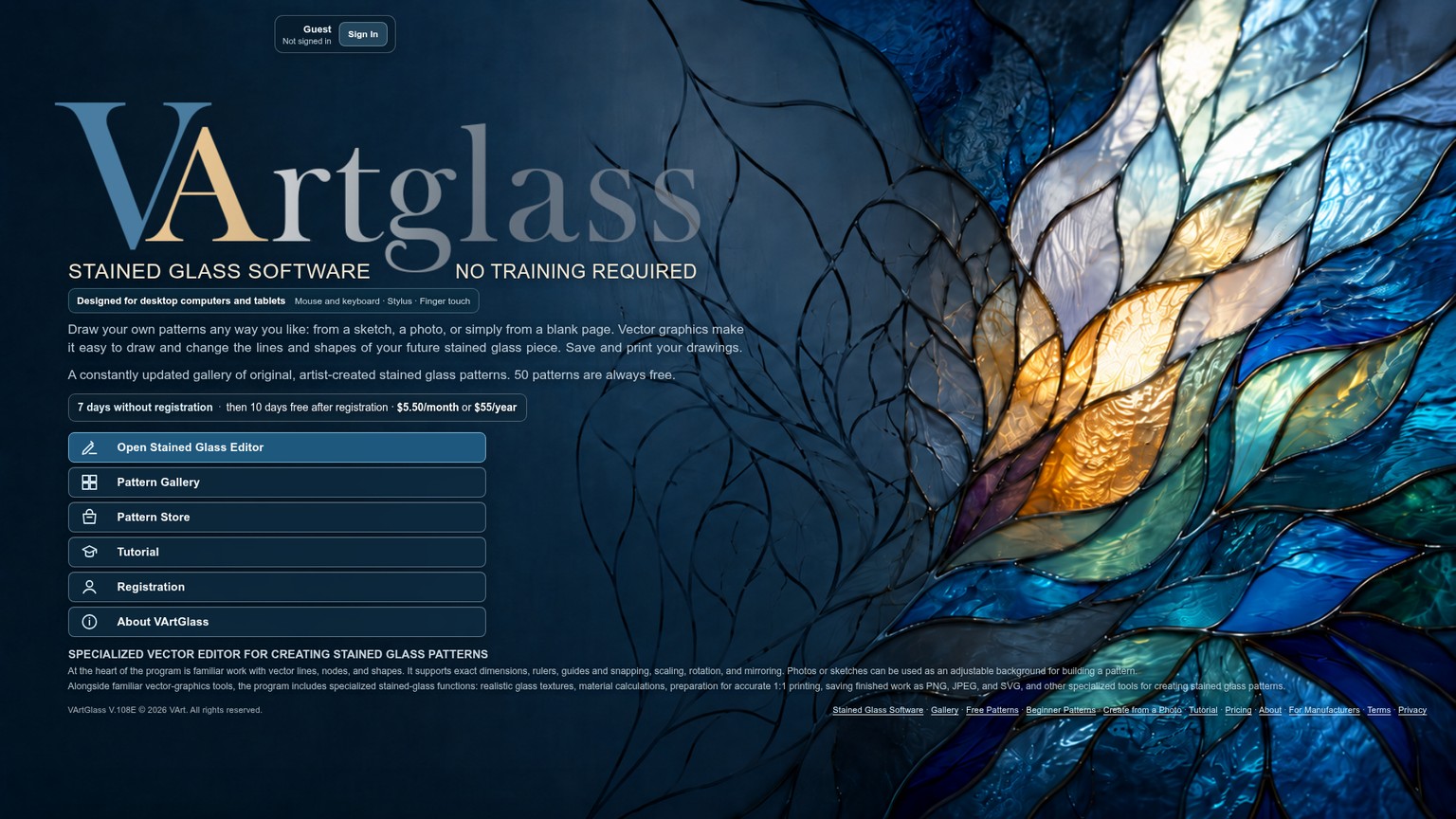
Its stained-glass features go beyond drawing: realistic glass textures, material calculations, metric or imperial dimensions, and 1-to-1 tiled printing with numbered sheets and optional registration marks. It exports PNG, JPEG, and SVG. Access starts with 7 days without registration, followed by a 10-day no-card trial after registration. Paid access is $5.50 per month or $55 per year, with the annual price displayed as $4.58 per month.
Choose VArtGlass when the original sketch matters and you want to decide every seam. Skip it when automated cleanup and vectorization are the main reason to buy anything.
Glass Eye 2000: Better for a Windows Production Shop
Glass Eye 2000 is the deeper production alternative. Its Standard edition costs $150 once and includes drawing tools, grids, rulers, 15 glass textures, more than 400 patterns, piece numbering, and a bill of materials.
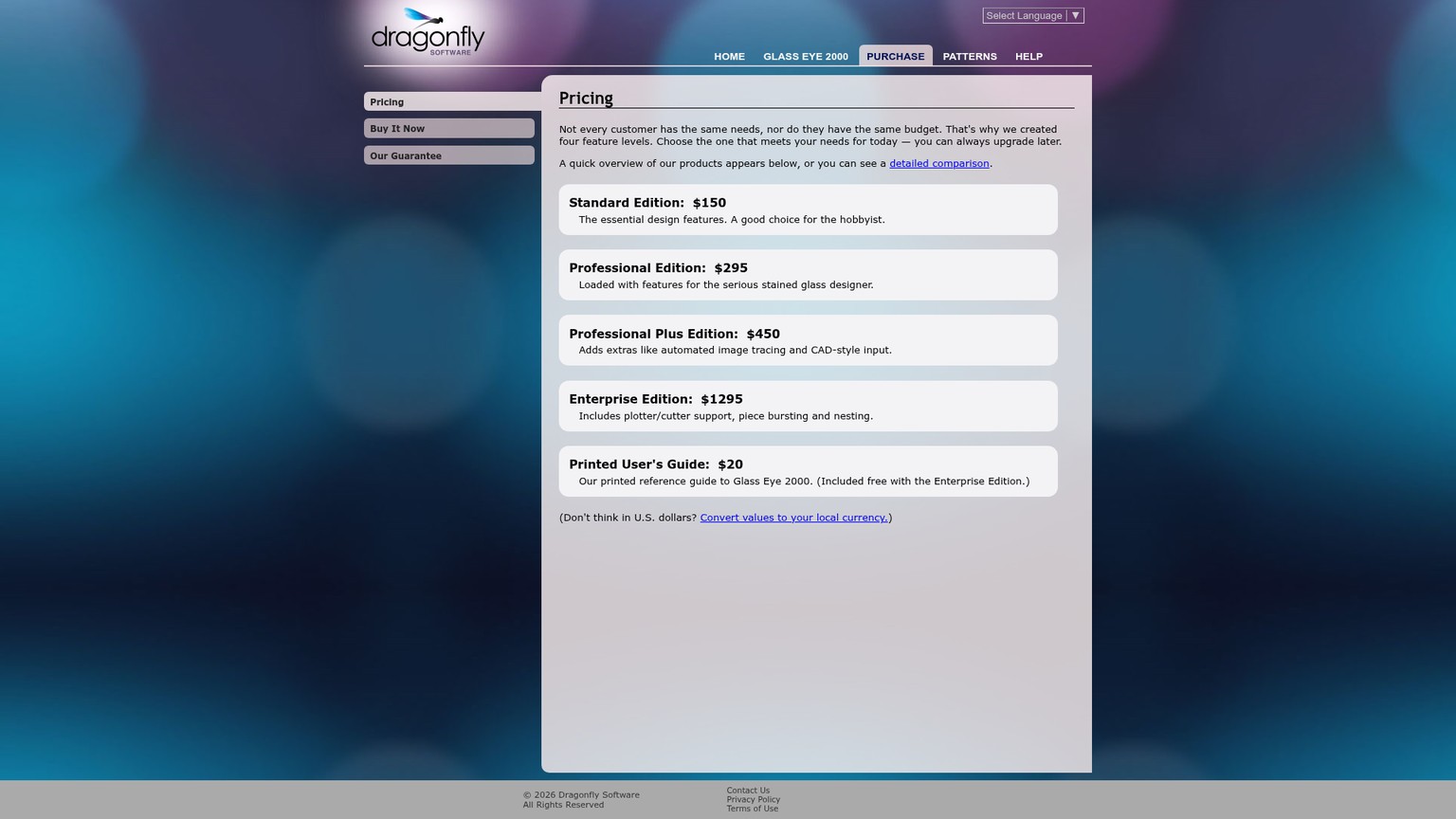
Professional costs $295 and adds more than 3,700 glass images, materials calculation, print scale factors, auto-orientation, printer calibration, PNG support, and DXF export. Professional Plus costs $450 and adds automatic tracing and CAD-style input, although its vector import is currently unsupported on Windows 8, Windows 10, and Windows 11. Enterprise costs $1,295 and adds plotter and cutter support, piece bursting, nesting by color, offset contours, and DXF, DWG, EMF, and WMF export. The optional printed guide costs $20 and is included with Enterprise.
Choose Glass Eye 2000 when numbering, costing, calibration, or machine output is worth the upfront price. Skip it for a lightweight browser workflow or if its Windows constraints conflict with your setup.
Inkscape: Better for Free Manual Vector Control
Inkscape is the no-cost option for a maker who already understands paths. It is a free vector editor with Bezier and spiro curves, flexible drawing tools, text tools, and broad format support.
It can repair a Pattrn-AI SVG or replace the vector-editing stage entirely. What it lacks is stained-glass context. There is no built-in promise of cutability, materials calculation, glass preview, or tiled craft workflow on the product page. Choose it when software cost must be $0 and your craft knowledge can supply the missing system.
Verdict: When Pattrn-AI Is Worth It
Pattrn-AI is worth paying for when one corrected vector saves more time than the $5 Inspiration fee. The product has the right middle layer: it cleans inputs, exposes editable centerlines, and carries them into a full-size tiled print. That is more useful than a generator that ends at a decorative image.
The decision rule has four gates. Buy if Pattrn-AI reduces tracing time, the SVG survives node-level connectivity inspection, every region passes a cutability review at final size, and a physical measurement confirms the print. If any one of those gates repeatedly fails, stop spending credits and move the job to VArtGlass, Glass Eye 2000, or Inkscape according to the missing control.
For a working stained-glass designer, the strongest plan is Inspiration first, not Creator. Use a difficult but non-critical source, record the metered operations, correct the vector, print it, and measure it. The accepted result, not the generated preview, decides whether the subscription stays.
Frequently Asked Questions
What is the best app for designing stained glass patterns?
Pattrn-AI is the strongest fit when converting a photo or sketch quickly matters most. VArtGlass is better for a craft-specific manual drawing workflow, Glass Eye 2000 is better for deep Windows production controls, and Inkscape is best for free manual vector editing. None replaces the maker's cutability check.
Can I convert a picture to a stained glass pattern online for free?
Yes, within limits. Pattrn-AI offers public samples without sign-up and a Free plan with 2 image generations. Its full displayed Image to Pattern sequence costs 3 credits, while a custom Pattern to Vector job requires sign-in and credits, so free access does not visibly cover every private workflow stage.
What is the most expensive color of stained glass?
There is no universal answer across manufacturers, glass families, sheet sizes, and availability. Pattrn-AI's Color Simulator is a visual planning aid, not a current supplier catalog or material-price source. Price the selected glass with the supplier you will buy from.
What are common stained glass mistakes?
At the pattern stage, common costly mistakes are accepting deep inside curves, leaving long narrow pieces, keeping tiny inserts, overlooking disconnected seams, and printing at an unverified scale. Also avoid assuming that a region is cuttable merely because the software can fill it with color.
Is making stained glass an expensive hobby?
It can be, because pattern software is only one cost. Glass, cutters, grinding, foil or came, soldering supplies, ventilation, safety equipment, and rejected pieces shape the project budget. A cheap pattern becomes expensive if poor geometry wastes material.
Are there any free, easy stained glass patterns for beginners?
Yes, but free does not mean easy. Favor a compact design with broad sections, mostly straight lines or gentle arcs, a clear finished size, and reliable full-scale printing instructions. Inspect the smallest piece and deepest curve before downloading or cutting.
What stained glass pieces sell best?
There is no universal product type that sells best for every audience. Pattrn-AI permits users to sell patterns they create, but a saleable pattern still needs buildable geometry, verified dimensions, clear instructions, and rights appropriate to every source element. Validate demand with the audience and channel you already serve.
Can I teach myself to do stained glass?
You can learn pattern drafting independently, but software is not a complete safety or fabrication course. Cutting, grinding, soldering, ventilation, lead handling, assembly, and installation deserve current instruction from qualified teachers and equipment manufacturers.
What is the rarest stained glass color?
No single color is consistently rare across every sheet-glass maker and product line. Availability changes by manufacturer, glass type, production run, and supplier inventory. Treat simulated colors as design references and confirm the exact physical sheet before finalizing the palette.
Get the AI Business Workflow Audit Checklist
Map the source, correction gate, accepted output, handoff, and cost before adding an AI design tool to production.
- Last Updated
- Sep 12, 2026
- Category
- Design
Prefer this site in Google


Mark omidsaffari.com as preferred and Google lifts it in Top Stories, AI Overviews and AI Mode for you.
Glimeo Pricing (2026): Redos, Extras, and Expiry
Decode Glimeo plans, $10 extra videos, paid redos, expiry rules, and annual billing so your demo-video budget matches the work you approve.Sep 12, 2026Design
Best AI Tools for Landscape Design Proposals
Compare AI landscape design tools for client proposals by photo fidelity, revisions, exports, commercial use, and cost per project.Sep 11, 2026Design
ngram vs Guidde for Product Demo Videos
Compare ngram and Guidde for product demos: source material, capture, editing, branding, exports, and the work needed for each update.Sep 10, 2026Design
Demosmith Pricing
Decode Demosmith plans by AI minutes, demo limits, video versions, exports, and the point where a weekly demo workflow needs an upgrade.Sep 10, 2026Design
CullAi vs Narrative Select
CullAi is now a legacy app. Compare its photo-selection workflow with Narrative Select and see what an existing user gains by moving.Sep 10, 2026Design
Best AI Tools for Jewelry on Model Photos
Compare NeuroViz, Photta, FormaNova, and SellerPic for jewelry detail checks, live credit costs, export limits, and catalog-ready on-model photos.Sep 9, 2026Design
Photta Review for Jewelry Photos
Evaluate Photta for jewelry photos: product fidelity, model placement, redo credits, exports, and the cost of each image that passes inspection.Sep 9, 2026Design