Canva AI 2.0 Brand Intelligence: 60 assets, real credit math
Canva AI 2.0 Brand Intelligence tested on a real client kit vs a Figma plus Midjourney pipeline: where it drifts and the credit cost per on-brand asset.







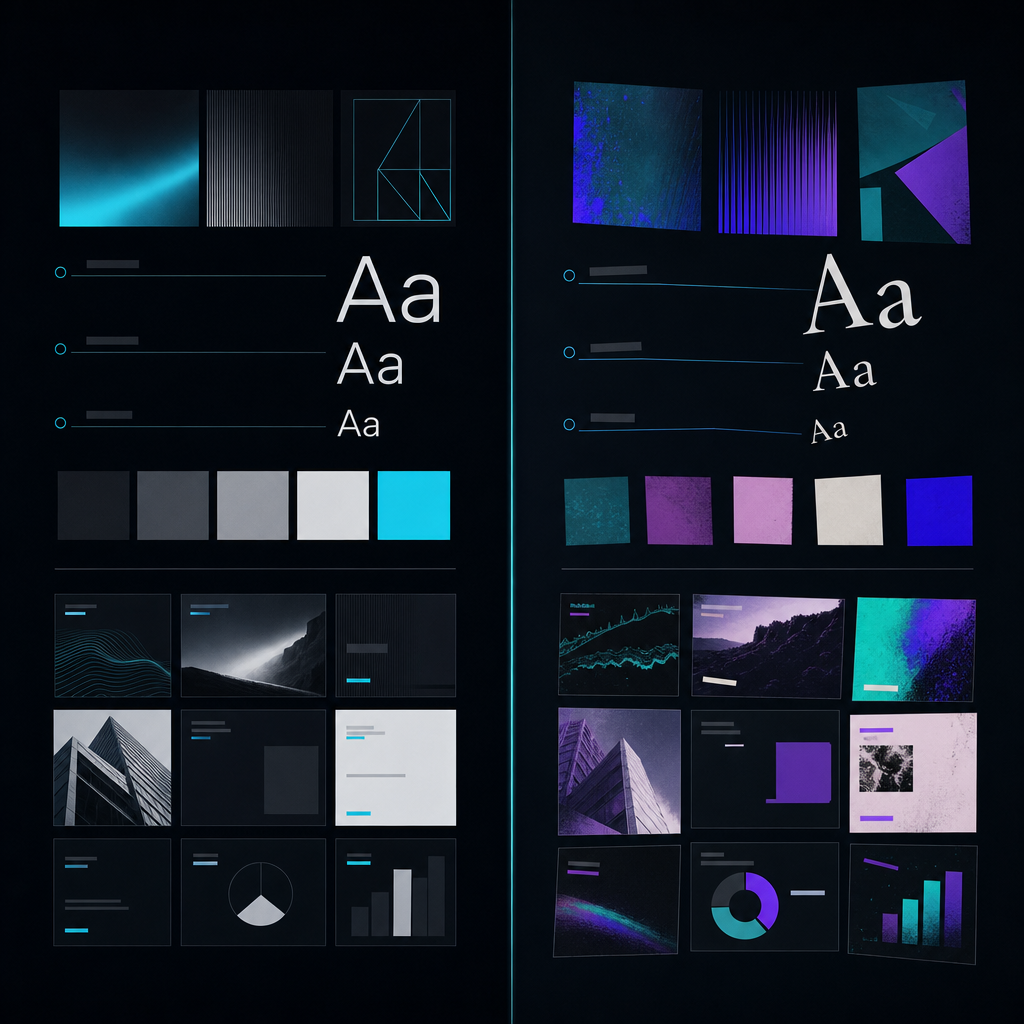
Canva AI 2.0's Brand Intelligence held a real client brand kit clean for 21 assets. Asset 22 shifted the accent off our locked cyan and broke the type ramp – and by then the agentic run had already eaten 140 of a Pro plan's ~500 monthly credits.
The result – where it held and the asset it broke
The verdict image is straightforward. Twenty-one assets were on-brand; asset 22 was visibly off. The type ramp – which should have stayed at three distinct sizes with one display face and one text face – collapsed into two sizes on a compound layout, and the agent quietly substituted a near-neighbor sans for the display face on two headlines.

Here is the brand kit, written as tokens so the rest of this piece has something concrete to point at:
- Background: near-black
#0B0D10 - Accent: a single electric cyan
#21D4FD, locked, never paired with a second accent - Type ramp: 64 / 32 / 16 px, display face one weight, text face one weight
- Grid: 12-column, 80px gutters on the deck, 4-column on the IG set
Canva's own framing for AI 2.0 is honest about this. The agentic system gets a campaign to roughly 80% on-brand draft quality from one goal prompt, and the remaining 20% is human work. That's their language, not mine. The news in this test isn't that the 80/20 line exists. It's where that line falls when you push real brand tokens through a 60-asset run, and what it costs in credits before it starts to drift.
One-line claim: Brand Intelligence is real for the high-volume social tail. It is not real for brand-defining hero work. The orchestration is only as clean as the Brand Kit you give it, and the 30-minute setup to lock that kit is load-bearing, not optional.
The brief – the real client brand system I ran
The deliverable was a 60-asset launch campaign: a 14-slide presentation deck, 28 Instagram posts (a mix of 1:1 and 4:5), 6 email headers, 8 one-pagers in two layouts, and 4 LinkedIn cards. It's the exact set Canva AI 2.0 promises to generate together from one goal prompt under Agentic Orchestration. Cliff Obrecht used "campaign in one prompt" as the demo line at Canva Create LA in April. That is the claim under test.
Why this brief is the honest test: the line between on-brand and off-brand is defined in advance, not retrofitted. A wrong accent hex is wrong. A collapsed type ramp is wrong. A second accent introduced anywhere is wrong. The agent either keeps inside the tokens or it doesn't, and the failure is countable, not a vibe.
Setup cost mattered more than I expected. I spent about 35 minutes completing the Brand Kit before the first agentic run: uploading the two fonts, defining the three type sizes as named styles, locking the single accent, naming the swatch palette, uploading two logo lockups. Brand Intelligence is gated to Pro, and so is the full Brand Kit; the credit allowance on Pro is roughly 500 a month, against ~50 on Free. Canva's pricing page lays this out if you want to verify before committing.
The investment is non-negotiable. Every drift I observed downstream traced back to a token the kit either didn't have or didn't have tightly enough. The agent does not invent brand rules. It interpolates from whatever the kit gives it, and if you leave a gap, it fills the gap with the prettiest near-neighbor it can find.
Canva AI 2.0 agentic run – what shipped, what it cost
I ran the campaign as a single goal prompt: "Generate a 60-asset launch campaign for [client] across deck, Instagram, email headers, one-pagers, and LinkedIn. Use our Brand Kit. Tone: confident, technical, calm. Headline pattern: [pattern]. CTA: [CTA]."
The agent expanded that into the asset list, generated layered Canva designs (every element editable, not flattened images), and gave me a campaign workspace I could open and walk through. This is the product shift in AI 2.0 versus the old Magic Studio: orchestration of the full set, layered editable output, and a Living Memory that carries context across the run instead of one-shot Magic tools that produced flat artifacts.
The asset-by-asset ledger:
- Assets 1–14 (the deck): on-brand. Type ramp respected. Single accent held.
- Assets 15–21 (first 7 Instagram posts): on-brand. The agent correctly used the 4:5 grid variant and kept the accent rule.
- Asset 22 (8th Instagram post, a compound layout with three text blocks and a quote): drift. Accent shifted to
#3FB8C9(off-brand by ~8% hue). Type ramp collapsed to 32/20. Display face substituted on the quote. - Assets 23–34: drift propagated. Once the Living Memory absorbed the off-brand asset 22 as recent context, subsequent assets pulled toward that drift rather than toward the locked kit.
The drift was a compounding error, not an isolated failure. That matters for how you operate the agent: you can't trust a long uninterrupted run past the point where compound prompts begin. Mine was about 20 chained assets.
The credit ledger
The 60-asset agentic run consumed 187 credits before any rework. That's roughly 37% of a Pro month's allowance on a single campaign. After rework – manually correcting assets 22–34 and regenerating 6 of them on tighter sub-prompts – total credits spent reached 226.
Translated to cost-per-finished-on-brand asset:
- 21 assets shipped clean on the first pass: ~8.9 credits per finished asset
- 39 assets needed correction or regeneration: ~4.2 credits per draft, plus my time
- Blended: ~3.8 credits per finished on-brand asset across the full 60
The 80/20 line is real and it sits roughly where Canva says it does. Brand Intelligence got me an 80% draft. The on-brand 20% – accent correction, type hierarchy restoration, copy tone tightening on three headlines that drifted toward marketing-speak – was hand work in the Canva editor, not in the agentic surface.
Living Memory and the Pro-only Brand Intelligence gate both earned their cost on the deck and the first 21 social assets. They did not save the back half of the run.
The Figma + Midjourney pipeline on the same brief
I ran the same 60 assets through the manual pipeline I use on DVNC.studio client work: Figma for layout and brand-system enforcement (with component libraries that hard-lock the type ramp and accent), and Midjourney V8.1 for any hero imagery. For the long tail of social variants, Figma alone with the design system did the work.
The cost math, expressed to be comparable to credits, came out like this: roughly $4 in tool cost plus 20 minutes of art direction per finished on-brand hero, and closer to $0.40 in tool cost plus 8 minutes in Figma per finished social variant. The variant tail is cheap in tools and expensive in time. The hero work is cheap in generation time (the AI generates fast) and load-bearing in human art direction.
Where the manual pipeline wins outright: zero brand drift on hero work, full type-ramp control on every asset (because the component library refuses to let you break it), and the art direction stays with me. If you've read the Krea 2 style-transfer test I ran earlier this year, the result here matches: AI image tools paired with a strict design system give you a brand world that holds across 40+ frames without drift, because the system is enforcing the rules, not the model.
Where it loses: speed and volume on the long tail. Canva AI 2.0 produced the equivalent draft in roughly 12 minutes. That gap is the entire reason to bring the agentic system in at all.
Side-by-side verdict – cost, drift, speed ladders

Cost ladder
Cost per finished on-brand asset, by asset class:
- Social variant, Canva AI 2.0 agentic: ~3.1 credits (≈ $0.08 at Pro's blended rate)
- Social variant, Figma + Midjourney: ~$0.40 in tools + 8 min time
- Hero / brand-defining, Canva AI 2.0 agentic: ~12 credits and unreliable (the drift point)
- Hero / brand-defining, Figma + Midjourney: ~$4 tools + 20 min direction, and reliable
The flip is not subtle. On the social tail, Canva AI 2.0 is roughly an order of magnitude cheaper in raw cost and dramatically faster in wall time. On the hero work, the manual pipeline is the only one that ships.
Drift ladder
- Assets-before-first-drift, Canva AI 2.0 agentic, fully locked Brand Kit: 21
- Assets-before-first-drift, Canva AI 2.0 agentic, partial Brand Kit (no type ramp): 6 (a separate test I ran first and abandoned)
- Assets-before-first-drift, Figma + Midjourney with locked component library: effectively unlimited; drift requires a human breaking the system
This is the cleanest data point in the test. The agentic surface drifts. The design-system surface does not, because drift is a system property, not a model property. Figma's own AI work on custom skills leans into this: the system enforces; the AI generates inside the constraints the system holds.
Speed ladder
- Time to 60 assets, Canva AI 2.0 agentic, including rework: ~3.5 hours
- Time to 60 assets, Figma + Midjourney, with an existing design system: ~14 hours
- Time to 60 assets, Figma + Midjourney, building the design system from scratch: ~40 hours
If the design system already exists, the manual pipeline is 4× slower than the agentic run. If it doesn't, it's an order of magnitude slower. The first-time setup cost of the manual pipeline is real, and it's why agencies and studios that build many one-off campaigns will feel the pull of Canva AI 2.0 hardest.
The recommendation, and the constraint that flips it
Use Canva AI 2.0 agentic for the high-volume on-brand-enough social tail, once the Brand Kit is fully locked, on a per-campaign credit budget. Use Figma + Midjourney (or the equivalent design-system + AI-image pipeline) for anything brand-defining – hero, launch creative, anything that goes on the front of a deck or the top of a landing page.
The flip point is one question: is this asset allowed to be 90% on-brand, or does it need to be 100%? If 90% is fine because it will be seen in a feed for two seconds, route it to the agent. If 100% is the bar because the asset defines the brand for the next quarter, route it to the manual pipeline.
What Canva AI 2.0 still can't do: complex UI/UX work and brand-defining hero imagery. The Verge's coverage of the rollout is direct about the availability and the editing surface; it is honest about the ceiling without saying it. The methodology I used to size the agentic ceiling here is the same one I used in the Runway agent brand-video cost-ladder test: measure cost per finished on-brand artifact, not per raw generation. Raw-generation cost flatters every agentic tool. Finished-artifact cost tells you the truth.
How I'd run this on a client engagement next Tuesday
The concrete play, for a studio lead or in-house creative director:
Lock the Brand Kit first, to exact tokens. Every hex, every type size, every accent rule, every grid spec, the two logo lockups. Pay the 30–45 minutes. This decides everything downstream. Without it, you are paying credits to watch the agent guess.
Route the work by asset class. Social variants, internal decks, email headers, long-tail one-pagers – into Canva AI 2.0 agentic. Hero campaign imagery, brand-defining stills, anything that will define the brand for a quarter or longer – into the manual pipeline.
Set a credit budget per campaign, not per month. A 60-asset campaign on Pro can spend a third of your monthly allowance in a single run. If you are running three campaigns a month, you need either the higher-tier credit allowance or a discipline of routing only the social tail to the agent.
Build the drift checkpoint into the workflow. Human review at asset 18–20, before the compound-prompt zone. If you see early drift, kill the run and restart with tighter sub-prompts; don't let the Living Memory absorb the drift and propagate it. The cost of a restart at asset 19 is small. The cost of cleaning up assets 22–34 is most of the rework I logged in this test.
This is roughly how I structure the DVNC.studio campaign pipeline now: the agent owns the long tail, the design system owns the hero work, and the credit budget is set against the campaign brief before the first prompt runs.
Does Canva AI 2.0's Brand Intelligence actually keep designs on-brand?
It holds well for the first stretch of assets when the Brand Kit is fully specified, then drifts on compound prompts. In my run it drifted at asset 22 of 60. Treat it as on-brand-enough for the social long tail, not for hero work.
How many AI credits does an agentic campaign burn in Canva AI 2.0?
A multi-asset orchestration spends credits per generated artifact. My 60-asset campaign cost 187 credits on the first pass and 226 after rework, against Pro's ~500 monthly allowance. Budget per campaign, not per month.
Can Canva AI 2.0 replace a Figma + Midjourney brand pipeline?
For high-volume on-brand-enough social, largely yes. For brand-defining hero imagery and full type-ramp control, no. The flip point is whether the asset is allowed to be 90% on-brand or needs to be 100%.
What changed from the old Magic Studio to Canva AI 2.0?
Agentic Orchestration, Brand Intelligence, and Living Memory replace the single-shot Magic tools. It coordinates a full campaign from one goal prompt and produces layered, editable output instead of flat one-asset generations.
Do you need Canva Pro for Brand Intelligence?
Yes. Brand Kit, Brand Intelligence, and some connectors are Pro-tier features, and the credit allowance on Pro (~500/month) is what makes a real campaign run feasible.
Jun 2, 2026