Chart Minder vs Stitchmastery
Compare Chart Minder and Stitchmastery for knitting chart design, written instructions, exports, and the point where paid software earns its cost.

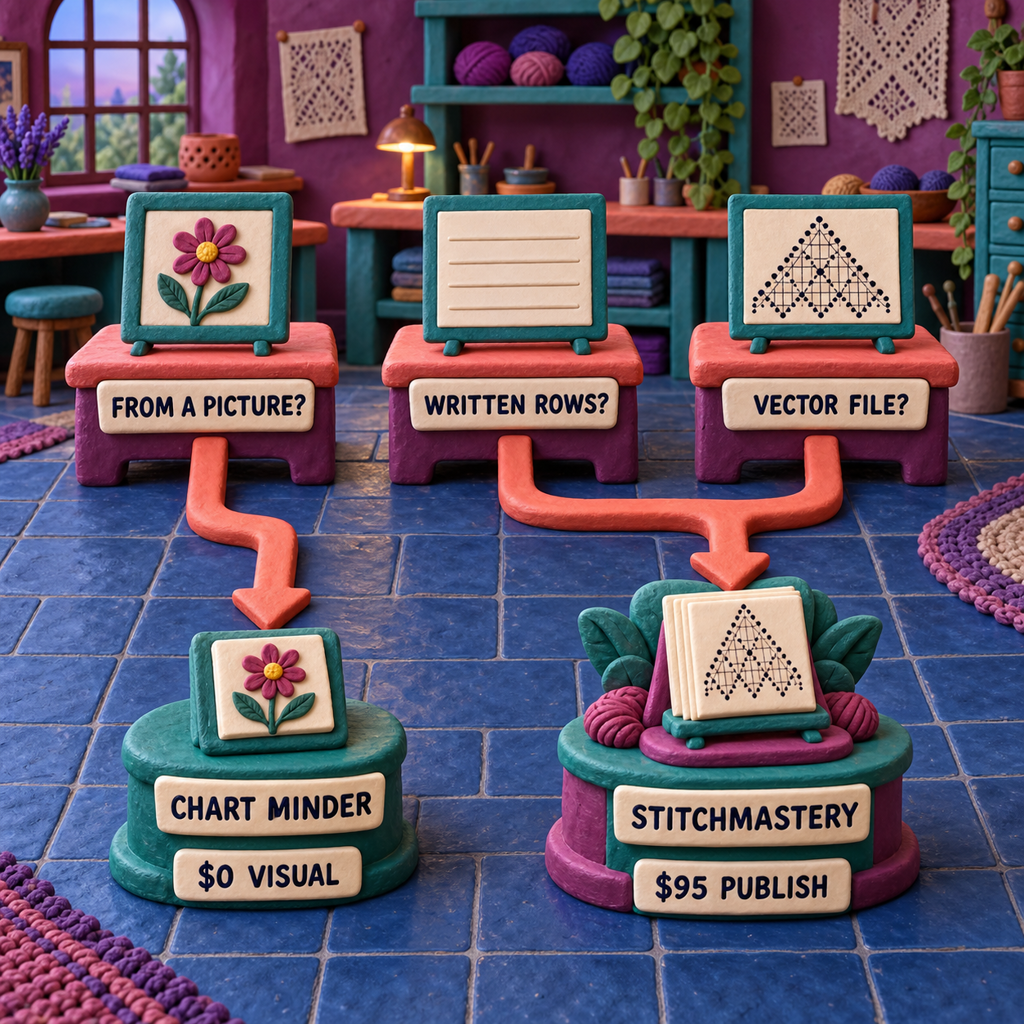
Chart Minder vs Stitchmastery has a clean verdict: Chart Minder is the better free visual editor; Stitchmastery is the better publishing system. At $95 for a lifetime activation, Stitchmastery earns its cost when a lace or cable designer needs structural count warnings, written rows that update with the chart, and vector customer files. If the job is an editable colour grid or a chart scanned from a picture, keep the $95.
Prices, licence terms, supported formats, and capabilities were verified against the vendors' public pages on September 15, 2026. No paid licence was opened and no chart was knitted from either product. The comparison follows one original repeat through the behaviour each vendor documents, then keeps count checking separate from physical proof.
That distinction decides the purchase. Both products can put knitting symbols into cells. Only one documents stitch meanings deeply enough to compare what one row produces with what the next row consumes, then turn the same chart into written directions and a glossary.
Chart Minder vs Stitchmastery: Which One Should You Pick?
Chart Minder should be your first pick when the output is a quick colour, lace, or cable chart and the working budget is zero. Its browser workflow covers drawing, image scanning, gauge-aware dimensions, stitch preview, row tracking, library storage, and image download.
The caveat is not that Chart Minder is a toy. Its help centre documents real knitting symbols and cable tools. The caveat is that its current public pages do not document the semantic validation, synchronized written directions, glossary, or vector export that turn a grid into a fuller publishing package.
Stitchmastery should be your pick when the deliverable is a pattern another knitter will buy, a technical editor will inspect, or a layout designer will place. Its current feature page documents invalid-chart warnings, automatic written instructions, a stitch glossary, custom symbols, and SVG, PDF, and EPS vector export alongside JPG and PNG.
Those features cost £70 or $95 for an activation key, before applicable VAT, and the key can be used on two computers with lifetime access. The vendor says future upgrades may cost extra. Chart Minder's homepage says its core editor is free, but its still-live help pages also name a Pro tier without publishing a current price. That ambiguity is part of the verdict, not a price to guess around.
Knitting Chart Software Comparison: One Repeat, Two Kinds of Editing
The useful test is not whether both editors can display a yarn over. It is what happens after a late edit quietly changes the stitch count.
Use this original six-stitch, four-row lace repeat as the shared brief:
- Row 1, right side: k1, yo, ssk, k1, k2tog, yo.
- Row 2, wrong side: purl 6.
- Row 3, right side: yo, k2tog, k2, yo, ssk.
- Row 4, wrong side: purl 6.
Here, yo is a yarn over that creates a stitch. ssk is a left-leaning decrease that consumes two stitches and produces one. k2tog is a right-leaning decrease with the same count behaviour. Each right-side row consumes six stitches and produces six, so the repeat stays balanced.
Before: The Visual Draft Is Correct
In Chart Minder, the work is direct visual authorship. Choose the appropriate symbol, place it on the grid, number the chart for flat knitting, and name symbols clearly. The chart can look correct because the yarn overs and decreases occupy the intended cells. The designer is responsible for checking the row arithmetic and writing the prose that accompanies it.
In Stitchmastery, the same marks carry more than appearance. The current manual assigns each stitch consumed and produced values plus a wrong-side equivalent. The application compares the stitches one row produces with those the following row consumes. That is why its warning can respond to a structural edit rather than merely displaying a different glyph.
After: One Revision Breaks the Count
Now replace the final ssk on Row 3 with k1. The revised row consumes five stitches but produces six. Its picture may still resemble a plausible lace row, especially inside a larger chart, but it no longer begins with the same live-stitch count created by the preceding row. Stitchmastery should flag the adjoining rows because the counts disagree. Chart Minder's reviewed pages do not document an equivalent automatic check, so that audit remains manual.
The stronger warning has a precise limit. Replace ssk with k2tog instead and Row 3 still consumes six and produces six. The lean is now wrong for the motif, but the arithmetic balances. Stitchmastery's manual says the program cannot tell which flagged row or position contains the mistake. When there is no count mismatch at all, it has even less evidence.
This before-to-after pass is where Stitchmastery earns the stronger publication verdict. It reduces one expensive class of revision error and updates the written output when the chart changes. It does not certify the pattern, and treating the warning as certification would erase its most important limitation.
Price and Crossover: When $95 Pays Back
There is no direct software-price crossover. For the same public, credited PNG-chart workload, Chart Minder costs $0 and Stitchmastery costs $95 once. Zero remains cheaper at every pattern volume.
The fair comparison therefore asks what the one-time activation costs per published pattern and how much production time the extra system must save. At the US base price, Stitchmastery costs $95.00 per pattern if you publish one, $19.00 each across five, $9.50 across ten, $3.80 across twenty-five, and $1.90 across fifty.
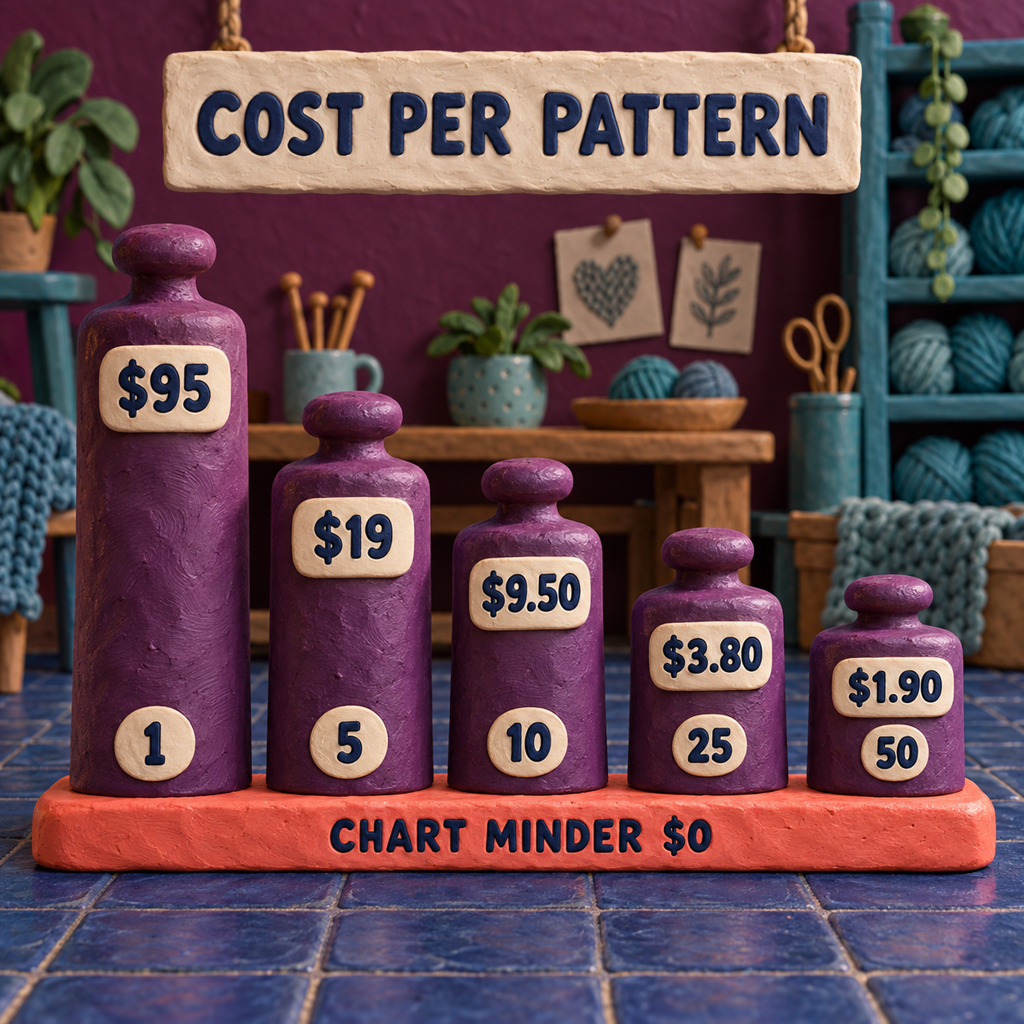
Chart Minder's missing public Pro price matters here. The free comparison is valid only for a public chart and an appropriately credited PNG under the vendor's acceptable-use policy. A designer who requires private client work or a higher-quality unwatermarked download should confirm the current account terms before treating the total as zero.
The economic crossover is time, not licences:
hours saved × your loaded hourly value > $95
At $25 an hour, Stitchmastery must save 3.8 hours over its useful life. At $50 an hour, it must save 1.9 hours. At $100 an hour, the threshold is 0.95 hours. These are workload examples, not vendor performance claims. The savings can come from catching a count break, regenerating written rows after a revision, avoiding manual glossary repair, or exporting a vector without rebuilding the chart in layout software.
Knitting Chart Editor: Chart Minder Wins for Fast Visual Drafts
Chart Minder is a browser-based chart maker with more range than the phrase "free colour grid" suggests. Its symbol picker documents 81 knitting symbols, variants for some stitches, and editable symbol names. A separate cable guide documents 16 ready-made cable symbols. Charts can use colours or symbols, be numbered for flat or circular work, preview gauge-linked dimensions, and live with other charts inside one project.
That combination is useful when design is still visual. A cable motif can be moved by eye. A lace repeat can be redrawn without launching a desktop publishing stack. A colour chart can be followed from another connected device through the stored library. The fast feedback loop is the feature: edit a cell, inspect the rhythm, and keep moving.
Its price story is less tidy than its interface. The current homepage labels the editor free. The live overview help still says a free basic service exists and that Pro adds operations such as cut, paste, mirror, rotate, fine colour control, and larger-surface repeats. Another help page says free projects are public and Pro can make them private, but that page marks itself as updated three years ago. No current public Pro price appeared on the pages reviewed.
Export is also a clear boundary. Chart Minder's save and print guide documents PNG download. A PNG is a raster, a fixed grid of pixels that can soften when enlarged. The guide says the free image bears a watermark that must remain unless Chart Minder is credited elsewhere, while its acceptable-use policy permits charts in the user's own patterns and projects with that credit condition.
That is enough for a personal project, a simple PDF chart placed at final size, or a free visual draft. It is weaker for a confidential pattern in development, a client who expects editable vector artwork, or a technical editor who needs chart and prose to change together.
Best for: Fast browser-based visual charts, including colourwork, lace, and cables.
Current cost: Core editor $0; a Pro tier remains in live help, but no current public price was found.
Skip it when: Privacy, automatic written directions, structural count checks, or vector handoff is mandatory.
Knitting Chart Written Instructions: Stitchmastery Wins
Stitchmastery is a desktop authoring system built around the relationship between a chart and its knitting language. Its feature page documents automatic written instructions and a stitch glossary, while the manual says the text output updates when the chart is edited. That is the practical advantage: a revised decrease does not require a separate round of find-and-replace through hand-written rows.
The symbol model makes that possible. Built-in and custom stitches can carry consumes and produces values, names, abbreviations, and a wrong-side equivalent. Stitchmastery uses those properties for count comparison, written output, and parsing. A custom cable is therefore not only a picture if its data has been defined correctly. It is a chart object whose meaning can travel into the prose.
The output still needs editing. Written stylesheets control how instructions are worded and condensed, and the generated glossary reflects the stitches in the chart. The manual documents written-instruction export as TXT, not a finished typeset pattern. Treat that text as synchronized production copy to style in the main pattern document, not a customer PDF on its own.
The current licence FAQ states £70 or $95 USD for an activation key on two computers with lifetime access, plus VAT in EU countries. Future upgrades may incur another cost. The free demo is useful for inspecting the workflow, but the manual says it cannot save edits and disables image and text export. A demo chart should never be the only working copy of a live pattern.
Stitchmastery also carries a desktop constraint. The current feature page lists 64-bit Windows 10 and 11, macOS Monterey through Tahoe, and Linux with official Ubuntu support. That is broad desktop coverage, not browser collaboration. A designer who only wants a quick grid on a borrowed tablet is buying more system than the job needs.
Best for: Lace and cable designers who publish written patterns and expect revisions.
Current cost: £70 or $95 base activation for two computers, before applicable VAT.
Skip it when: The deliverable is only a simple visual chart and the written rows, glossary, validation, and vector files add no value.
Create Knitting Chart From Picture: Chart Minder Wins
Chart Minder has the documented path when the starting asset is a picture. Its image-scan guide accepts JPG or PNG, caps the source at 300 stitches by 300 rows, extracts colours, and turns the result into an editable chart. The page describes automatic colour selection as free and an eyedropper as Pro.
That makes it the cleaner choice for a logo-like colour motif, a geometric reference, or a photograph that will be heavily simplified by hand. Scanning is the beginning, not the approval step. Gauge changes physical proportions, similar colours can collapse into noise, and tiny regions may be unpleasant to knit even when the conversion is faithful.
Stitchmastery's current feature page and manual describe symbol-chart composition rather than automatic picture conversion. It can author a polished chart once the motif has been translated into stitches, but its public documentation does not position it as the one-click route from JPG to editable knitting grid.
For a larger image-led colourwork workflow, the adjacent intarsia chart comparison explains why a source image, a measured gauge, and an editable grid should remain separate decisions.
Knitting Pattern Design Software: Stitchmastery Wins at Publication
Stitchmastery becomes the stronger publishing system when the chart must move through layout, customer delivery, and revision. It exports SVG, PDF, and EPS vectors as well as JPG and PNG rasters. A vector stores lines and shapes so they stay sharp when resized; a raster stores a fixed pixel grid. That difference shows up when a chart is enlarged, recoloured, or placed into Affinity Publisher, InDesign, Illustrator, or another layout tool.
The best handoff is not one universal file. Give the customer a readable PDF or appropriately sized image inside the finished pattern. Keep the editable .knt2 chart as the design source. Send the technical editor that working file only if they use Stitchmastery and the collaboration calls for it. When the chart depends on custom symbols, preserve the .smlib user library too, because the symbol definitions are part of the system.
Written instructions leave separately as TXT. That may sound inelegant, but it protects the right boundary: Stitchmastery generates synchronized knitting language, while the pattern layout tool owns typography, page flow, accessibility, and the final sales file. One app does not need to pretend it is the entire publishing studio.
Chart Minder's PNG can still ship when it is crisp at final size and the prose has been audited independently. What it cannot provide, according to the pages reviewed, is the same documented package of vector chart, editable semantic source, generated rows, and glossary. That package is what the $95 buys.
Switching Costs: Preserve the Editable Source
Moving from Chart Minder to Stitchmastery is usually a rebuild, not a file conversion. Chart Minder documents PNG output. Stitchmastery's public workflow describes manual chart authoring, and an exported image is not an editable .knt2 project. Keep the original Chart Minder chart available while recreating symbols, repeats, row numbers, and abbreviations, then compare every row before retiring the old source.
Moving between Stitchmastery installations has its own file discipline. Version 3.2.3, released March 26, 2025, tells users to back up .knt2 charts and .smlib libraries before installation. It also warns that files edited in 3.2.2 cannot be opened in earlier versions. A PNG proof is useful for comparison, but it cannot replace either editable file.
Custom symbols raise the switching cost because their appearance and their stitch behaviour both matter. A tech editor who receives the chart without its user library may see a missing definition or lose the semantics that support the written output. Archive the chart, library, exported vector, generated TXT, and a PDF proof together with the product version noted in the project record.
Who should not switch? A designer making occasional personal charts, with no confidential client source, no matching written-row requirement, and no vector handoff, should stay in Chart Minder. Rebuilding a settled grid to gain unused publishing features creates work rather than removing it.
A Repeat-Safe Publication Recipe
The same workflow can keep either editor honest. The difference is which checks happen automatically and which stay on the designer's checklist.
Name the deliverable first
Decide whether the job ends as a personal PNG, a customer PDF, editable vector artwork, synchronized written rows, or a technical-editor package. Choose Chart Minder for the first visual job and Stitchmastery when any of the publishing assets are required.
Build the smallest complete repeat
Enter the original six-stitch, four-row lace unit before laying out a full garment panel. Set flat or in-the-round numbering correctly, define the right-side and wrong-side symbols, and keep abbreviations short enough to read in prose.
Count the boundary between rows
Write what each row consumes and produces. In Stitchmastery, inspect the automatic warning after every structural edit. In Chart Minder, keep the same arithmetic beside the chart and update it manually.
Make one deliberate failure
Replace the final
sskon Row 3 withk1. Confirm that the written count no longer balances and, in Stitchmastery, that the adjoining rows are flagged. Restore the stitch, then replace it withk2togto prove that equal counts do not protect the intended lean.Read the chart and prose separately
Follow the chart once as a knitter, then follow only the written rows. Check repeat boundaries, wrong-side wording, glossary entries, cable direction, and every decrease lean. A synchronized generator prevents drift; it does not replace editorial judgment.
Export the production set
For Chart Minder, download the PNG at its intended display size and apply the required credit. For Stitchmastery, save
.knt2, preserve.smlibwhen custom symbols are used, export the vector chart, export TXT instructions, and make a PDF proof for visual comparison.Knit and block the risky section
Work the smallest sample that includes the decrease pair or cable crossing most likely to fail. Blocking can expose proportions, tension, and legibility problems that no chart validator can see. Revise the editable source, regenerate the text, and replace every downstream export together.
Frequently Asked Questions
Is Stitchmastery better than Chart Minder for lace and cable patterns?
Stitchmastery is better when the lace or cable pattern will be sold, revised with matching prose, or handed to a technical editor. Chart Minder is the better value for a quick visual chart when you are comfortable checking stitch counts and writing instructions yourself.
Can Chart Minder generate written instructions like Stitchmastery?
Chart Minder's current public product and help pages do not document automatic written-instruction generation. Stitchmastery explicitly generates written rows and a glossary from the chart and updates that output after chart edits.
What is the price difference between Chart Minder and Stitchmastery?
Chart Minder's core editor is presented as free, while its live help still mentions an unpriced Pro tier. Stitchmastery costs £70 or $95 for a lifetime activation on two computers, with VAT where applicable and possible charges for future upgrades.
What is the best knitting chart maker?
Chart Minder is the best pick for free browser-based visual charts and picture scanning. Stitchmastery is the best pick here for publication work that needs count warnings, matching written instructions, a glossary, and vector files. The required deliverable decides the winner.
How does Chart Minder work?
Chart Minder runs in a browser. You draw or scan a chart, edit colours or knitting symbols, set gauge and repeat information, preview the stitches, track progress, save the project in its cloud library, and download a PNG. Check the current visibility and credit terms before using it for client work.
What are some free alternatives to Stitch Fiddle?
Chart Minder is a credible free browser alternative when you need colourwork, lace, cable symbols, image scanning, or a tracked chart. It is not a feature-for-feature substitute for Stitch Fiddle or Stitchmastery, so confirm privacy, export, and written-instruction requirements first.
Can AI design a knitting pattern?
AI can propose a motif or help simplify an image, but it cannot certify stitch structure, gauge, fit, decrease direction, written-row accuracy, or blocked fabric. Use it upstream for ideas and keep a deterministic chart audit plus a physical sample before publication.
- Last Updated
- Sep 15, 2026
- Category
- Design
Prefer this site in Google


Mark omidsaffari.com as preferred and Google lifts it in Top Stories, AI Overviews and AI Mode for you.
ArtPatt Pricing
ArtPatt pricing explained: Free limits, Pro exports, saved patterns, AI-image allowances, and when a paid plan earns its place.Sep 15, 2026Design
Stitchly Pricing (2026): Pay Once, but Maybe Twice
Check Stitchly's one-time price, free limits, paid exports, Family Sharing, and why purchases do not transfer between iOS and Android.Sep 15, 2026Design
Beadographer vs BeadTool
Compare Beadographer and BeadTool for computer support, existing patterns, bead libraries, photo conversion, and sellable PDF exports.Sep 15, 2026Design
Loomerly Pricing
Decode Loomerly's one-time purchase, free download, listed special offer, supported Apple devices, and the paid features worth checking.Sep 15, 2026Design
Best AI Tools for Peyote Patterns
Compare tools for turning artwork into peyote bead patterns, with checks on staggered rows, bead palettes, word charts, and printable exports.Sep 15, 2026Design
Best AI Tools for Intarsia Knitting Charts
Compare intarsia chart tools for stitch proportions, color-block cleanup, bobbin planning, and usable exports from a photo or AI-made motif.Sep 14, 2026Design
Best AI Tools for Rug Tufting Patterns
Compare tools for rug tufting patterns by color blocks, editable outlines, yarn palettes, and the work needed before printing or projection.Sep 14, 2026Design