Separo vs UltraSeps
Compare Separo and UltraSeps for simulated-process separations, Photoshop work, correction time, and the files your screen printer needs.


The Separo vs UltraSeps decision has a practical split: choose Separo for a low-volume shop that wants a browser first pass without buying Photoshop; choose UltraSeps when Photoshop is already part of prepress and you want deeper channel surgery with a one-time $399 license. At 10 simulated-process jobs a month, Separo Starter costs $588 for the first year versus $638.88 for UltraSeps plus Adobe's least-expensive current desktop-Photoshop plan, but UltraSeps crosses below Separo's cumulative cost in month 14 if today's prices hold.
Prices, plan terms, compatibility pages, and vendor documentation were verified on 14 September 2026. No hands-on output or press test was run, so the verdict turns on documented controls, files, dependencies, and cost rather than a claimed print-quality benchmark.
Separo vs UltraSeps: The Verdict
Pick Separo if separation is the bottleneck but Photoshop is not already part of the shop. It runs in a browser, performs the heavy processing on its servers, selects an ink combination, builds an underbase for dark garments, and exports a multichannel EPS. Starter is the cleaner entry for a shop doing up to 10 simulated-process jobs a month, especially when unlimited spot-color jobs and customer proofs carry much of the queue.
Pick UltraSeps if the prepress operator already lives in Photoshop. Its automated Actions, plugins, and JavaScript produce several simulated-process starting points, then leave the plates inside the editor where the operator can choose underbases, merge or subtract channel data, pull custom spot channels, and make local repairs. The current $399 one-time price gets cheaper quickly against Separo Plus, but Photoshop is mandatory and the live machine needs a compatibility preflight before purchase.
The decision flips on where correction happens. Separo automates more before the file reaches the editor. UltraSeps makes the editor the workbench. If your operator routinely repairs small edges, redistributes density between plates, or builds custom spot channels, UltraSeps offers the more direct control. If most approved jobs need a strong first pass and a predictable external RIP handoff, Separo removes more setup.
The Same Dark-Garment Job, From Source Art to Plates
The useful comparison starts with one photographic illustration for a black garment, not two vendor-selected showcase files. The artwork has a skin-tone passage, a soft color transition, a hard-edged word, and small light details. Those features expose the places where simulated process can fail: muddy tonal overlap, a weak white foundation, a halo around hard edges, or a plate that looks persuasive only in the composite proof.
Simulated process uses a limited set of spot inks and halftone dots to reproduce a wider range of color. The separation is only the first pass. A production-ready result also needs an underbase, which is the white foundation beneath color on a dark shirt, plus editable ink plates and a known route to halftones and registration.
Simulated Process Separation Software Is Not the Whole Workflow
With Separo, the operator uploads the source, sets the garment and available inks, and lets the cloud service choose an ink combination. PMS matching and a stocked-ink constraint can keep the recommendation inside the shop's shelf. The proof updates as colors are added, removed, or changed. Separo builds an underbase and exposes the dot-gain curve, underbase choke, and color trapping before the multichannel EPS leaves the service.
That path is strongest when the automatic plate structure is sound. A global choke or trapping change can fix a broad registration concern without rebuilding the file by hand. A local defect, such as a missing highlight beside the small word, changes the economics: Separo's own page sends detailed tweaks into Photoshop, so the browser advantage narrows whenever channel surgery becomes routine.
With UltraSeps, the source is prepared in RGB with transparent non-printing areas, the vendor's color settings loaded, and preferably 200 to 300 dpi. The v3 user guide offers Sim Process #1, #2, and #3 rather than pretending one recipe fits every image. In Sim Process #1, the operator reviews multiple black, red, and white-base choices, keeps the useful channels, deletes or combines the rest, and uses Curves when a plate carries too much or too little density.
The same local highlight defect can be repaired without leaving Photoshop. Channel data can be merged or subtracted, a custom spot can be added, and the chosen underbase can be intensified or selectively changed. UltraSeps also supplies 1, 2, or 3-pixel choke Actions. Its guide is candid that choking cannot be fully automated because the operator must select the outside and isolated areas that should move inward.
The after state is not a prettier mockup. It is a plate pack another prepress operator can reopen, solo channel by channel, compare against the ink list, and send through the intended output path. The hard-edged word should not reveal a white fringe, the soft transition should not collapse into mud, and the small highlights should survive as intentional dots rather than isolated noise.
Separo: The Better Browser Service
Separo is the better service for a shop that wants automatic separation without installing another local package. It explicitly describes its engine as machine learning, but the practical value is the surrounding workflow: ink detection, proofs, dark-garment controls, and a standard handoff.
The live feature page says processing happens on Separo's servers, so there is no local operating-system or Photoshop requirement for the automatic pass. Inputs include EPS, Adobe Illustrator AI, and Adobe Photoshop PSD among other formats. The engine rasterizes at 300 dpi and documents multichannel EPS as the standard output.
Starter costs $49 per month with unlimited proofs, unlimited spot-color jobs, and 10 simulated-process jobs. Plus costs $149 per month with the same unlimited proof and spot-color allowances, 40 simulated-process jobs, and advanced separation options. Both plans advertise a 30-day trial and cancel-anytime language.
The strongest production controls are clear. Every separation includes an underbase for dark garments. The operator can customize dot gain, underbase choke, and color trapping. Colors can be constrained to inks already in stock, which prevents a clever automatic palette from quietly creating a purchasing problem.
Three limits deserve equal weight:
- The RIP remains external. Separo still describes its integrated cloud RIP as coming soon. "Go straight to ripping" means the EPS can enter an existing RIP, not that a complete film engine is included today.
- The editable-output contract is narrower than the sample gallery suggests. Separo offers downloadable PSD samples, but its feature page names multichannel EPS as the normal output. Confirm the production account's exact export before designing a Photoshop correction process around PSD.
- The commercial language conflicts. The pricing block advertises a money-back guarantee, while Separo's terms, last updated 28 February 2017, say paid fees are non-refundable. Treat the 30-day trial as the safe evaluation window and get any refund promise in writing.
The cloud model also deserves a procurement read. Separo's terms grant rights to use non-personal company data to provide and improve the service. A shop handling unreleased licensed artwork should decide whether that language fits its client agreements before upload.
Best for: A distributed or lower-volume shop that values fast first passes, proofs, and stocked-ink matching without a local install.
Skip if: Local, pixel-level plate repair is normal rather than exceptional, or a cloud upload is unacceptable for client artwork.
UltraSeps v3: The Better Photoshop Workbench
UltraSeps v3 is the better workbench for a production artist who wants automation without giving up Photoshop's channel controls. It is conventional automation, not a documented machine-learning product: Photoshop Actions trigger plugins and JavaScript that build and modify the separation.
The package supplies three different simulated-process methods plus a Basic 5 Color Simulated method. That choice matters because a separator tuned for one palette structure can overbuild another. UltraSeps does not force one answer; it gives the operator several starts and expects judgment afterward.
Its correction depth is the reason to buy it. The guide documents multiple underbases, alternate black and red channels, custom spot generation, channel merging and subtraction, Curves, density inspection, registration marks, and separate paths for black versus other dark garments. Sim Process #1 alone produces four underbase options. This is not one-click simplicity, but it keeps the correction beside the generated channels.
The current product listing shows a $399 sale price, reduced from $599, for an immediate download. The purchase includes Windows and macOS installers. Version 3 removes the older request-number and authorization-code scheme and can be installed on all of the purchaser's computers without an added machine fee.
That is not an unlimited team license. The vendor asks buyers not to share one copy among many users and says larger art departments with more than a few users should buy extra copies, at minimum one for each pair of users. The wording leaves procurement less precise than a per-seat contract, so a multi-operator shop should confirm its required license count before payment.
The trial and refund terms make that preflight important. UltraSeps offers a 15-day trial, but the download is the full version of v2 rather than v3. The vendor says the functions are essentially the same, while v3 is faster and uses different licensing. The paid v3 download is final sale, and the product page says refund requests will not be processed.
Best for: A Photoshop-fluent prepress operator who wants automated starts plus deep, local channel control and expects to keep the tool long enough for the one-time price to pay back.
Skip if: The shop wants a browser workflow, lacks full Photoshop, needs a precisely defined multi-user license, or cannot preflight the current workstation before a non-refundable purchase.
Screen Printing Photoshop Separation: Where Correction Time Lives
Photoshop dependence is not automatically a cost or a benefit. It is valuable only when the operator uses its local control often enough to improve accepted plates.
UltraSeps puts correction time in the foreground. After an automatic pass, the operator decides which black, red, underbase, and color channels survive. Curves can change one plate's density. Merge and subtract operations can move image data between inks. A custom spot can rescue a color the standard set misses. The underbase can be changed under a selected top color without rerunning the entire separation.
Separo tries to reduce that work before export. It selects inks, honors stocked colors, updates a proof, and exposes global dot-gain, choke, and trapping controls. When those controls solve the job, the browser service has removed Photoshop labor. When a small edge or isolated tonal passage still needs repair, the multichannel EPS enters an editor and the workflow starts to resemble the local alternative.
There is no honest universal claim that one is faster. Correction time depends on source quality, the shop's ink set, and the operator's plate standard. The useful test is financial:
Monthly software saving divided by the shop's loaded prepress hourly cost equals the correction-time budget.
At the lower-volume workload, a shop that already pays for Photoshop saves $15.75 per month in first-year license cost when the $399 UltraSeps purchase is spread across 12 months. If UltraSeps takes more than $15.75 worth of extra correction time each month, that software saving disappears. At the higher-volume workload, UltraSeps plus the Photography plan saves $95.76 per month versus Separo Plus. Separo must save more than $95.76 of correction and handoff labor each month to overturn that software gap.
The craft bar is local repair without collateral damage. If fixing one pale edge requires a fresh automatic pass that changes every plate, the automation owns too much of the job. If the operator can repair that edge while preserving the approved ink set, underbase, and print order, the file is closer to ship-ready.
Price Difference and Crossover
UltraSeps wins on long-run software cost; Separo wins the first year at the lower-volume scenario for a buyer who needs to add Photoshop. The conclusion changes with workload and with whether Adobe is already paid for.
Adobe currently lists its Photography plan, which includes desktop Photoshop, at $19.99 per month on an annual billed-monthly commitment. The Photoshop single-app plan is $22.99 per month. Using the cheaper Photography plan makes the comparison conservative in UltraSeps's favor.
Separo UltraSeps Comparison by Workload
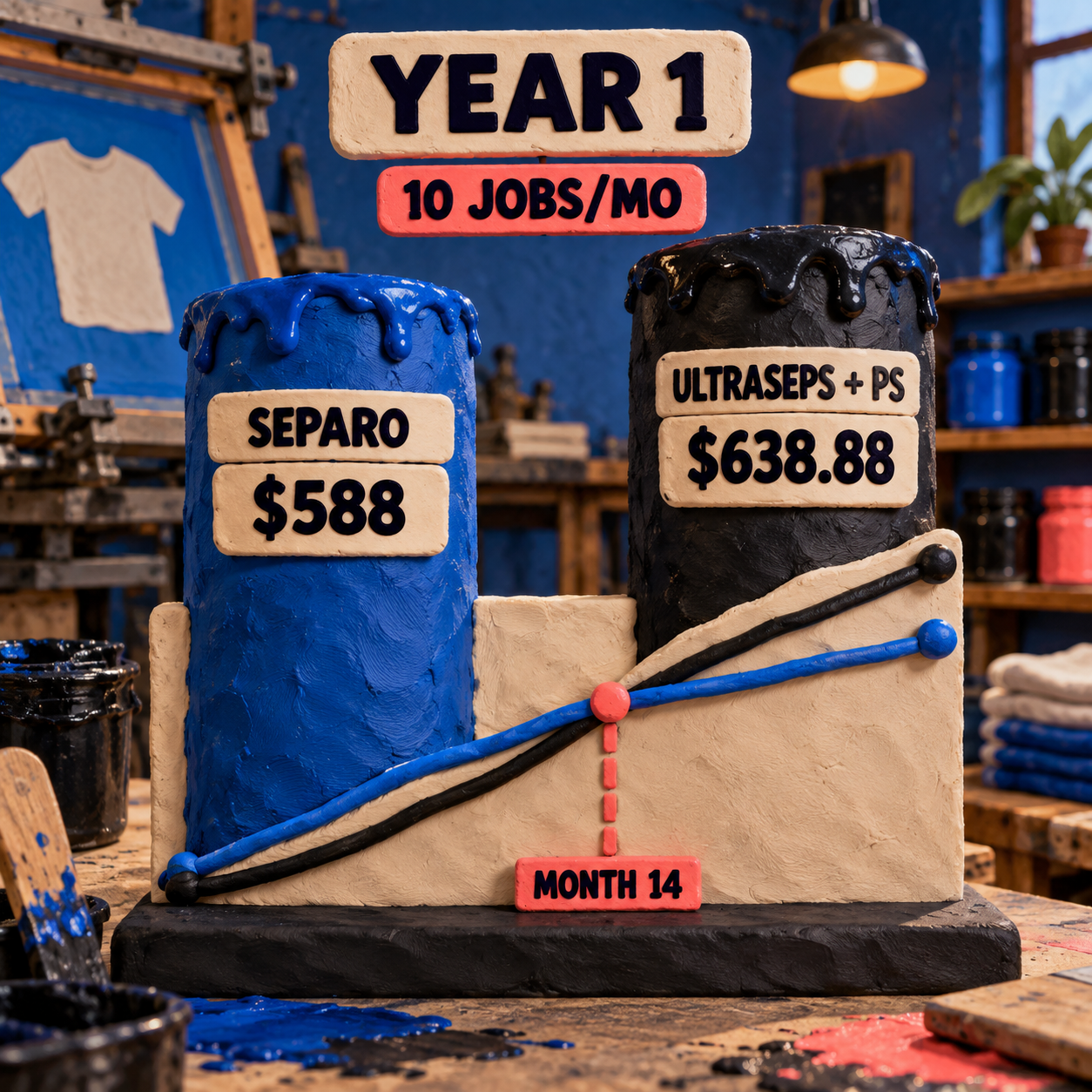
The $638.88 UltraSeps total is the $399 purchase plus $239.88 for 12 months of Adobe Photography. Choosing the $22.99 Photoshop single-app plan instead produces a $674.88 first-year stack. Neither total includes tax, hardware, RIP software, output materials, or labor.
The cumulative crossovers make the decision clearer:
- If Photoshop is already paid for, UltraSeps crosses below Separo Starter after 8.14 months. Month 9 is the first whole month when it is cheaper.
- If a new buyer adds the $19.99 Photography plan only for UltraSeps, it crosses below Separo Starter after 13.75 months. Month 14 is the first whole month when it is cheaper.
- Against Separo Plus, UltraSeps plus Photography crosses after 3.09 months. Month 4 is the first whole month when it is cheaper.
These are license crossovers, not productivity claims. A recurring service can still be cheaper if it removes enough skilled correction time. A perpetual local tool can still be expensive if compatibility work interrupts the queue.
RIP Handoff: EPS Versus Native Photoshop Channels
Separo has the simpler separation handoff; UltraSeps has the more flexible film handoff. Neither should be bought until its exported file reaches the shop's existing RIP or direct-output path without reconstruction.
Separo's documented standard output is a multichannel EPS produced by a 300-dpi raster workflow. That is a sensible exchange file for an established spot-channel workflow, and Separo says the file can go to a RIP or into Photoshop for tweaks. The service's cloud RIP is still listed as coming soon, so the downstream system remains the shop's responsibility.
UltraSeps keeps editable channels in Photoshop. For adjustable halftone output from modern Photoshop, the vendor recommends placing or opening the PSD in Illustrator or CorelDraw and sending it through the RIP there. RGB composite channels must be retained for that external application to read the file. Direct output from newer Photoshop can use the RIP's presets, but Photoshop no longer exposes the older per-channel LPI, angle, and dot-shape controls in its print dialog.
Color Separation for Screen Printing Ends at the Handoff
UltraSeps also offers a No RIP conversion. It turns up to 10 color channels into a 600-dpi, pre-screened multichannel bitmap with the LPI, angle, and dot shape embedded. That is a useful fallback, not a free-form editing state: after conversion the channels cannot be adjusted with Curves or Levels, and the file cannot be resized. Corrections must happen before that step.
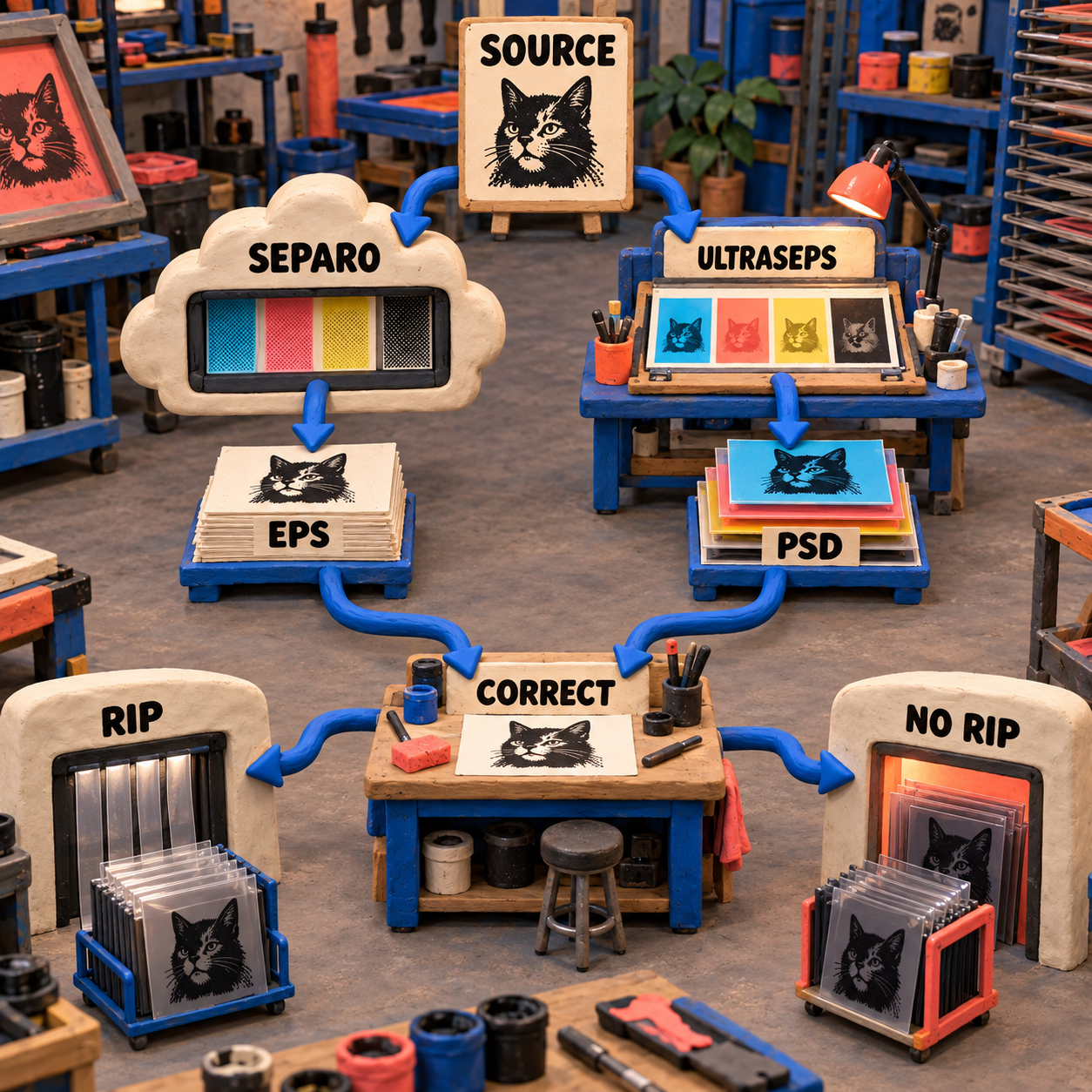
Ask the printer for its accepted container, required composite channels, ink naming, final size, registration method, and halftone responsibility. "Editable" is meaningless if the next workstation cannot open the plates correctly.
Compatibility and License Terms Need a Preflight
Separo avoids local application compatibility because its processing runs on the web. UltraSeps trades that convenience for Photoshop integration, so its compatibility claim has more moving parts.
The UltraSeps FAQ requires a full English-language copy of Photoshop and excludes Photoshop Elements. It claims support from Photoshop CS3 through Creative Cloud, with CS2 also supported on Windows. The same page claims Windows XP or higher, Mac OS X 10.5 or higher on Intel, and M1-or-higher compatibility through the M1 Universal build. Both platform installers come with the purchase.
The qualification matters. Adobe's current technical requirements identify Photoshop 27.x and later, Windows 11 24H2 or 23H2, Windows 10 22H2 or 21H2 LTSC, and macOS 26, 15, or 14 as supported environments. UltraSeps's public pages make a broad current-and-future Creative Cloud claim, but they do not explicitly name Photoshop 27.x or macOS 26.
The v3 support page shows why a live preflight beats broad wording. It documents a registration-mark fix for CC 2020, an installer issue for v3 purchases before 25 July 2019, a reset for solid or inverted channels in Creative Cloud, a native v3.3 build for M1, and a JavaScript replacement for a Color Book error in Photoshop v24 or higher.
That does not prove UltraSeps fails on the current stack. It proves compatibility is a versioned operational claim rather than a checkbox. Install the trial, run the actions used by the shop, save the result, reopen it, and pass it to the actual output workstation before treating the purchase as safe. Remember that the trial is v2, so it validates the core functions more convincingly than it validates the current v3 installer and license behavior.
Switching Costs and Who Should Not Switch
Do not switch a working separation workflow for a lower sticker price alone. The expensive part is rebuilding the chain around it.
Moving from Separo to UltraSeps adds a full Photoshop subscription if one is not already present, plus installer management, Actions, color settings, source-preparation rules, and a local update path. The operator must learn which simulated-process method fits which source, how to choose among alternate channels, and when to stop correcting. Existing EPS handoffs and proof habits need to be mapped into PSD, Illustrator, CorelDraw, RIP, or No RIP output.
Moving from UltraSeps to Separo removes much of that local setup, but it also changes where judgment happens. Custom Actions, favored underbase recipes, density habits, and archived PSD channel structures do not become cloud settings automatically. The shop accepts monthly simulated-process caps, a cloud upload, standard multichannel EPS, and an external RIP while it retrains its proof and approval path.
An established UltraSeps shop should not switch if its operator is fast in Photoshop, the current installer is stable, archived jobs reopen correctly, and the RIP handoff is proven. Separo's recurring fee would be paying to replace a workflow that is already working.
An established Separo shop should not switch if most jobs pass with global controls, spot-color work dominates the queue, remote proofing matters, and local Photoshop correction is rare. UltraSeps's deeper channel tools only create value when the operator needs them.
The safest migration keeps both paths available for a short overlap. Reopen representative archived work, preserve the approved output, and compare the new plates against that reference before routing a reorder through different software.
A Controlled Trial Recipe
The right evaluation uses one source, one production brief, and one allowed correction round. It tests the handoff instead of rewarding whichever preview looks best first.
Lock one revealing source
Choose a paid-work-like image with a soft tonal area, a hard edge, small highlights, and transparency. Keep the master untouched and use the same final dimensions in both paths.
Freeze the production brief
Record the garment color, available inks, base requirement, proof expectation, and exact RIP or direct-output destination. Do not change the ink list to flatter either separator.
Capture the automatic pass
Save the composite proof and every plate before manual edits. Record what the software selected, which controls were exposed, and whether the output opened correctly downstream.
Allow one correction round
Fix the same revealed problem in each workflow. In Separo, use the available global controls and then the EPS correction path if needed. In UltraSeps, make the smallest channel-level change that solves it.
Preflight film output
Confirm ink names, print order, underbase, dimensions, halftone responsibility, and registration. Reopen the saved file on the output workstation rather than trusting the creation machine alone.
Price only accepted jobs
Add software spend to correction and handoff labor, then divide by jobs whose plates pass prepress. A cheap automatic pass that needs reconstruction is not a cheap separation.
The trial windows are not equivalent. Separo advertises 30 days on its current service. UltraSeps offers 15 days on v2, while the paid product is v3 and final sale. Use the UltraSeps trial for function and output validation, then ask the vendor to confirm the exact installer and workstation before payment.
The Monday move: take one representative archived dark-garment job, lock the existing approved plates as the reference, and run the protocol above before changing any live queue. The winning tool is the one that reaches the printer with fewer unsupported decisions, not the one that generates the fastest composite.
Frequently Asked Questions
Is Separo better than UltraSeps for simulated-process separations?
Separo is better for browser-first automation, low-volume entry, stocked-ink matching, and proofs without a local install. UltraSeps is better when a Photoshop-fluent operator needs local channel repair, alternate underbases, custom spots, and several automated separation methods.
What does the UltraSeps plugin require?
UltraSeps v3 uses Photoshop Actions, plugins, and JavaScript and requires a full English-language Photoshop installation. Photoshop Elements is not supported, and the exact current workstation should be preflighted before the final-sale purchase.
Can Separo replace Photoshop and UltraSeps?
Separo can remove Photoshop from the automatic first pass and can hand its multichannel EPS to an existing RIP. If the plates need local repairs, Photoshop or another compatible channel editor may still return to the workflow, and Separo's integrated cloud RIP is not available yet.
What is the price difference between Separo and UltraSeps?
Separo costs $49 per month for 10 simulated-process jobs or $149 for 40. UltraSeps v3 is currently $399 once, but a new buyer must add Photoshop, currently as low as $19.99 per month through Adobe Photography. At 10 jobs per month, that makes Separo $50.88 cheaper in year one; at 40, the UltraSeps stack is $1,149.12 cheaper before labor and RIP costs.
Does UltraSeps work with current Photoshop and macOS?
UltraSeps claims broad Creative Cloud and M1-or-higher support, and its support page provides fixes for several modern-version issues. Its public pages do not explicitly name Photoshop 27.x or macOS 26, so the responsible answer is to validate the exact installer, Actions, save/reopen cycle, and RIP handoff on the target machine.
Does UltraSeps need a RIP?
Not always. UltraSeps can send editable Photoshop channels through a RIP, or it can convert up to 10 colors into a 600-dpi pre-screened multichannel file for No RIP output. The converted file cannot be resized or adjusted, so all corrections must be finished first.
For the wider field, including browser tools and conventional benchmarks, see the current screen-print color-separation roundup.
- Last Updated
- Sep 14, 2026
- Category
- Design
Prefer this site in Google


Mark omidsaffari.com as preferred and Google lifts it in Top Stories, AI Overviews and AI Mode for you.

Best AI Tools for Laser Engraving Depth Maps
Compare AI depth-map tools for laser reliefs by editing, export quality, and the cost of reaching a usable file.Sep 13, 2026Design
Cutsio Video Indexing Cost
Decode Cutsio's indexed minutes, stored hours, seats, and overages to choose a plan for a growing video library.Sep 13, 2026Design
Best AI Tools for Cross Stitch Pet Portraits
Compare AI and photo-conversion tools for cross-stitch pet portraits, with checks for likeness, thread codes, cleanup, and printable charts.Sep 13, 2026Design
DreamYard AI Review
A DreamYard review of photo fidelity, revisions, downloads, free limits, current pricing, and the permission required for client work.Sep 13, 2026Design
Textile-Designer.ai Review for Screen Printing
Test Textile Designer AI's route from artwork to editable print files, including color separation, export limits, credits and manual cleanup.Sep 12, 2026Design
Best AI Tools for Screen Printing Color Separations
Compare tools for editable color plates, underbases and print handoff, with clear limits on what AI and ordinary separation automation do.Sep 12, 2026Design
Pattrn-AI Review for Stained Glass Patterns
Check whether Pattrn-AI turns photos and sketches into editable, printable stained glass patterns, and where manual pattern work remains.Sep 12, 2026Design