Best AI Tools for Intarsia Knitting Charts
Compare intarsia chart tools for stitch proportions, color-block cleanup, bobbin planning, and usable exports from a photo or AI-made motif.

The best AI tools for intarsia knitting charts are not all AI tools: ArtPatt is the strongest AI-assisted route, but no product should get the last word on gauge or bobbins. Its Pro plan is $6.99 a month, and it is the only option in this four-tool field that documents an AI-image allowance alongside intarsia-specific stitch proportions, color-block handling, and yarn estimates; Stitch Fiddle is the stronger editor when the first chart needs repair.
Prices, limits, export formats, and capabilities were verified against the vendors' public pages on September 14, 2026. No source image was uploaded to these products, no paid plan was opened, and no swatch was knitted. The ranking traces one controlled motif through each documented workflow, then separates what the pages prove from what only a physical swatch can settle.
That distinction matters because intarsia is not pixel art with yarn. A small palette can still require many separate yarn supplies. A square-looking preview may knit short and wide. A polished PDF may still make wrong-side rows painful to follow. The best choice is the tool that removes the most production uncertainty without hiding the chart from you.
Best AI Tools for Intarsia Knitting Charts at a Glance
ArtPatt ranks first for turning a photo or generated motif into an intarsia-aware draft. Stitch Fiddle ranks second because its custom gauge, cell editing, progress tracking, and layered exports make it the strongest repair workspace. Chart Minder is the best entirely free cleanup choice. Stitchmastery belongs last for this particular search because it is a professional chart-authoring tool, not a photo converter, but it becomes the right final stage when a pattern needs publication-grade symbols and written instructions.
AI Knitting Colorwork Chart: Where AI Helps and Where It Should Stop
This colorwork workflow is safest when AI proposes the motif and conventional controls decide the stitches. Ideation benefits from variation. Gauge, row order, color ownership, and export benefit from repeatability.
Only ArtPatt's current pricing page explicitly lists an AI feature: one AI image-to-pattern use per account on Free and five a month on Pro. Its engine description separately names perceptual color clustering, stitch-aware geometry, dithering, partial-stitch handling, and technique-specific confetti reduction. Those are image-processing and craft-conversion operations. The pages reviewed do not name the AI model or explain where model inference ends and deterministic conversion begins, so the defensible label is AI-assisted, not autonomous pattern design.
Stitch Fiddle documents picture import, automatic color selection, custom gauge proportions, box-level editing, chart checks, and export. Chart Minder documents a scanner, editor, gauge-linked dimensions, stitch preview, and tracking. Stitchmastery documents manual chart composition, validation, symbol control, and written-instruction export. None of those three vendors claims a generative model on the reviewed pages. Calling them AI tools would turn a useful capability into a marketing guess.
That does not make them lesser choices. If a wing edge must move one stitch, a fill tool is better than a model. If a crowded row contains several active blocks, a visible chart is better than a prose answer. If the final file needs an SVG with editable layers or a PDF whose row numbers remain legible, deterministic export is the advantage.
The reliable stack therefore has two roles:
- Open choice: use a photo or an AI-made source motif to explore subject, pose, silhouette, and broad color relationships.
- Closed specification: use a knitting chart engine to lock measured gauge, grid size, color regions, row direction, yarn supplies, and the deliverable file.
The handoff between those roles is the risk point. A generator may add a highlight because it looks attractive. In intarsia, that highlight may become another disconnected region, another bobbin, more ends, and a fragile join. The image stage asks whether the mark improves the motif. The chart stage asks whether it deserves its own yarn supply.
What an Intarsia Knitting Chart Generator Must Get Right
A useful generator earns its place by solving three separate problems: stitch geometry, region topology, and row usability. A tool that solves only color reduction can still leave the hardest planning to the knitter.
Stitch Geometry Comes From the Swatch
Stockinette cells are rarely square. The visual width of one stitch and the visual height of one row depend on yarn, needle, fabric, tension, washing, and blocking. A chart made on square graph paper can look correct on screen and compress vertically when knitted.
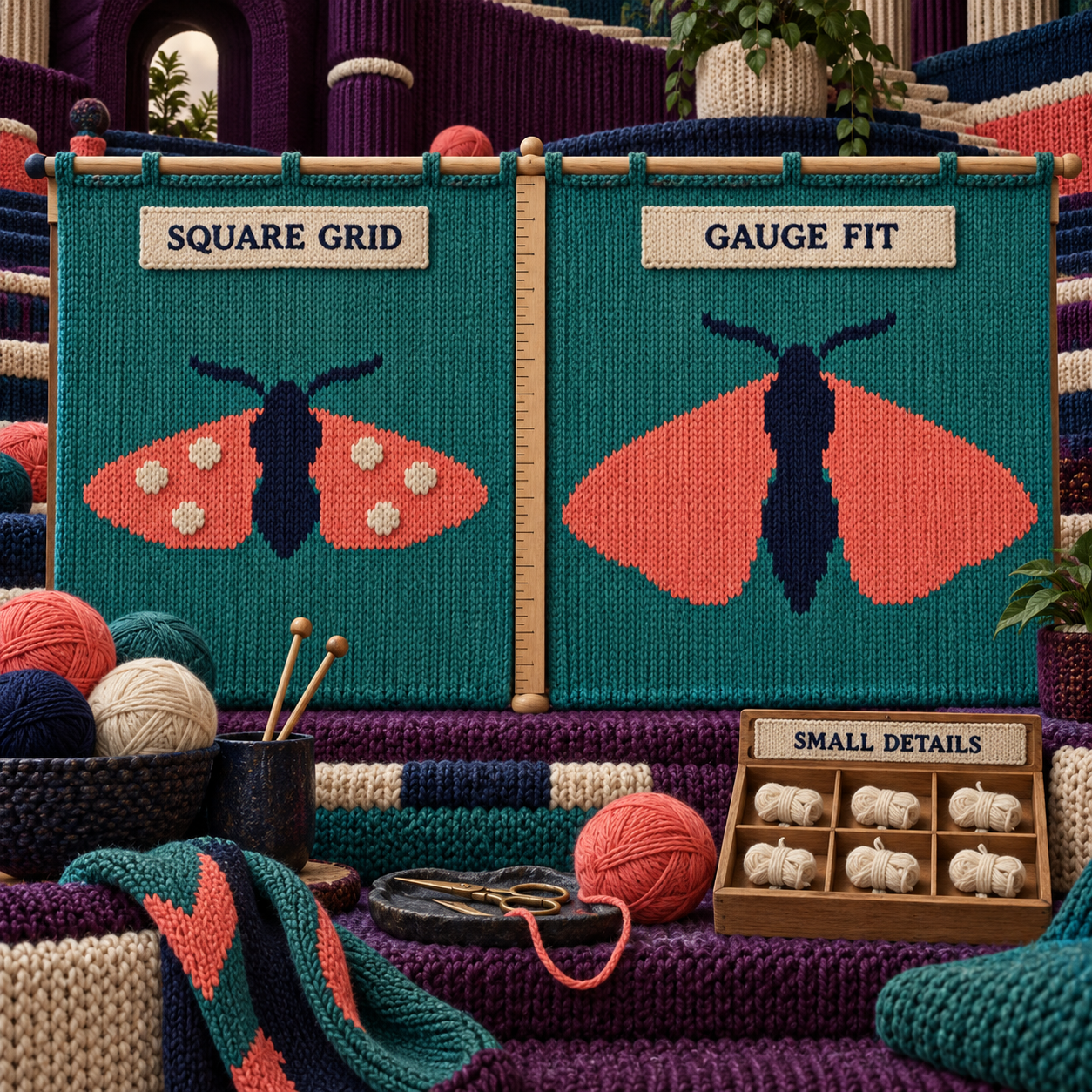
The controlled example uses a four-color geometric moth and a deliberately simple worked assumption: a blocked swatch measures 22 stitches and 30 rows across 4 inches, and the motif is 60 stitches wide. At that gauge, 60 stitches span about 10.91 inches. A square 60 by 60 grid produces only 8 inches of height. To give the motif approximately the same physical height as width, the chart needs 60 divided by 22, multiplied by 30, or 81.82 rows. Rounded to a whole row, the working grid becomes 60 by 82.
The calculation is useful. The inputs are not universal. ArtPatt publishes about 1.3 rows for every stitch of width, and Stitch Fiddle starts knitting imports at 18/24, a similarly rectangular proportion. Both are sensible defaults for previewing. Neither should overrule the blocked swatch made with the yarn, needles, and fabric planned for the project.
Region Count Matters More Than Color Count
The moth uses only four colors: a teal ground, navy body, coral wings, and six cream wing spots. That sounds manageable until the same cream appears as separate islands. In intarsia, two shapes with the same color may still need separate supplies when they are disconnected across the row. Palette count answers, "How many yarn shades?" Region count answers, "How many live yarn sources?"
Nimble Needles' intarsia tutorial gives the practical rule: every new color panel in a row needs a new bobbin, and one supply can continue vertically but cannot jump horizontally between separate panels. That is why a six-spot detail can be more troublesome than one large third color.
The first cleanup pass should therefore inspect horizontal connectivity, not just color frequency. Ask of every small island:
- Can it merge into a nearby large block without changing the silhouette?
- Can two neighboring islands become one deliberate mark?
- Is it important enough to add later with duplicate stitch, which embroiders a small detail over finished stockinette?
- If it remains intarsia, on which rows does it create an additional active supply?
The raw moth keeps all six cream spots and preserves more surface detail. The production version keeps the broad wing shapes, removes the weakest spots, and reserves any essential tiny marks for duplicate stitch. The subject stays recognizable while the yarn plan gets calmer.
Row Reading Is Part of the Design
A clean motif can still be miserable to knit if the row logic is ambiguous. ArtPatt documents the ordinary flat-reading sequence as bottom-up, right-to-left on right-side rows, and left-to-right on wrong-side rows. Each cell is one stitch. The direction alternates because the work turns after each row.
The chart should make that turn visible. Useful signals include row numbers on both edges, heavier gridlines at regular intervals, a current-row highlight, and a legend whose similar colors remain distinguishable when printed. A browser tracker can be more valuable than another automated cleanup slider because losing one row can shift every boundary above it.
Color joins create a second audit. At every boundary, the old and new yarns need to cross so the panels remain connected. A diagonal move by one stitch is readable. A jagged edge that moves back and forth every row may be technically possible but creates more handling and makes tension harder to control. Simplifying a boundary is a design decision, not a failure of fidelity.
Export Must Preserve the Instructions
A preview is not a production file. For a personal project, a high-resolution image or PDF can be sufficient if it preserves cells, row numbers, gridlines, direction, color key, and page breaks. For a pattern sold or laid out professionally, vector output is stronger because lines and symbols stay sharp at any scale. A vector is geometry that can be resized without turning soft; a raster is a fixed grid of pixels.
The minimum export audit is short:
- Can every cell be counted at the size you will use?
- Are right-side and wrong-side rows unambiguous?
- Can similar yarn colors be told apart without relying on screen brightness?
- Does the key map each chart color to the yarn you will buy?
- Can the file be reopened or edited when the swatch exposes a problem?
An app that passes all five can carry a project. A beautiful preview that fails the first one cannot.
How These Tools Were Picked
The ranking follows one controlled brief rather than choosing a different flattering example for every product. The source is a four-color geometric moth with paired coral wings, a navy body, six cream spots, and a teal field. It deliberately stresses the places where generic image conversion and intarsia planning part company.
Eight criteria determine the order:
- Source handling: Can the product start from a photo or generated image?
- Gauge control: Can it represent the measured relationship between stitch width and row height?
- Region cleanup: Can the draft be edited after colors are reduced?
- Bobbin planning: Does it count disconnected blocks or estimate separate supplies?
- Row reading: Are direction, numbering, and progress usable while knitting?
- Export: Does the output remain sharp, countable, keyed, and editable enough for its intended audience?
- Price clarity: Can a buyer tell what Free, Premium, Pro, demo, or lifetime access permits today?
- AI attribution: Does the vendor identify an AI step, or is the product a conventional editor being used after AI?
This is a documentation-verified comparison, not a hands-on generation test. Public pages can prove available controls, limits, prices, supported exports, and stated workflow. They cannot prove that one conversion preserves the moth's exact wing rhythm, that one yarn estimate matches a particular tension, or that a printed chart feels comfortable across a full project.
The current general chart-maker comparison ranks three products. Four earn full sections here because ArtPatt adds the missing intarsia-specific conversion stage, while Stitch Fiddle, Chart Minder, and Stitchmastery cover three different downstream jobs. Adding more names would reduce the depth without adding another distinct workflow.
Two adjacent craft comparisons help draw the boundary. A cross-stitch pet portrait needs square-count geometry and purchasable floss codes; those priorities do not make a cross-stitch chart safe for stockinette. A rug tufting pattern also turns an image into physical color regions, but pile width, mirroring, and transfer replace row direction and bobbin management. The shared lesson is to design for the physical process, not the screen preview.
1. ArtPatt: Best Overall for Intarsia-Specific Conversion
ArtPatt is the best overall choice because it is the only product here that starts with an image and documents intarsia-specific geometry, cleanup, disconnected-region planning, and yarn estimates in the same route.
The useful distinction is its Intarsia color-block mode. ArtPatt says that mode exposes disconnected-region bobbin counts and per-bobbin winding estimates. That moves the workflow beyond a palette legend. If the cream shade appears in separate places on the same row, the relevant problem is several active cream supplies, not one color swatch.
Its geometry is also closer to the craft than a square-pixel converter. The vendor publishes a stockinette default of about 1.3 rows per stitch of width, adds rows to protect the source proportions, and prints gridlines at ten-stitch intervals. For the moth, that gets the first draft near the 60 by 82 worked grid instead of leaving it at 60 by 60.
The word near matters. The 1.3 value is a product default. The final chart should use the ratio implied by the blocked swatch. If the intended fabric has a different row gauge, the required row count changes with it. Substitute the project's own measurements before approving the file.
Color cleanup follows the same principle. ArtPatt supports up to 64 colors and publishes 10 to 20 as practical for intarsia, with Medium confetti reduction as its starting preset. Those values may be suitable for a large pictorial panel. They are far too permissive as a default target for the small moth. Four colors can already create a crowded back when one shade breaks into several islands.
The yarn estimate is useful because the formula is visible. ArtPatt states 3.5 cm per stockinette stitch, multiplied by the number of stitches and a 1.15 buffer. That is a planning baseline, not a universal yarn law. A bulky yarn, loose gauge, deep color join, or frequent tails can consume differently. Measure yarn across a representative swatch, compare it with the tool's result, and adjust the bobbins before the full panel.
The AI label needs equal care. ArtPatt's current pricing page gives Free one AI image-to-pattern use per account and Pro five a month. The public pages reviewed do not name the underlying model or describe how it changes an intarsia motif. Use that allowance to create a source option when you do not already have one. Do not assume the word AI adds any guarantee to the subsequent grid.
Pricing is straightforward once the newest page wins. Free costs $0 and permits one pattern each week without a credit card. Pro costs $6.99 a month or $59.99 a year and adds unlimited patterns, HD PNG and PDF downloads, a library of the last 50 patterns, the pixel editor, backstitch, and five AI images a month. Twelve monthly payments total $83.88, so annual billing saves $23.89 and averages about $5.00 a month.
One stale page deserves a warning. ArtPatt's About page still shows $4.99 a month or $39.99 a year. The live pricing page and its structured offer data show $6.99 and $59.99, so those newer values are used here. A buyer should confirm the checkout total rather than planning from the older copy.
For the controlled moth, ArtPatt covers the widest stretch of the journey: import the four-color source, choose intarsia, preview stockinette proportions, apply color-block cleanup, inspect disconnected regions, and review per-bobbin estimates. The wall arrives when the published default disagrees with the swatch or when the generated boundary needs deliberate cell-by-cell art direction. That is where Stitch Fiddle earns the second step.
Best for: A photo or generated motif that needs an intarsia-aware first chart with region and yarn guidance.
Standout: Disconnected-region bobbin counts plus visible per-bobbin yarn estimates.
Pricing: Free for one pattern a week; Pro $6.99/month or $59.99/year.
Free trial: A Free plan exists and requires no credit card.
- Starts from an image and targets intarsia rather than generic square pixels.
- Publishes a stockinette proportion correction and intarsia cleanup preset.
- Distinguishes disconnected color regions for bobbin planning.
- Shows the yarn-estimate formula instead of presenting a hidden total.
- Keeps Free useful for previewing before a paid export decision.
- The published stitch ratio and yarn formula are defaults that still need a swatch check.
- The documented practical palette can produce far more bobbins than a small project needs.
- The AI model and its role are not disclosed on the reviewed pages.
- An older About page still carries superseded prices.
An ArtPatt First Pass That Protects the Knit
Prepare a flat source
Use the four-color moth without shadows, texture, lettering, or a decorative background. Large closed shapes give the converter a better starting point than photographic gradients.
Measure before sizing
Wash and block a stockinette swatch in the project yarn. Record stitches and rows across the same measured span. Use ArtPatt's ratio as the preview only when your values are not available yet.
Choose the intarsia route
Open the Intarsia generator and use its color-block mode. Do not choose a Fair Isle preset for a motif whose large regions are meant to use separate yarn supplies.
Limit the first palette
Begin with the four intended yarn shades, not the maximum the tool permits. If conversion introduces near-duplicate colors, merge them before judging detail.
Audit regions row by row
Inspect the six cream spots. Keep only the marks that define the moth, combine neighboring spots where the silhouette survives, and move the smallest essential details to duplicate stitch.
Check the yarn baseline
Compare the published 3.5 cm per stitch plus 15 percent buffer with yarn consumed by the representative swatch. Increase or decrease the winding plan from the physical result.
Export and read a sample
Open the PDF or PNG at working size. Follow several right-side and wrong-side rows with the same marker you will use while knitting, then knit a small boundary sample before committing the full panel.
2. Stitch Fiddle: Best for Editable Charts and Row Tracking
Stitch Fiddle is the best second-stage editor because it combines picture import, changeable knitting proportions, box-level correction, a strong progress tracker, and unusually broad export choices in the browser.
Its picture route accepts JPG, GIF, or PNG after the user selects Knitting / Colorwork. The importer starts knitting at an 18/24 gauge proportion, but that value is editable. For the moth, enter the measured relationship before conversion so the preview cells resemble the planned stockinette rather than square pixels.
The editor is the reason Stitch Fiddle outranks the other conventional options. After import, every box and color can be adjusted. That makes it practical to smooth a jagged wing boundary, merge two tiny cream islands, or restore one spot that automated cleanup erased. The right question is not whether its first conversion looks more detailed. It is whether the important detail can be controlled without regenerating everything else.
Its progress tracker can move horizontally, vertically, or diagonally and remembers a separate position for each person who has access to a shared chart. A horizontal highlight is the relevant mode for ordinary flat intarsia. Design on a larger screen, then follow the chart from a tablet or phone while knitting. The import help page warns that some advanced settings are unavailable on a small screen, so do the repair work before moving to the couch.
The export contract is the strongest in the browser field. Stitch Fiddle's download guide covers printable vector PDF, SVG and SVGZ, EPS, spreadsheet and document formats, plus PNG, JPG, and GIF. Its SVG keeps symbols, gridlines, highlighted fifth and tenth lines, drawn lines, row and column numbers, and the legend in separate layers. That is useful when a pattern designer wants to adjust typography in Affinity Designer, Inkscape, or Illustrator without redrawing the chart.
There are two different color ceilings in the vendor's current pages. Picture import documents 50 colors on Free and 200 on Premium. The pricing comparison lists 50 unique colors or symbols on Free and 250 on Premium for charts overall. Those are not safely interchangeable. Treat 200 as the imported-picture ceiling and 250 as the broader chart palette ceiling.
Price favors occasional use. The current pricing comparison gives Free 15 charts, 50 unique colors or symbols, and a 300 by 300 maximum grid. Premium includes unlimited charts, 250 unique colors or symbols, and a 1,000 by 1,000 grid. It costs $5.50 for one month or $33.00 for one year, paid once with no automatic renewal. Twelve separate monthly purchases would cost $66, so the year saves $33 and averages $2.75 a month.
The limitation is intarsia specificity. Stitch Fiddle documents automatic color selection and ordinary picture conversion, not a generative model, disconnected-region counts, bobbin quantities, or per-bobbin yarn estimates. Its chart check focuses on stitches consumed and produced by structural symbols. It does not turn a four-color palette into a yarn-supply plan for you.
That makes Stitch Fiddle a stronger repair bench than a one-click answer. Bring it a source whose colors are already disciplined, set the gauge, then use the visible grid to make each remaining region intentional. For the moth, it is where the six cream spots become a row-by-row decision rather than a global confetti percentage.
Best for: A knitter who wants to import a motif, repair individual cells, track rows on screen, and export a layered professional file.
Standout: Editable gauge proportions plus a row tracker and layered SVG output.
Pricing: Free with 15 charts; Premium $5.50 for one month or $33.00 for one year.
Free trial: The Free plan supports picture charts within its limits.
- Picture import lands in an editable knitting colorwork grid.
- Gauge proportions can be changed to match the planned fabric.
- The progress tracker is useful during alternating right-side and wrong-side rows.
- Vector and document exports cover both personal knitting and pattern layout.
- Premium is inexpensive and does not renew automatically.
- The vendor does not document an AI model or intarsia-specific conversion mode.
- Bobbin count and per-region yarn quantities remain manual work.
- Advanced editing is constrained on small screens.
- Import and overall-chart pages publish different Premium color ceilings, which requires careful reading.
3. Chart Minder: Best Fully Free Cleanup Workspace
Chart Minder is the best fully free option because its browser workspace combines photo scanning, stitch-by-stitch drawing, gauge-linked dimensions, a stitch preview, progress tracking, and image export without a published paid tier.
The scanner turns a photo or image into a colorwork chart. The editor can also begin from a blank grid or a community pattern, then recolor and adjust individual stitches. Entering gauge updates the expected finished measurements and repeats while the design changes, which makes the tool more useful than a generic pixel-art canvas.
For the moth, Chart Minder is the zero-cost place to test the core questions. Does the navy body stay centered after the grid adopts stockinette proportions? Which cream spots disappear without weakening the wings? Do the coral boundaries read cleanly as the chart is tracked row by row? The preview of the chart as stitches helps expose a proportion error that square cells can disguise.
Its price is also its cleanest advantage: the current homepage describes the editor, scanner, library, tracking, download, and print workflow as free. An older chart-maker comparison listed a paid plan, but the current vendor page does not publish one, so no legacy price belongs in a 2026 decision.
The wall is the production handoff. Chart Minder's current feature page promises image export and print, but it does not document the layered vector formats that Stitch Fiddle publishes. It also does not claim generative AI, disconnected-region analysis, or per-bobbin yarn estimates. A maker must count active blocks and build the winding plan separately.
That missing automation is acceptable for a simple personal panel. It is less attractive when the motif has many repeated islands or when a designer needs a scalable chart inside a commercial pattern layout. Rank it above Stitchmastery for an image-led personal project because it accepts the source and costs nothing. Rank it below Stitch Fiddle because the export and row-repair contract is less fully documented.
Best for: A personal intarsia motif that needs free scanning, gauge-aware editing, and on-screen tracking.
Standout: A current all-free browser workflow with a visual stitch preview.
Pricing: Free.
Free trial: Not applicable; the documented product is free.
- Starts from a photo, blank grid, or public pattern.
- Links gauge to finished measurements while editing.
- Supports stitch-level drawing and recoloring.
- Includes on-screen progress tracking and a stitch preview.
- No paid software tier is published on the current homepage.
- No generative-AI model is documented.
- No disconnected-region count or bobbin estimate is documented.
- The current feature list does not promise layered vector export.
- A complex motif still needs a separate row-by-row supply audit.
4. Stitchmastery: Best for Professional Pattern Publication
Stitchmastery is the best final-stage choice for a professional pattern designer because it prioritizes symbol systems, repeats, borders, row labels, validation, written instructions, and sharp publication exports rather than photo conversion.
That scope explains both its strength and its fourth-place rank. Stitchmastery can create and customize stitches, control whether wrong-side rows appear, annotate repeats, warn when a chart is structurally invalid, and generate written instructions plus a stitch glossary. Its feature page supports SVG, PDF, and EPS vector output as well as JPG and PNG.
The current user manual adds an important colorwork detail: written instructions can include colors for intarsia and other color techniques, and the text export is TXT. That is valuable when a sellable pattern needs both a chart and a prose row sequence. It does not replace the chart's visual bobbin plan, but it creates another route for checking long runs and repeated sections.
The product runs on 64-bit Windows 10 and 11, macOS Monterey through Tahoe, and Linux with Ubuntu as the officially supported distribution. It is desktop software, so there is no browser-to-tablet handoff like Stitch Fiddle's unless the exported file moves into another reading app.
There is no documented photo-to-chart importer or generative model in the pages reviewed. The moth would need to arrive as a manually reconstructed color chart after its geometry and regions were settled elsewhere. That is extra work for one sweater panel and sensible control for a designer building a pattern library.
Stitchmastery's current FAQ lists a £70 or $95 USD activation key, valid on two computers with lifetime access. VAT applies in the EU, and future upgrades may cost extra. The free demo allows exploration, but the 3.2.2 manual says saving is disabled until activation.
The long-term price only beats Stitch Fiddle for the right user. Three years of Stitch Fiddle at $33 a year totals $99, slightly above Stitchmastery's $95 lifetime USD price before VAT or future upgrade charges. That does not make the products equivalent. The browser subscription buys photo import, cloud access, collaboration, and tracking; the desktop license buys deeper knitting notation and publishing control.
For the controlled moth, Stitchmastery belongs after the creative decisions. Rebuild or import the resolved chart logic, define the color key, set row labels and wrong-side behavior, generate color-aware written instructions, then export vector art for the layout. If the goal is simply to knit the panel once, the setup is disproportionate. If the goal is to sell a polished pattern in several sizes, it is the strongest finisher here.
Best for: A knitwear designer publishing charted patterns with custom notation and written colorwork instructions.
Standout: Professional symbols, validation, written instructions, and vector exports in one desktop application.
Pricing: £70 or $95 USD for a lifetime activation on two computers.
Free trial: Free demo, but saving is disabled.
- Deep control over knitting symbols, repeats, labels, borders, and wrong-side rows.
- Can generate written instructions and a stitch glossary.
- Colorwork can be included in exported written instructions.
- SVG, PDF, and EPS suit professional pattern layout.
- The activation is lifetime rather than a recurring subscription.
- No documented photo-to-chart workflow or generative AI.
- The demo cannot save work.
- Desktop workflow is less convenient beside the knitting than a synced browser tracker.
- Bobbin planning and yarn quantities remain outside the documented toolset.
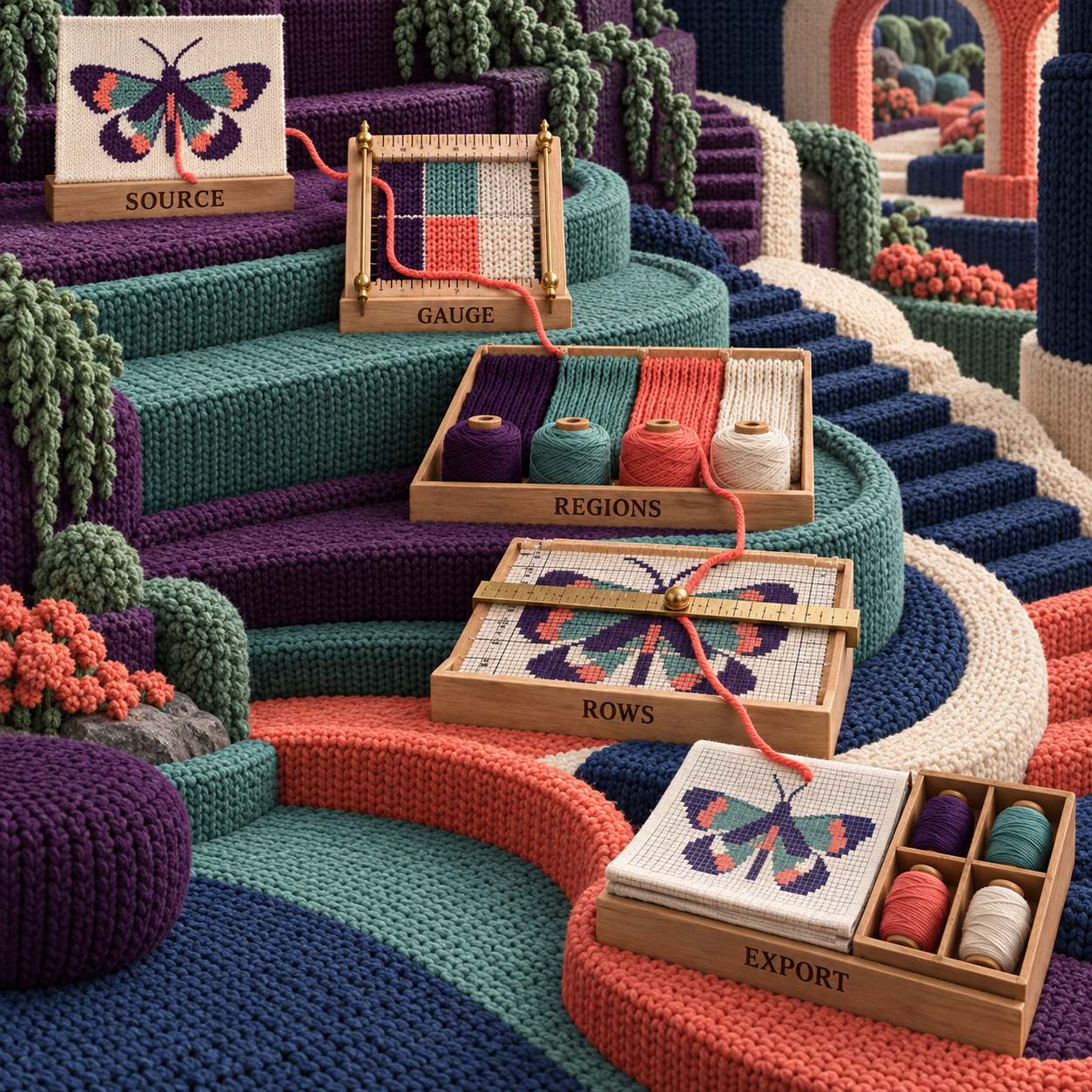
Photo to Intarsia Pattern: The Complete Workflow
The cleanest image-led intarsia workflow makes the source less photographic before it asks the chart to become more precise. Every transition should remove ambiguity: simplify the image, measure the fabric, consolidate the regions, audit the rows, then prove the export.
1. Reduce the Source to the Craft's Vocabulary
Start with broad flat shapes, purposeful negative space, and a palette that maps to yarn you can obtain. A photo with soft shadows, flyaway hair, textured wallpaper, and reflected highlights may be visually coherent, but a converter must turn every tonal shift into either a new yarn or an approximation.
The moth begins with four named digital colors and no lighting effects. Its navy body and coral wings define the silhouette. The cream spots are optional detail. The teal field exists only to make boundaries visible during conversion; it can become the sweater's base yarn or transparent negative space depending on the project.
If the source begins with an AI-generated image, simplify it before charting. Remove pseudo-lettering, tiny repeated ornaments, accidental gradients, inconsistent symmetry, and details that occupy only a few source pixels. A generator's decorative instinct often creates the same disconnected regions that intarsia cleanup must later remove.
2. Build and Block the Swatch
Use the actual yarn, needles, stockinette structure, and finishing method planned for the project. Wash or treat the swatch as the finished piece will be treated, let it settle, then measure stitches and rows across a stable central area. Edge stitches distort easily, so do not use the curling border as the evidence.
The worked 22-stitch by 30-row gauge is a demonstration input, not a substitute for this step. The swatch also answers a second question that software cannot: how the chosen colors meet. Two yarns with different loft or elasticity may pull a boundary differently even when the cell count is correct.
3. Calculate Both Grid Dimensions
Choose the motif's finished width, convert that width to stitches from the measured stitch gauge, then calculate its height from the measured row gauge. If the source should appear physically square, the 60-stitch worked example becomes 82 rows at the stated gauge. If the desired motif is intentionally tall or wide, use that physical proportion instead of forcing a square.
Enter both gauge values where the editor allows them. When a converter exposes only a ratio preset, use it to generate the draft, then verify the output dimensions independently. A ratio correction changes the image sampling. It does not know how many inches the garment panel has available.
4. Convert With the Smallest Credible Palette
ArtPatt is the first choice when the source still needs intarsia-aware cleanup and yarn guidance. Stitch Fiddle or Chart Minder can start directly from the source when the design is already flat and you expect to edit manually. Do not begin at the maximum supported color count. Begin at the planned yarn palette and add a shade only when it protects a meaningful form.
For the moth, four colors are enough to judge every key boundary. If the conversion invents a second coral or a near-identical cream, merge it before inspecting the spots. Otherwise the palette noise disguises the harder region problem.
5. Draw a Region Map, Not Just a Legend
Scan each row and count active blocks in sequence. Write a short row signature such as teal, coral, cream, coral, teal. When the same shade returns after another color, it is a separate region for that row and normally needs another supply.
Mark where each region begins, continues, merges, splits, and ends. This reveals peak bobbin load, which is often more useful than the total number of colors in the design. It also exposes short-lived islands that add more ends for only a small visual return.
Apply the cleanup hierarchy in order:
- Delete accidental one-cell flecks.
- Merge near-duplicate colors.
- Smooth boundaries that reverse direction without helping the silhouette.
- Combine small adjacent islands into a deliberate mark.
- Move essential isolated detail to duplicate stitch.
- Keep a separate intarsia block only when its size and meaning justify the yarn supply.
6. Audit Every Turn and Join
Read from the bottom upward. On right-side rows, follow the chart right-to-left; on wrong-side rows, follow it left-to-right. Confirm that the row numbers and legend make this alternation obvious at the screen or print size you will use.
At every color boundary, plan the twist that connects the panels. A chart cannot enforce hand tension, but it can avoid needlessly jagged joins. If one edge zigzags by a stitch on every row, compare a smoother version. Protect a meaningful diagonal, eye, or wing tip; simplify random noise.
7. Export for the Person Who Will Read It
For personal knitting, prioritize legible cells, row numbers on the useful edges, a plain color key, and a format that opens reliably on the chosen device. For publication, prioritize vector lines, editable labels, a separate legend, consistent symbols, and written colorwork instructions when they add clarity.
Open the export after download. Zooming into the editor proves nothing about the PDF's page breaks or the PNG's final resolution. Follow several alternating rows without looking back at the source image. If the chart alone cannot answer which block owns a stitch, the handoff is not finished.
8. Knit the Smallest Representative Proof
Do not swatch an easy corner if the project risk sits at a wing full of small blocks. Knit a sample that includes the most crowded row, a diagonal boundary, and at least one join that changes direction. Wash and block it, then compare physical width, height, color separation, and join tension with the plan.
The useful before-and-after is not "AI image" versus "knitted masterpiece." It is a square-grid, six-island draft versus a gauge-correct chart whose remaining blocks have a reason to exist. That is the iteration the software can support and the swatch can judge.
Intarsia Knitting for Beginners: Keep the First Chart Boring
A beginner's best first chart has one clean color boundary, a stable vertical or gentle diagonal edge, and no isolated spots. The twist at the join, consistent tension, untangling the supplies, and weaving the ends already provide enough variables.
Once that join sits flat, add another block or a simple interior shape. Save tiny eye-like details for duplicate stitch. A simple chart that teaches clean joins creates more reusable skill than a detailed chart that turns the first project into yarn management.
Best AI Tools for Intarsia Knitting Charts Free
Chart Minder is the best fully free cleanup workspace, Stitch Fiddle Free is the strongest no-cost route when cloud editing and row tracking matter, and ArtPatt Free is the best no-cost preview of an intarsia-specific conversion. The free choice changes with the stage, not with a single overall score.
Choose Chart Minder when you need a photo scanner, gauge-linked dimensions, stitch preview, manual editing, and image export without a published paid tier. It is the cleanest zero-budget answer for one personal chart, provided you are willing to count regions and plan bobbins yourself.
Choose Stitch Fiddle Free when 15 saved charts, 50 unique colors or symbols, and a 300 by 300 grid cover the project. It is especially useful if the chart will be followed online. Premium becomes relevant when the chart exceeds those limits or the export needs the paid vector, document, organization, or collaboration features.
Choose ArtPatt Free when the first question is whether an image can become a plausible intarsia chart. The plan permits one pattern a week and no credit card. Pro is the production tier when unlimited patterns, HD PNG or printable PDF, saved-library capacity, advanced controls, or the larger AI allowance matters.
Free does not remove the swatch cost. Yarn, time, and finishing remain part of every path. A no-cost converter that produces unnecessary bobbins is more expensive in use than a paid month that helps remove them.
Who Should Pick What
Pick ArtPatt when the project begins with a photo or generated motif and the conversion must understand intarsia before you edit. Its choice flips away when the fixed ratio disagrees with the swatch, the cell art needs close repair, or the yarn formula proves unreliable for the material.
Pick Stitch Fiddle when the grid itself is the working document. It is the strongest match for a knitter who wants to change individual boxes on a computer, track rows on another device, and export a layered file. The choice flips away when automatic bobbin planning matters more than editing.
Pick Chart Minder when the budget is zero and the motif is simple enough for manual region counting. Its choice flips away when a professional vector handoff or documented bobbin analysis is a requirement.
Pick Stitchmastery when the reader is not only the knitter but also the pattern customer, technical editor, or layout designer. Its choice flips away when the job begins with photo conversion or needs a chart beside the work on a synced mobile device.
The paid-stack budget is smaller than it first appears, but paying twice is not automatically wise. One month of ArtPatt Pro plus one month of Stitch Fiddle Premium costs $12.49. One year of both costs $92.99. Use the combination only when ArtPatt removes enough conversion work and Stitch Fiddle removes enough editing or export work to justify the handoff.
The Ones to Avoid for This Job
Avoid ArtPatt's Fair Isle route for a large-block intarsia motif. Fair Isle is designed around carried strands and tight per-row color constraints; intarsia gives disconnected blocks their own supplies. The same source image can require different cleanup because a useful dither in stranded colorwork becomes a field of extra intarsia islands.
Avoid Stitch Fiddle Free when the deliverable depends on Premium-only vector and document exports or a grid larger than 300 by 300. Free is a capable editor, not a back door around every paid production feature. Confirm the download format before spending hours on final typography.
Avoid Chart Minder as an automatic bobbin calculator. Its current page documents scanning, gauge, editing, preview, tracking, and image export. It does not document disconnected-region counts or per-bobbin quantities. Use it when you are comfortable doing that audit by hand.
Avoid the Stitchmastery demo for a live deliverable. It is excellent for exploring the interface, but its current manual says saving is disabled in demo mode. A chart that cannot be saved cannot be the only working copy of a paid pattern project.
Avoid any cross-stitch converter used unchanged for stockinette. Cross-stitch squares represent square stitches; stockinette gauge creates rectangular physical cells. Floss codes, fabric count, and square geometry solve a different craft. If a cross-stitch image supplies the motif, rebuild its dimensions from the knitting swatch before charting.
The warning sign across every option is a preview that hides the grid. If the product cannot show cells, row order, color ownership, and an export at working size, it has produced motif inspiration rather than a knittable intarsia chart.
Frequently Asked Questions
Can AI generate knitting patterns?
AI can generate a motif or a draft, but it cannot certify the finished knitting pattern. A usable pattern still needs measured gauge, construction logic, intentional color regions, readable rows, an accurate yarn plan, and a representative swatch. For intarsia, use AI upstream and a specialist chart editor for the specification.
How to create an intarsia pattern?
Start with a simple flat-color motif, measure a blocked stockinette swatch, calculate stitches and rows separately, convert the image, remove unnecessary disconnected regions, and audit every row direction and color join. Export a countable chart, then knit and block the most demanding section before committing the full piece.
What is the best software for creating knitting charts?
ArtPatt is the best starting point for an image-led intarsia draft, Stitch Fiddle is the best browser editor and row tracker, Chart Minder is the best fully free workspace, and Stitchmastery is the best professional publishing tool. The right choice depends on whether conversion, repair, price, or publication is the first constraint.
How to change colors in intarsia knitting?
Use a separate yarn supply for each active block. At the boundary, bring the new yarn up from beneath the old yarn so they cross, then work the next stitch with the new color. That twist connects the panels and helps prevent a hole; keep the join snug without pulling the surrounding stitches tight.
Can you provide a beginner's guide to knitting intarsia?
Begin with flat stockinette and one clean color boundary. Mark the chart's right-side and wrong-side directions, use a separate supply for each block, twist at every boundary, and untangle the yarns whenever the work turns. Practice a gentle diagonal only after a straight join looks even, and add tiny details later with duplicate stitch.
What's the difference between intarsia and fair isle?
Intarsia normally gives each separate color block its own yarn supply and joins the blocks at their boundaries. Fair Isle, a form of stranded colorwork, carries unused yarn across the back. Intarsia suits large distinct motifs; stranded work suits repeating patterns and frequent color alternation.
How difficult is intarsia knitting?
The knit and purl stitches are familiar, but the planning adds difficulty. The knitter must read alternating row directions, manage several supplies, twist consistently at joins, control tension, and finish more ends. A simple two-block chart is approachable; a chart full of tiny islands becomes difficult quickly.
Is stranded colorwork the same as intarsia?
No. Stranded colorwork carries the unused strand behind the active stitches, while intarsia usually uses separate supplies for separate blocks. The same motif may need different charts because floats, palette rhythm, disconnected regions, and fabric thickness create different constraints.
What are the benefits of intarsia knitting?
Intarsia can create large, crisp color areas without carrying every unused shade across the back. That avoids long floats across broad blocks and can keep a large pictorial panel less bulky than a heavily stranded version. It also gives each boundary deliberate control, at the cost of more supplies and ends.
- Last Updated
- Sep 14, 2026
- Category
- Design
Prefer this site in Google


Mark omidsaffari.com as preferred and Google lifts it in Top Stories, AI Overviews and AI Mode for you.
Best AI Tools for Rug Tufting Patterns
Compare tools for rug tufting patterns by color blocks, editable outlines, yarn palettes, and the work needed before printing or projection.Sep 14, 2026Design
Separo vs UltraSeps
Compare Separo and UltraSeps for simulated-process separations, Photoshop work, correction time, and the files your screen printer needs.Sep 14, 2026Design
Best AI Tools for Laser Engraving Depth Maps
Compare AI depth-map tools for laser reliefs by editing, export quality, and the cost of reaching a usable file.Sep 13, 2026Design
Cutsio Video Indexing Cost
Decode Cutsio's indexed minutes, stored hours, seats, and overages to choose a plan for a growing video library.Sep 13, 2026Design
Best AI Tools for Cross Stitch Pet Portraits
Compare AI and photo-conversion tools for cross-stitch pet portraits, with checks for likeness, thread codes, cleanup, and printable charts.Sep 13, 2026Design
DreamYard AI Review
A DreamYard review of photo fidelity, revisions, downloads, free limits, current pricing, and the permission required for client work.Sep 13, 2026Design
Textile-Designer.ai Review for Screen Printing
Test Textile Designer AI's route from artwork to editable print files, including color separation, export limits, credits and manual cleanup.Sep 12, 2026Design