Best AI Tools for Handloom Weaving Drafts
Compare tools for handloom weaving drafts, threading and tie-ups. See which outputs reach a loom and where AI only supplies visual inspiration.


The best AI tools for handloom weaving drafts are mostly not AI tools. WeavePoint is the strongest complete drafting choice, AdaCAD is the best free generative option, and the $160 WeaveIt Pro is the clearest paid desktop middle ground. Pattern Weaver stops at visual inspiration because a repeating image does not encode threading, tie-up, treadling, or a liftplan.
Best AI Tools for Handloom Weaving Drafts at a Glance
A loom does not weave a picture. It follows structure: which shaft receives each warp end, which shafts connect to each treadle, and which sequence lifts them for every pick. That is why the strongest products here are specialist drafting programs, even when the search starts with AI.
Prices and product pages were verified on September 16, 2026. Fiberworks is the one exception to the first-party source rule: its direct site timed out, so the current version and price come from authorized loom dealer Metiers Seguin and are labeled as secondary.
The ranking is documentation-led, not a disguised product test. No paid license was opened, no draft was woven, and no electronic loom was driven in this run. The order compares live feature documentation, current prices, file interchange, structural controls, and the amount of judgment still required before a draft reaches the loom.
What Makes a Weaving Draft Loom-Ready
A loom-ready shaft draft must answer four linked questions. Threading says which shaft holds each warp end. The tie-up says which shafts each treadle raises or lowers. Treadling gives the treadle sequence for successive weft picks. A drawdown shows the resulting over-under cloth structure. On a dobby or table loom, a liftplan can replace the tie-up and treadling pair by stating the shafts lifted for each pick.
That distinction is the whole comparison. A repeating image can resemble woven cloth while leaving every one of those decisions unresolved. The pixels show color at the surface. They do not say how the warp and weft interlace, whether a float runs too far, whether the loom has enough shafts, or whether the weaver can reproduce the result with available treadles.
Is an AI Weaving Draft Generator Ready for the Loom?
Not without a structural pass. Use the same brief to see the gap: an indigo-and-cream diamond cloth for an eight-shaft handloom, with short floats and a reversible rhythm.
The visual pass may return a polished seamless tile of nested diamonds. It can help settle scale, color balance, edge softness, and whether the motif feels formal or lively. Pattern Weaver is built for that sort of repeat image. The output can be an excellent reference and still contain no usable threading.
The drafting pass starts over at the level of interlacement. A weaver chooses a structure that can produce the diamond, assigns an eight-shaft threading, builds a tie-up or liftplan, enters the treadling, and reads the drawdown. A float analysis then exposes warp or weft spans that exceed the cloth's intended use. Only after those choices agree does the image become a draft.
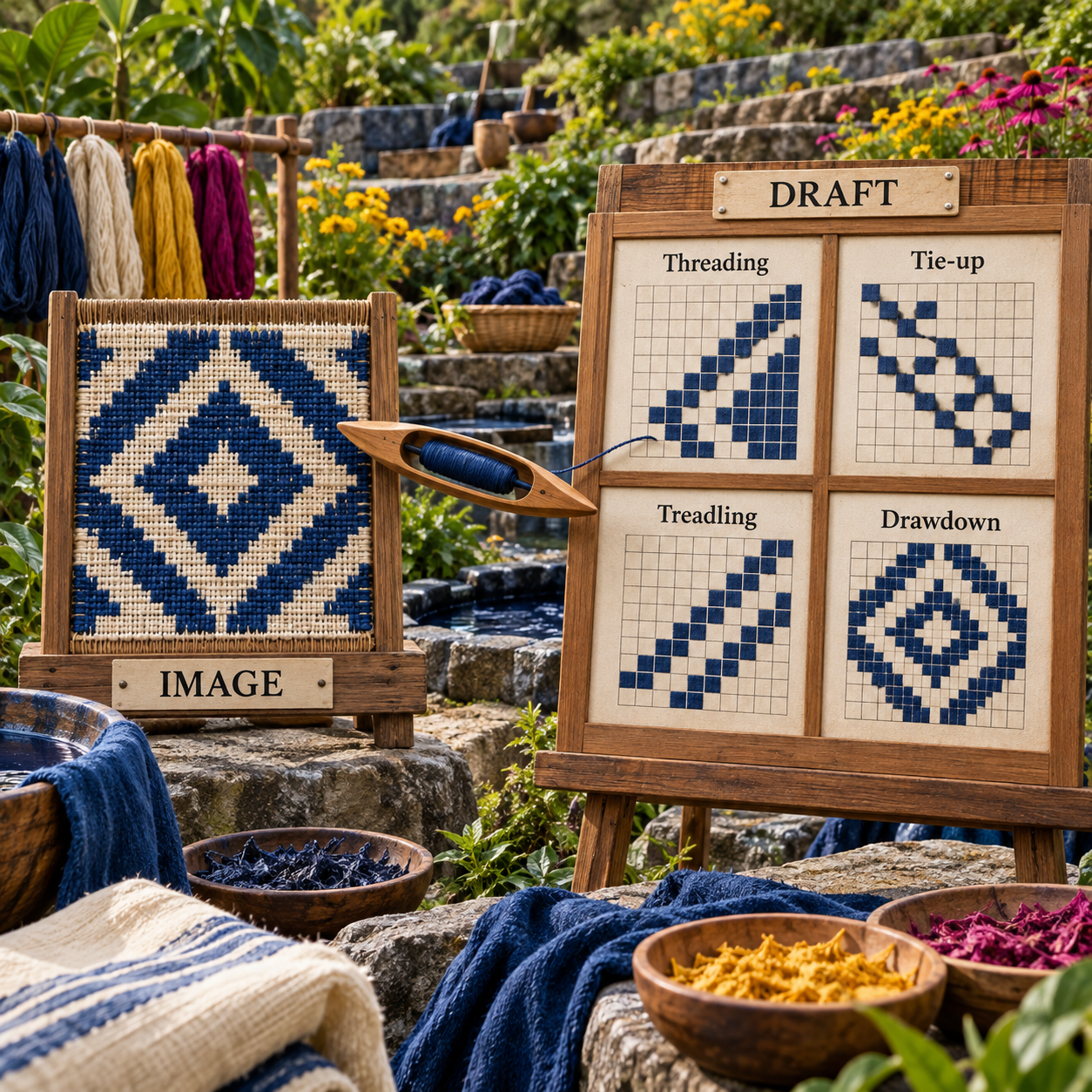
The after state is not merely a cleaner version of the before state. It is a different kind of artifact. This is why a beautiful first pass can be mood-board-ready but loom-useless, and why an austere black-and-white grid can be the more valuable deliverable.
Why WIF Export Matters
WIF, the Weaving Information File, is the practical bridge between drafting programs. WeavePoint's manual describes WIF as a human-readable interchange format that can carry a liftplan or a tie-up and treadling, along with other draft information. WeavePoint, WeaveIt Pro, iWeaveIt, AdaCAD, and Treadl all document some form of WIF workflow on their current pages.
WIF support does not certify a design. It does reduce transcription risk. A desktop draft can move to a mobile treadling tracker, a parametric experiment can move into a conventional checker, and a shared project can remain editable instead of flattening into an image.
A reliable handoff should survive five checks:
- The draft matches the actual shaft and treadle count of the loom.
- Rising-shed or sinking-shed assumptions are explicit.
- Threading, tie-up, treadling, and drawdown agree, or the liftplan is complete.
- Long floats are intentional and suitable for the cloth's use.
- The exported WIF reopens correctly in the next program before the loom is dressed.
The same production distinction appears in adjacent fiber crafts. A rug-tufting pattern needs scale, yarn regions, and transfer after image generation. An intarsia knitting chart must resolve stitches and colors rather than merely look knitted. Handloom weaving is stricter still because the picture must become interlacement.
How These Tools Were Picked
The ranking rewards products that reduce the distance between an idea and a checked draft. It does not reward a product merely for using the word AI.
Seven criteria decide the order:
- Structural control: Can the product edit threading, tie-up, treadling, liftplan, and drawdown rather than only a picture?
- Analysis: Can it expose floats, heddle counts, repeats, or inefficient structure before weaving?
- Interchange: Can it import or export WIF without forcing the draft through an image?
- Loom fit: Does it support ordinary shaft, table, treadle, dobby, direct-tie, or jacquard workflows relevant to its audience?
- Generative value: Does it create meaningful structural variations, and is that generation accurately labeled as parametric, algorithmic, or AI?
- Buying clarity: Are the platform, current version, trial, and price clear enough to make a decision?
- Failure visibility: Does the product help reveal a bad draft, or can it make an invalid idea look finished?
The field was narrowed aggressively. Garment pattern CAD was removed because a sewing pattern is not a weave draft. General image models stayed out of the ranked list because they produce pictures rather than interlacement. pixeLoom was considered, but its current public product and download pages did not document the WIF path needed for this comparison, so it remains a trial-first candidate rather than a ranked recommendation.
The Seven Best Tools, Ranked by Distance to the Loom
1. WeavePoint 9: Best Overall for Advanced Handloom Drafting
WeavePoint 9 is the best overall choice because it combines complete draft editing, structural analysis, WIF interchange, and support for multiple loom systems in one established desktop program.
The decisive feature is not its cloth simulation. It is the connection between the draft's parts. WeavePoint shows all four quadrants, updates related areas as you edit, and can work backward from a design to a threading, treadling, tie-up, or liftplan. Its live feature page also documents float analysis, heddle counts, tie-up and dobby modes, block substitution, network drafting, double width, and WIF import/export.
The ceiling is high: up to 128 shafts, 128 treadles, 9,600 ends, 9,600 picks, and 256 colors. That is far beyond the needs of a typical four- or eight-shaft floor loom, but the breadth matters for designers moving among table looms, computer-assisted dobbies, drawlooms, and advanced structure studies.
Its wall is procurement and platform. The current site does not publish a direct price, instead routing buyers to the maker or regional agents. WeavePoint is a Windows product; its own FAQ points Mac users toward compatibility software. A buyer who wants a native modern Mac interface or a transparent checkout price has to accept friction before learning the program.
Start from the real loom
Choose the correct loom system first: treadles and tie-up for an ordinary floor loom, a liftplan for a table or dobby workflow, and the actual shaft and treadle counts. A draft designed for imaginary hardware is not rescued by better graphics.
Build the structure before the colorway
Enter the threading, tie-up, and treadling, or start with a liftplan. Watch the drawdown update while the structure is still small enough to understand. Use color only after the interlacement behaves as intended.
Interrogate the draft
Run the float view and inspect repeat lengths, heddle counts, and the cloth simulation. Treat every unexpected long span as a question, not as a cosmetic flaw to hide with a different palette.
Export a small WIF proof
Save one repeat as WIF, open it in the next app in the workflow, and compare shaft order, shed convention, tie-up or liftplan, and color sequence. Validate the exchange before expanding the warp.
Print or track only after the proof agrees
Once the reopened draft matches, prepare the threading and treadling views for the loom. Keep the original editable file beside the exchanged WIF so a conversion never becomes the only master.
Best for: Experienced handweavers, teachers, and designers who want one deep structural environment.
Standout: Drawdown-to-draft analysis plus extensive shaft, treadle, dobby, and WIF support.
Pricing: Quote required through the maker or a regional agent.
Free trial: A working WeavePoint 9 demo is available.
- Edits and analyzes the complete weave draft rather than a surface image.
- Supports WIF import/export and several manual and computer-assisted loom systems.
- Handles block substitution, network drafting, double width, and float analysis.
- Scales from ordinary shaft work to unusually complex drafts.
- Current price is not published on the product site.
- Windows-first workflow adds friction for Mac users.
- Depth creates a larger learning surface than a simple browser editor.
2. Fiberworks PCW: Best Established Alternative Across Windows and Mac
Fiberworks PCW is the strongest established alternative when a weaver wants tiered versions, Windows or Mac availability, and an optional path to computer-assisted loom control.
The current authorized-dealer page separates Bronze from Silver and Silver Plus. Windows Bronze 4.2.4.0 covers four to 12 shafts; Windows Silver and Silver Plus 4.2.4.2 extend to 64 shafts. Silver Plus adds loom operation for named ARM, AVL, Leclerc, Louet, Macomber/Dobbytron, Noble, Seguin, and Toika systems.
The Mac line requires closer reading. Bronze and Silver 2.0.2 are listed for macOS 14 through 26.1, but the dealer says version 2 no longer supports the weaving-display and loom-control features retained in older Silver Plus versions. That makes Fiberworks a product where the edition and operating system matter as much as the name.
The trial is useful but deliberately incomplete: most functions can be explored, while Save, Save As, and Print remain disabled until validation. The dealer's current price list starts Bronze at US $99 and warns that taxes and price changes may apply. WIF support is confirmed here from Long Thread Media's current WIF FAQ because the direct Fiberworks site did not answer during this verification run.
That sourcing issue costs Fiberworks the top spot. A serious buyer should ask the dealer to confirm the exact OS build, edition, WIF behavior, and loom driver before paying. The software may fit beautifully, but its public buying path is less legible than the draft deserves.
Best for: Weavers who want a long-established tiered program and may need computer-assisted loom support.
Standout: Editions that range from beginner shaft counts to 64-shaft and loom-control workflows.
Pricing: From US $99 through the authorized dealer checked; exact edition and OS change the price.
Free trial: Yes, but Save, Save As, and Print are disabled until purchase.
- Windows and Mac editions cover a broad range of shaft-loom users.
- Silver Plus supports several named computer-assisted loom systems.
- Trial access lets a buyer inspect much of the workflow before purchase.
- Entry pricing is lower than WeaveIt Pro through the checked dealer.
- Direct vendor pages were unavailable during fact verification.
- Mac version 2 drops some weaving-display and loom-control functions.
- Edition, OS, and driver choices make the purchase harder to compare cleanly.
3. AdaCAD: Best Free Generative Tool for Woven Structure
AdaCAD is the closest honest match to a generative weaving tool because it creates and transforms actual woven structures through parametric dataflows, not prompts that only paint a textile-looking image.
Parametric design means the draft is produced by connected operations with adjustable inputs. Change a repeat, system, rotation, shift, material assignment, or source structure, and downstream drafts update. The AdaCAD documentation describes support for shaft, dobby, and jacquard work, while the live app identifies version 5.1.3.
This is a better form of generation for weaving because the output remains structural. AdaCAD can import WIF and bitmap seeds, create drafts through traditional point-paper editing or dataflows, and export selected results as WIF, bitmap, or image. Its loom guides cover WIF routes for floor and dobby work as well as bitmap routes for TC2 workflows.
The wall is reliability and learning. AdaCAD calls itself experimental, recommends Chrome on a laptop or desktop, and openly says its small team still faces bugs. A dataflow also demands more conceptual setup than filling cells in a familiar four-quadrant draft. It rewards a weaver who wants to explore transformations, not someone who only needs to enter a published twill tonight.
For the indigo-diamond brief, AdaCAD can use a known twill as a seed, transform or tile it, assign systems, and pass a result onward as WIF. The correct discipline is to inspect that WIF in a conventional draft view before treating generative variation as loom-ready.
Best for: Experimental weavers who want free parametric structure generation and editable WIF output.
Standout: Dataflows generate woven structures rather than visual imitations of cloth.
Pricing: Free and open source.
Free trial: The full browser workspace is free.
- Generates and transforms actual weave drafts through algorithms and parameters.
- Imports and exports WIF and supports several loom representations.
- Free, browser-based, and open source.
- Makes complex and jacquard-oriented exploration accessible without enterprise CAD.
- Experimental product with publicly acknowledged reliability issues.
- Dataflow thinking is less immediate than a conventional draft grid.
- Generated structure still needs a weaver's float, sett, yarn, and loom checks.
4. WeaveIt Pro: Best Paid Desktop Middle Ground
WeaveIt Pro is the clearest paid desktop choice for a handweaver who wants full draft quadrants and advanced tools without WeavePoint's quote-based purchase path.
The Windows product page states the job plainly: enter threading, treadling, and tie-up, then read the drawdown. WIF support, float finding, turned and blended drafts, block substitution, interleaving, double weave, fabric analysis, network drafting, parallel threading, advancing twills, and loom-side tracking are all documented.
Windows WeaveIt Pro costs US $160 and supports Windows 10 and 11. A free demo is available. The separate Mac edition documents a similar advanced feature set and WIF, but the current public Mac page does not state a price, so it should not be assumed to match Windows.
The buying logic is simple. Choose it over iWeaveIt when designing and analyzing on a full desktop matters. Choose it over AdaCAD when a conventional draft editor is more valuable than an experimental dataflow. Move up to WeavePoint when the deepest analysis, very large drafts, or broader loom configurations justify the learning and quote process.
Best for: Handweavers who want a conventional, capable desktop draft environment at a posted one-time Windows price.
Standout: Strong design and analysis tools tied to a clear threading, tie-up, treadling, and drawdown workflow.
Pricing: Windows license $160; current Mac price is not published on the product page.
Free trial: Free Windows demo.
- Full conventional draft workflow with WIF support.
- Advanced structure tools without an enterprise buying process.
- Float checks, yardage, heddle counts, and loom tracking connect design to setup.
- Posted one-time Windows price.
- Current Windows support starts at Windows 10; older hardware needs checking.
- Mac price is not transparent on the web page.
- It is deterministic drafting software, not prompt-based AI.
5. iWeaveIt: Best Mobile Draft and Loom-Side Companion
iWeaveIt is the best mobile pick because it can edit a real draft, read and write WIF, and track threading or treadling at the loom for US $39.
The app covers threading, treadling, tie-up, and liftplan setup rather than merely displaying a picture. It also documents float finding, turned drafts, color-and-weave tools, sett and yarn calculations, heddle counts, plus iCloud and Apple Files transfer. The current user guide says WIF is its saved pattern format.
Its advantage appears after the draft leaves the desk. A weaver can carry the WIF to the loom, step through threading, then track treadling or liftplan picks without printing a long sheet. That is a focused payoff, not an AI feature.
The limit is platform and screen. The current product is for iPad and iPhone, and the public page does not advertise an Android or desktop edition. It is also a basic drawdown app beside the deeper desktop WeaveIt Pro, so complex structure development belongs upstream.
Best for: Apple-device users who already have a WIF or want lightweight mobile draft editing and tracking.
Standout: WIF-native editing plus loom-side threading and treadling tracking.
Pricing: US $39 for iPad and iPhone.
Free trial: No trial is published on the current product page.
- Reads and writes WIF rather than flattening drafts into images.
- Tracks both threading and treadling or liftplans at the loom.
- Includes useful calculations and float finding at a low one-time price.
- Shares files through Apple Files and iCloud.
- Apple mobile devices only on the current page.
- Smaller editing surface than desktop drafting software.
- Not the best environment for deep network or parametric design work.
6. Treadl: Best Free Browser Editor and Project Hub
Treadl is the best free browser option for straightforward draft editing, WIF exchange, project organization, and sharing.
The platform documents point and line drawing, palette edits, pattern previews, cloud project storage, and WIF import/export. Projects can mix patterns with images, text, and other files, then remain private or be shared with downloadable source WIF files. That makes Treadl unusually useful for a guild, study group, teacher, or weaver moving among machines.
The price is clear: Treadl is free and open source. The maker is equally clear about the limit, saying the editor may not yet include everything a user needs and suggesting export to another tool for further work. That candor belongs in the buying decision.
Use Treadl when access and exchange matter more than advanced transformation. It is a better beginner route than asking a chatbot to invent shaft sequences, and a lighter project hub than buying a deep desktop package for every participant.
Best for: Beginners, study groups, and weavers who need free browser access and portable WIF projects.
Standout: Shareable projects with an editable browser draft and source WIF.
Pricing: Free.
Free trial: The product itself is free.
- Free, open source, and browser-based.
- Imports and exports WIF.
- Combines draft editing with project notes, files, previews, and sharing.
- Honest about handing complex work to another program.
- Does not claim the deep analysis set of WeavePoint or WeaveIt Pro.
- Cloud workflow may not suit every private or offline studio.
- No AI or parametric structure generation.
7. Pattern Weaver: Best AI Motif Inspiration, Not a Draft
Pattern Weaver is the only purpose-built visual AI product in the ranking, and it finishes last because its output is a seamless surface tile rather than a handloom draft.
For the visual phase, its current feature set is strong. Pattern Weaver documents repeat layouts, palette steering, seam repair, CMYK and ICC-aware print output, and exports that extend through PNG, JPG, WEBP, TIFF, PDF, SVG, EPS, and DXF. The top paid tiers reach 8K export.
None of the live homepage or pricing documentation checked for this article claims WIF, threading, tie-up, treadling, liftplan, or drawdown controls. That does not make Pattern Weaver a bad product. It makes it a product for printed textile and surface imagery, not for deciding how warp and weft interlace on a shaft loom.
Pricing is credit-based and one-time. Free includes 5 credits. Starter costs $19.99 for 100 credits, Pro costs $39.99 for 240, and Max costs $99.99 for 640. Because one credit equals one pattern, one tiling fix, or one enhance action, the simple pack math is about $0.20, $0.17, and $0.16 per action respectively before unused credits.
Use it to explore the indigo diamond's scale, palette, and surface rhythm. Then rebuild the chosen direction in WeavePoint, Fiberworks, AdaCAD, WeaveIt Pro, or another verified structural editor. The moment the design needs shafts is the moment Pattern Weaver's job has ended.
Best for: Visual motif, colorway, and repeat inspiration before structural drafting begins.
Standout: Purpose-built AI surface repeats with print-oriented export controls.
Pricing: Free 5 credits; Starter $19.99 once; Pro $39.99 once; Max $99.99 once.
Free trial: Five free credits with no card.
- Generates textile-oriented visual repeats instead of generic isolated images.
- Offers palette, tiling, resolution, and print-export controls.
- One-time credit packs do not expire.
- Useful for comparing visual directions before committing to structure.
- No documented WIF or shaft-draft workflow.
- A seamless tile can conceal impossible or unsuitable interlacements.
- Adds a handoff because the idea must be reconstructed in drafting software.
Which Handloom Weaving Software Should You Pick?
Pick by the first irreversible decision in your workflow, not by the most exciting feature.
Choose WeavePoint 9 when the draft is complex, the loom configuration matters, and analysis must happen in the same program as design. The price quote and Windows dependency are worth tolerating only if those deeper controls will be used.
Choose Fiberworks PCW when its edition and operating-system matrix aligns with an existing loom setup. Confirm the exact version and driver with the dealer first, especially on Mac.
Choose AdaCAD when the goal is to explore structures algorithmically for free. Export an early WIF and inspect it elsewhere before investing yarn or loom time.
Choose WeaveIt Pro when a posted $160 Windows price and a conventional desktop draft feel more important than experimental generation. Add iWeaveIt only when mobile tracking earns the extra $39.
Choose Treadl when browser access, WIF sharing, and project context matter more than advanced analysis. Choose Pattern Weaver only when the unresolved task is visual motif direction, never when the unresolved task is interlacement.

The explicit decision rule is simple: if the next deliverable must tell a loom or a weaver which shafts move, choose structural software. If the next deliverable only needs to show what the cloth might look like, a visual AI tool can help.
Weaving Pattern Software Is Not All AI
The most useful generation in this category is often deterministic. Network drafting, block substitution, advancing twills, turning drafts, repeating sequences, and parametric dataflows create new results from explicit rules. They can feel generative because one input produces many variations, but calling every such function AI obscures how the draft was made and how predictable it is.
AdaCAD is best described as algorithmic and parametric. WeavePoint, Fiberworks, WeaveIt Pro, iWeaveIt, and Treadl are conventional specialist tools with automation and analysis. Pattern Weaver uses AI for visual surface patterns. Those labels are not a ranking of sophistication. They tell you where control lives.
For a loom-critical step, deterministic behavior is often the advantage. If the weaver changes one tie-up cell, the drawdown should change for a known structural reason. A surprising visual flourish is welcome during ideation and dangerous during loom setup.
The Ones to Avoid for This Job
Avoid a ChatGPT-only draft as the loom authority. A chatbot can explain terms, propose structures, or format a sequence, but text that looks orderly is not proof that threading, tie-up, treadling, drawdown, shed convention, and float behavior agree. Re-enter or import the proposal into structural software and inspect it before dressing the loom.
Avoid a Midjourney-only or Pattern Weaver-only workflow for the final draft. Both can contribute visual direction, and Pattern Weaver is expressly useful for surface repeats. A polished image still does not tell an eight-shaft loom which shafts to lift.
Avoid garment-pattern CAD such as CLO 3D when the task is handloom structure. Garment patterns describe cut pieces, grading, fit, and sewing construction. The shared word pattern does not make them weaving tools.
Defer buying pixeLoom for a WIF-first workflow until the trial confirms the required exchange on your machine. Its current site presents a draft editor and a $180 Windows license, while the trial disables Save, Print, and Copy to Clipboard. The public pages checked here did not document WIF, so the omission from the ranking is a verification limit, not a claim that the product cannot handle it.
The common warning sign is an impressive textile image beside no visible threading, tie-up, treadling, liftplan, drawdown, or WIF path. Look for the boring grid. It is usually where the production truth lives.
Frequently Asked Questions
Best AI tools for handloom weaving drafts free?
AdaCAD is the best free generative option because its dataflows produce structural drafts and can export WIF. Treadl is the simpler free browser route for editing, sharing, and WIF projects. Neither removes the need to check floats, loom fit, sett, and yarn.
Best AI tools for handloom weaving drafts for beginners?
Start with Treadl if free browser access matters, or WeaveIt Pro if a conventional paid desktop program and guided draft quadrants feel clearer. iWeaveIt is the better $39 choice when the main need is mobile WIF editing and loom-side tracking.
Weaving pattern generator online free?
AdaCAD is the stronger free online generator for algorithmic and parametric woven structures. Treadl is easier for straightforward draft editing and project sharing. Pattern Weaver generates visual repeat images, not shaft-loom structures.
Free weaving software for beginners?
Treadl has the gentler free starting point because it runs in a browser and supports WIF projects. AdaCAD is also free, but its dataflow model is more experimental and better suited to a learner who wants to explore how structures transform.
iWeaveIt?
iWeaveIt is a US $39 iPad and iPhone app that reads and writes WIF, edits threading, treadling, tie-up or liftplan information, and tracks threading and picks at the loom. It is a mobile companion, not an AI generator or full replacement for every desktop feature.
Can AI create a valid weaving draft from a picture?
It can suggest a visual target, and specialist or parametric tools can help translate or generate structure. A picture alone does not determine the one correct threading and lift sequence. The draft still needs a chosen structure, loom constraints, float inspection, and a verified handoff.
What is the difference between a liftplan and treadling?
Treadling names the treadle sequence used with a tie-up. A liftplan directly lists the shafts lifted for each pick, which suits table looms and dobby workflows. Both can describe the same cloth, but the loom and software must interpret the chosen form correctly.
- Last Updated
- Sep 16, 2026
- Category
- Design
Prefer this site in Google


Mark omidsaffari.com as preferred and Google lifts it in Top Stories, AI Overviews and AI Mode for you.
Texloom Studio Review for Seamless Textile Prints
A Texloom Studio review focused on seamless repeats, color control and print exports, with clear limits on what was tested and what needs checking.Sep 16, 2026Design
Best AI Tools for String Art Patterns
Compare string art pattern tools by nail sequences, printable templates, photo controls and usable exports. See where AI claims help and where they stop.Sep 15, 2026Design
Chart Minder vs Stitchmastery
Compare Chart Minder and Stitchmastery for knitting chart design, written instructions, exports, and the point where paid software earns its cost.Sep 15, 2026Design
ArtPatt Pricing
ArtPatt pricing explained: Free limits, Pro exports, saved patterns, AI-image allowances, and when a paid plan earns its place.Sep 15, 2026Design
Stitchly Pricing (2026): Pay Once, but Maybe Twice
Check Stitchly's one-time price, free limits, paid exports, Family Sharing, and why purchases do not transfer between iOS and Android.Sep 15, 2026Design
Beadographer vs BeadTool
Compare Beadographer and BeadTool for computer support, existing patterns, bead libraries, photo conversion, and sellable PDF exports.Sep 15, 2026Design
Loomerly Pricing
Decode Loomerly's one-time purchase, free download, listed special offer, supported Apple devices, and the paid features worth checking.Sep 15, 2026Design