PDFStitcher Review
Review PDFStitcher for joining tiled sewing PDFs, preserving size layers, fixing overlaps, and preparing a correctly scaled pattern.

PDFStitcher is worth using when your sewing pattern exists only as tiled Letter or A4 pages: in a controlled Ubuntu test, version 1.2 turned 20 labeled pages into one 34.00 x 52.27-inch page at $0, kept A1-E4 searchable, and preserved all 3 layers in a separate permitted fixture. This PDFStitcher review finds a narrow, dependable assembly tool, not a pattern editor: use it to join known tiles without scaling them, and skip it when the designer already supplies an A0 or projector file.
PDFStitcher is available from its official site through desktop downloads, a Python package, and source code.
PDFStitcher Review Verdict
PDFStitcher earns a clear yes for one job: converting a tiled print-at-home sewing PDF into one correctly ordered large page while keeping the source geometry intact. It is page-imposition software, meaning it places existing pages onto a larger sheet. It does not redraw pattern pieces, invent layers, or repair an ambiguous print map.
The current release is PDFStitcher v1.2, published on June 26, 2025 and verified as current on September 18, 2026. That version adds per-page rotation and fixes duplicate-page handling. The practical verdict is stronger than the modest version number suggests: if the input has a trustworthy tile order and measurable overlap, PDFStitcher removes the physical taping step without charging for the software.
PDFStitcher exposes its work through the Options, Tile Pages, and Layers areas, which is enough structure for the job without turning the application into a general design suite.
The evaluation turned on page order, overlap geometry, layer retention, readable labels, and final dimensions. The test used two fixtures from the project's official v1.2 source tree, covered by the project's Mozilla Public License: a labeled tiled document and a separate layered PDF. That is a controlled functional test, not a claim that every commercial pattern uses the same internal PDF structure.
PDF Stitcher Sewing Patterns: Who Should Use It and Who Should Skip
PDFStitcher suits sewists whose pattern purchase includes only Letter or A4 tiles but whose destination is a projector, copy-shop printer, or large-format archive. The strongest input is boring in the best way: one page size, a clear row-and-column map, a stated trim or overlap, existing size layers, and a calibration square.
Use it when:
- the pattern has no ready-made A0 or projector file;
- the print map tells you the page grid or makes the order obvious;
- you need to keep selectable size layers or make their lines easier to see;
- you want a repeatable full-page output rather than a one-time live projection.
Skip it when the designer already supplies a correctly scaled A0 or projector PDF. That file has already crossed the riskiest part of the workflow, so rebuilding it adds failure points without adding value.
Pattern Projector for a visual browser workflow
Pattern Projector is the better alternative when you want to see and manipulate the assembly in a browser, then project it directly. Its official site describes a free, open-source web app with stitching, calibration, line-weight, rotation, and layer-visibility tools.
Choose it if numerical trim fields feel like the wrong interface for the problem, or if projector calibration is part of the same session. PDFStitcher remains the cleaner choice when the deliverable itself must be a stable joined PDF.
Inkscape for object-level edits
Inkscape is the better alternative when you must move pattern pieces, alter vector paths, create new artwork, or rebuild content that is not already separated into useful layers. It is also free and open source, but it asks you to understand a vector canvas rather than a sewing-specific page grid.
That flexibility is also the risk: an object editor gives you more opportunities to change scale. The same format-first rule applies in adjacent craft workflows, including the choices in software for punch needle patterns: the simplest tool that preserves the required output usually wins.
How to Use PDF Stitcher: A Scale-Safe Workflow
PDFStitcher works best when validation is part of the recipe, not an afterthought. Its global options accept page lists, ranges, pages out of order, repeats, and zero as a blank page marker; the program also refuses to overwrite the input file.
Confirm permission and choose the right source
Work on a pattern you are allowed to modify for personal use. Start with the tiled pattern pages, not the instruction booklet, and keep the untouched original. If the download already contains an A0 or projector file, stop and use that file.
Read the print map before opening the app
Record the first pattern page, the number of columns or rows, any deliberate blank positions, and whether tiles are no-trim, trimmed, or overlapped. A layout diagram is evidence; guessing from thumbnails is not.
Set the page range and grid
Load the source, choose a different output filename, then enter only the pattern pages. Use zeros where the print map contains a blank cell. Select either rows or columns, not both unless you know how the program resolves a disagreement.
Match order and rotation
Keep the default row-first, left-to-right order only when the print map agrees. Reorder the page list when needed. In v1.2, append rotation notation to an individual page when one tile has a different orientation.
Enter overlap and layer choices
Copy trim or overlap values from the designer's instructions when available. In the Layers area, keep the sizes and marks you need. Treat line-colour, thickness, or style changes as optional improvements, because the documentation says they work in many, not all, PDFs.
Generate, inspect, and measure
Open the output in the same viewer or print pipeline you plan to use. Check page order at fit-to-page view, inspect every seam at high zoom, toggle the expected layers, and measure the calibration square at 100 percent. A visually neat join is not proof of correct scale.
The before-to-after workflow is deliberately conservative. The first pass should use the source's stated grid and no guessed overlap. Only a visible repeated border or a documented overlap justifies a correction pass. The final file is ship-ready when labels, seams, layers, and a known measurement all agree.
Capability 1: Page Order and Per-Page Rotation
PDFStitcher gives precise control over which tile occupies each grid cell, and v1.2 makes the occasional rotated tile explicit. The v1.2 release accepts individual page rotation in 90-degree increments and restores duplicate-page support.
The order test selected 8 source pages as 5-8,1-4 and placed them in 4 columns. PDFStitcher produced one 34.00 x 22.00-inch page with B1-B4 across the first row and A1-A4 across the second. The labels remained extractable text, which matters because a joined file should stay inspectable rather than becoming a flattened picture.
A separate rotation test used 1-3,4r90. The output was one 44.00 x 11.00-inch page: A1-A3 stayed upright, A4 rotated clockwise by 90 degrees, and all labels remained searchable. That is the right kind of feature for a strange source tile: local and explicit, without changing every page.
The trap is that page order cannot infer the designer's intent. A scrambled commercial pattern may need a custom list, zeros for missing grid cells, or separate outputs for disconnected pieces. PDFStitcher follows the map you give it, including a wrong one.
Capability 2: PDFStitcher Page Overlap and Output Dimensions
PDFStitcher page overlap is accurate enough to be useful and dangerous enough to demand a measurement check. The official page-tiling documentation supports separate edge values and distinguishes overlap from actual trimming.
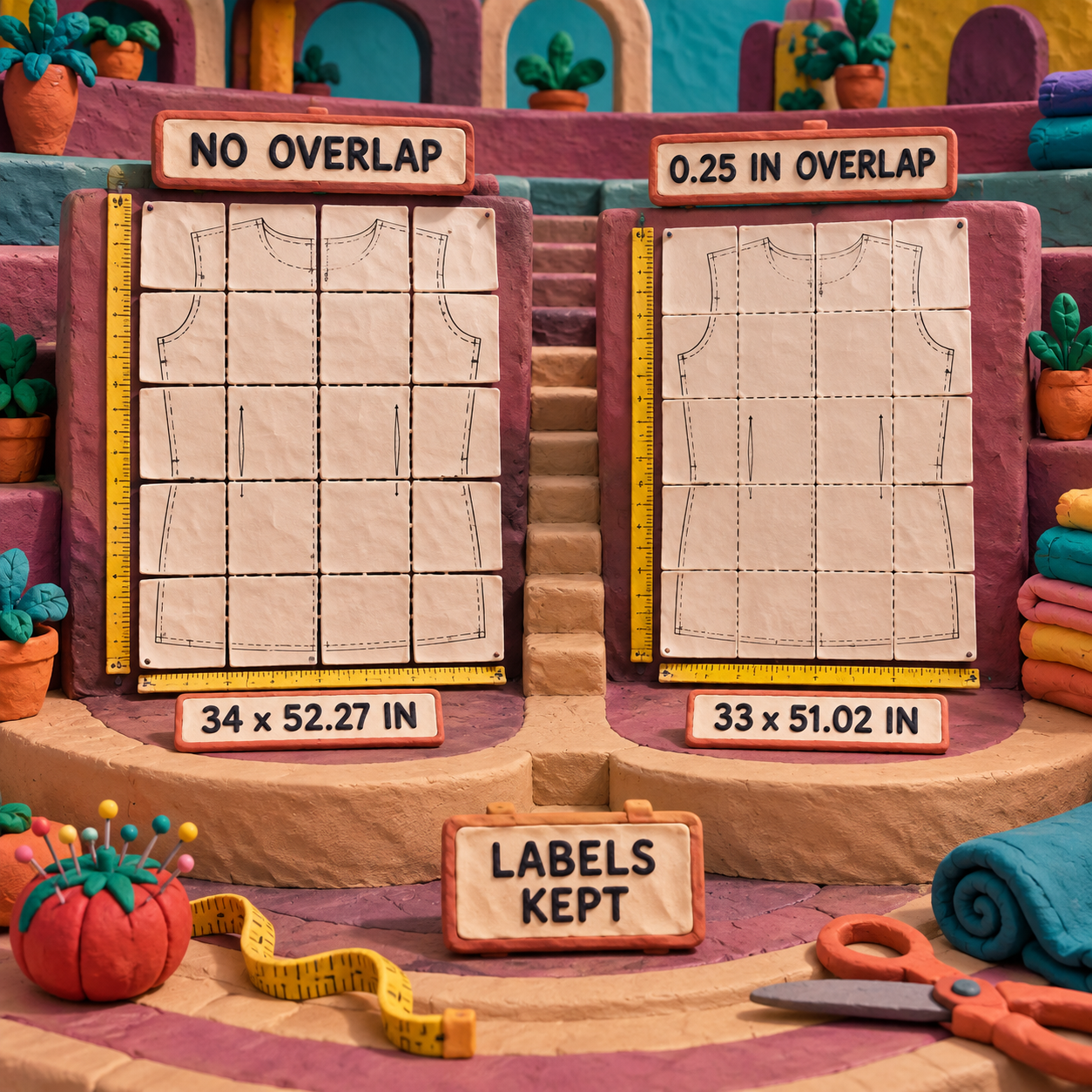
The baseline test tiled 20 labeled pages into 4 columns with no overlap. The result was one 34.00 x 52.27-inch PDF. Repeating the run with a 0.25-inch overlap on the right and bottom produced one 33.00 x 51.02-inch PDF. A1-E4 remained present and in order.
Those dimensions tell the important story. The overlap reduced the canvas by 1.00 inch across the 4 columns and by 1.25 inches down the 5 rows. The tool applied the requested geometry consistently; it did not decide whether 0.25 inch was correct for the pattern. That judgment still comes from the print map, registration marks, and calibration square.
This is the design craft bar: look for continuous curves through every seam, not merely aligned page rectangles. A shoulder curve shifted by a small, repeated amount can look smooth at fit-to-page view and still produce the wrong garment.
Capability 3: PDFStitcher Layers and Labels
PDFStitcher preserved every existing layer in the controlled fixture, which is the strongest reason to prefer it over a flatten-and-reassemble workaround. The official layer documentation says detected layers can be included or excluded, and that colour, thickness, and line style can be changed in many but not all PDFs.
The permitted layered fixture contained 2 pages and 3 Optional Content Groups, the PDF term for switchable layers: Layer 1, Layer 2, and Layer 3. After stitching the pages side by side, the output contained one page and the same 3 named groups. Its UserUnit remained 10, so the large-canvas scale multiplier also survived.
The label test was separate and simpler: A1-E4 remained searchable in the 20-tile output. Preserving text does not guarantee that every annotation in every proprietary pattern will survive, but it is stronger evidence than a screenshot alone because the labels stayed structured inside the PDF.
There is an important boundary. PDFStitcher works with layers already detected in the file; its documented controls select, hide, remove, or restyle them. If all sizes are baked into one undifferentiated content stream, this is not the tool for creating a new layer structure. Move to Inkscape or obtain a better source file.
Capability 4: Scale, Output Size, and the Final Check
PDFStitcher preserves PDF geometry when you tile without target-width or target-height scaling, but metadata alone does not make an output safe to cut. The controlled layered output retained UserUnit 10, a PDF multiplier used for very large pages, and PDFStitcher reported a 450.00 x 250.00-inch result.
That successful generation also hit a downstream limit. The official page-tiling documentation warns that Adobe Reader will not open a PDF larger than 200 inches. PDFStitcher can therefore create a structurally valid page that your intended viewer cannot use. Large projector canvases should be checked in the exact viewer and device workflow before the source pattern is archived or sent to print.
The final check is physical: measure a known square or line at 100 percent. Do not choose Fit, Shrink, or Scale to page in the print dialog. If the source has no calibration mark, measure a dimension stated in the pattern instructions. If neither exists, the file has no trustworthy scale proof and should not be treated as production-ready.
PDF Stitcher Free: Every Pricing Tier
PDFStitcher is free, full stop. The project's official About page describes it as 100% free and open source under the Mozilla Public License. There is no paid tier to compare, no annual plan to discount, and no premium export gate.
The direct software cost per completed pattern is therefore $0. The arithmetic stays $0 for 1 successful conversion, $0 across 10, and $0 across 100. The economic variable is attention: reading the print map, making a correction pass, and measuring the output.
The project's contribution page says the maintainer no longer accepts PayPal donations and instead points supporters toward related open-source projects. That makes the pricing unusually clean: the complete tool is free, not freemium.
PDFStitcher Mac, Windows, and Linux Support
PDFStitcher Mac and Windows users get packaged GUI builds, while Linux users can use Flathub or the Python package. The official download page lists Windows 7 or newer on 64-bit systems, macOS 11 Big Sur or newer with separate Intel and Apple Silicon downloads, and Linux distribution through Flathub.
This review tested the v1.2 command-line application on Ubuntu 26.04.1 LTS x86_64 with Python 3.14.4. The install from the official source tag succeeded and every described test completed. The Windows and macOS GUI builds were not opened, so this review does not claim hands-on evidence for their installer behavior or interface polish.
There is also a documentation mismatch worth knowing. The official download page states Python 3.6 through 3.12 for PyPI installation, while the v1.2 package metadata requires Python 3.8 or newer without an upper cap. Success on Python 3.14.4 here shows that the core package can run beyond the documented range; it does not turn Python 3.14 into an officially supported platform.
Limitations That Change the Decision
PDFStitcher's limits come from the gap between deterministic PDF geometry and messy pattern files. None is a reason to avoid the tool universally, but each can flip the verdict for a particular pattern.
The workflow is parameter-driven, not visual
You provide page order, grid shape, and overlap numerically, then inspect the generated PDF. That is fast when the designer supplied a clear print map. It is frustrating when the only clue is a pile of tiny previews. Pattern Projector is the better escape route for visual assembly.
A plausible output can still be wrong
PDFStitcher will faithfully execute a bad page list or overlap. Continuous-looking lines at a small zoom do not prove scale. The required workaround is a seam inspection plus a measured calibration mark at 100 percent.
Mixed page sizes stay mixed
The 20-page fixture produced warnings that pages 13 and 17 differed from the preceding page. The output centered those smaller pages in their grid cells instead of normalizing them, creating a visibly uneven row. That behavior preserves source geometry, but it means a mixed-size document may need page rotation, a custom range, or separate outputs before it becomes useful.
Layer tools cannot invent missing structure
PDFStitcher can preserve, select, hide, remove, and often restyle detected layers. It cannot turn a flat collection of size lines into semantically separated sizes through the documented workflow. Use Inkscape for manual object work, or ask the pattern designer for a layered file.
Very large outputs can outrun the viewer
The 450.00 x 250.00-inch layered output was generated successfully, yet it exceeds the official 200-inch Adobe Reader limit. The PDF creator and PDF viewer are separate parts of the workflow; success in one does not guarantee support in the other.
Platform documentation lags the package metadata
The official download page and the v1.2 package metadata disagree on the Python range. A packaged Windows or macOS build avoids that ambiguity. Linux users installing through Python should treat the website's documented range as the conservative support boundary, even though the source test ran beyond it.
- $0 with no reduced free tier
- Exact control over page range, grid, order, rotation, margin, and overlap
- Existing layers and searchable labels survived the controlled fixtures
- Input files cannot be overwritten accidentally
- No visual canvas for solving an unknown tile map
- Wrong overlap can create a convincing but inaccurate pattern
- Mixed page sizes can yield uneven rows
- Existing-layer tools do not create missing layer structure
- Oversized outputs may fail in the intended PDF viewer
Final Verdict: The Decision Rule
PDFStitcher is the right choice when all three conditions are true: the source is a tiled sewing PDF, its grid or page order can be established, and the result can be checked against a known measurement. Under those conditions, v1.2 is a precise $0 utility that keeps useful PDF structure intact.
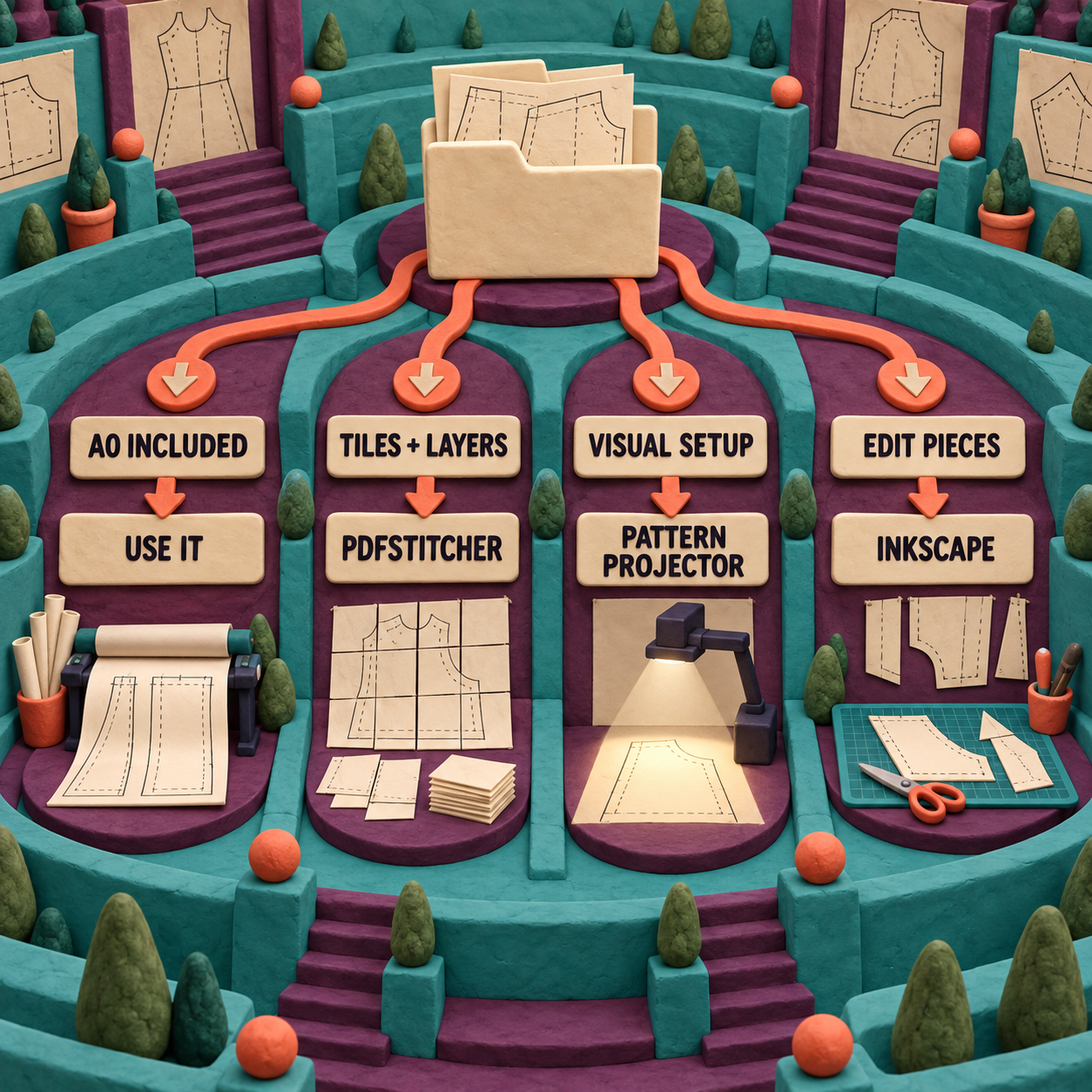
Skip PDFStitcher when any condition fails. Use the supplied A0/projector file when it exists. Use Pattern Projector when visual stitching and live calibration matter more than an archival full-page PDF. Use Inkscape when individual pieces or vector paths must move. If the source has no reliable map and no measurable scale reference, do not convert it on trust.
The Monday move is concrete: take one permitted tiled pattern, duplicate the source, record its print map, generate a default pass, inspect every join, and measure the calibration square at 100 percent. Save the joined file only after those checks pass. That single rehearsal tells you whether PDFStitcher belongs in your pattern workflow.
PDFStitcher FAQ
Are PDF sewing patterns worth it?
PDF sewing patterns are worth it when they include a reliable scale square and either a prepared A0/projector page or a clear tiled print map. A vague map, inconsistent pages, or no measurable reference can turn the convenience into setup risk.
What is the PDF Stitcher program?
PDFStitcher is free, open-source desktop software for placing tiled PDF pages onto one large page. It can control order, rows or columns, rotation, margins, and overlap while retaining compatible existing layers.
Is the Speedy Stitcher worth it?
Speedy Stitcher is a handheld sewing awl, not PDFStitcher software. It solves a physical stitching job and is not evaluated in this PDFStitcher review.
What is PDF stitching?
In this context, PDF stitching means arranging multiple small pattern pages onto one large PDF page while preserving order, geometry, labels, and compatible layers. Generic PDF merging usually keeps pages sequential rather than placing them on one canvas.
What is the best software to merge PDF files?
PDFStitcher is a strong choice for imposing tiled sewing-pattern pages onto one canvas. For simply combining documents into a sequential multi-page PDF, use a standard PDF merger instead; PDFStitcher's grid controls are unnecessary for that job.
What are the disadvantages of a PDF file?
PDFs can contain inconsistent page boxes, permissions, oversized canvases, hidden scaling metadata, and layers built in different ways. Those differences make a PDF visually stable but not always easy to restructure safely.
Why should we stop using PDFs?
Sewing patterns should not stop using PDFs. Fixed page geometry, vector lines, layers, and printable dimensions are useful here. The better rule is to verify scale and structure before treating any transformed PDF as a cutting master.
What is better, PDF or Word?
PDF is better for fixed-scale sewing patterns because it preserves page geometry. Word is designed for editable, reflowing text, which is the opposite of what a calibrated pattern needs.
Is it better to save as PDF or JPEG?
PDF is better for sewing patterns because it can preserve vector curves, text, layers, and physical page dimensions. JPEG flattens the page into pixels and discards layer structure.
Is PDF Stitcher online free?
PDFStitcher is free, but it is distributed as desktop software or a Python package rather than an online editor. Pattern Projector is the free browser-based alternative for visual stitching and projection.
Does PDFStitcher run on Mac?
Yes. The official site provides separate Intel and Apple Silicon downloads for macOS 11 or newer. Those GUI builds were not opened in this review; the hands-on test used the v1.2 command-line application on Ubuntu.
Want a stricter way to evaluate software before it enters a production workflow? Get the AI Business Workflow Audit Checklist.
- Last Updated
- Sep 18, 2026
- Category
- Design
Prefer this site in Google


Mark omidsaffari.com as preferred and Google lifts it in Top Stories, AI Overviews and AI Mode for you.
WeavePoint 9 Review for Loom Control
Review WeavePoint 9 for manual pick tracking and electronic loom control, including driver compatibility, Windows requirements and upgrade checks.Sep 17, 2026Design
Best Software for Punch Needle Patterns
Compare punch needle pattern software for clean outlines, photo conversion, color control, mirrored transfers and full-size printing.Sep 17, 2026Design
Glass Eye 2000 Review
Review Glass Eye 2000 for stained glass drawings, piece labels and full-size patterns, with edition limits, trial access and compatibility checks.Sep 17, 2026Design
Stitch Fiddle vs Chart Minder
Compare Stitch Fiddle and Chart Minder for photo charts, gauge, editing, privacy and print exports before choosing a browser pattern editor.Sep 17, 2026Design
Lace8 Pricing (2026): Licence, VAT and Add-Ons
Understand the Lace8 licence, VAT and optional motif packs so an add-on listing does not become your software budget.Sep 17, 2026Design
Treadl vs AdaCAD
Compare Treadl and AdaCAD for shared weaving projects, parametric drafts and WIF handoffs, with a clear choice for each workflow.Sep 17, 2026Design
VArtGlass Stained Glass Software Pricing
Decode VArtGlass trial access, monthly and annual plans, free patterns and the costs to check before preparing stained glass files.Sep 17, 2026Design