Stitch Fiddle vs Chart Minder
Compare Stitch Fiddle and Chart Minder for photo charts, gauge, editing, privacy and print exports before choosing a browser pattern editor.

Stitch Fiddle vs Chart Minder has a clean split: choose Stitch Fiddle for private, print-ready pattern work; choose Chart Minder for a fast free public draft. Both can turn a picture into a 300-by-300 chart for $0, but privacy, palette cleanup, and the file you can hand to a publisher split them long before the drawing tools do.
Prices, plan boundaries, and capabilities were verified against both vendors' live pages on 17 September 2026. No paid account was opened and no chart was uploaded. The same-motif comparison below is a documented-control walkthrough, so its judgments come from the controls each vendor publishes, the current checkout data, and reproducible arithmetic rather than a claimed hands-on test.
The deciding question is not which editor can colour a cell. It is whether the finished chart must stay private, whether six sampled shades can become four yarn colours without tedious repair, and whether the final file is a quick image or a production asset.
Stitch Fiddle vs Chart Minder: Which One Should You Pick?
Pick Stitch Fiddle if you design patterns for sale, need work private before launch, or want PDF and editable vector output. Pick Chart Minder if you want the shortest route from a photo to a free public chart, value its live gauge and stitch previews, and can accept an image-based handoff.
The split changes by situation:
- Independent pattern designer: Stitch Fiddle. Private-by-default charts and layered SVG or printable PDF are worth more than a slightly lighter drafting flow.
- Personal colourwork experiment: Chart Minder. Its core scanner, editor, gauge, stitch preview, tracking, and image download are free.
- Confidential client motif: Stitch Fiddle. Chart Minder reserves private charts for Pro, while Stitch Fiddle keeps charts private by default.
- One-month publishing push: Stitch Fiddle Premium at $5.50 is the transparent paid option. Chart Minder names quarterly and yearly Pro plans but does not expose a current amount in its publicly readable page.
Stitch Fiddle vs Chart Minder for Beginners: Start With the Deliverable
Chart Minder is the friendlier first stop for a beginner making one public motif because its homepage reduces the job to draw or scan, adjust colours and gauge, then download or track. That simplicity becomes a constraint when the chart is confidential or the output must survive professional layout.
Stitch Fiddle asks you to make more decisions, but those decisions belong to the later workflow anyway: chart type, gauge, legend, sharing permissions, and output format. A beginner planning to sell the pattern can avoid a rebuild by starting there.
Browser Knitting Chart Software: One Motif, Five Decisions
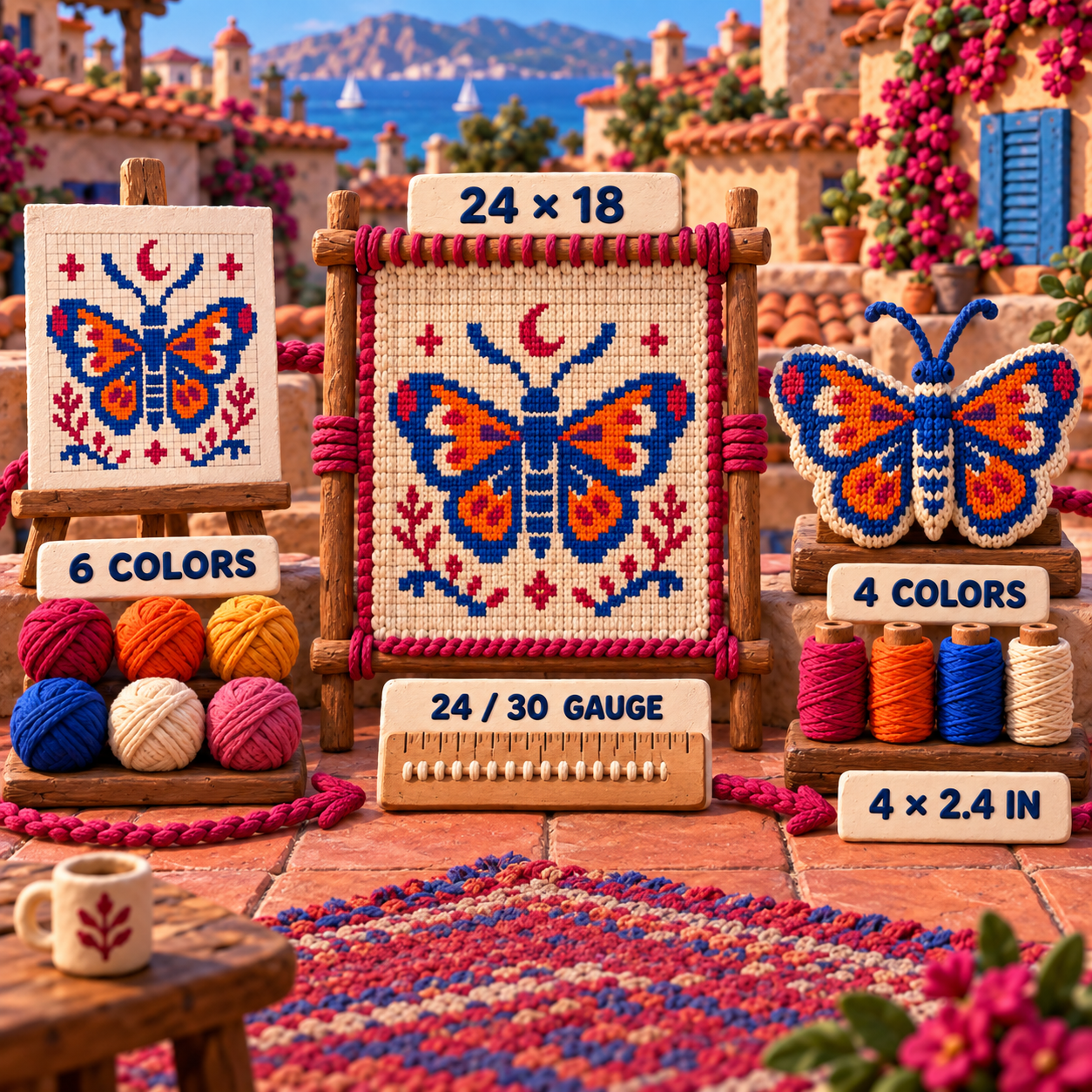
The most useful comparison follows one motif all the way through. Use an original moth drawn on a 24-column by 18-row grid. The source image contains six visually distinct shades, but the yarn plan allows four colours. The blocked gauge is 24 stitches and 30 rows per 4 inches.
That gauge makes the knitted motif 4 inches wide and 2.4 inches tall. A square-cell preview hides that proportion because knitting stitches are not square. The chart therefore needs five decisions in order: import size, gauge, palette reduction, visibility, and output.
Knitting Chart From Photo: Stitch Fiddle Wins on Headroom
Stitch Fiddle wins image import overall because its free ceiling matches Chart Minder at 300 by 300, then Premium extends the grid to 1,000 by 1,000. Its picture-import guide accepts JPG, GIF, and PNG; Chart Minder's current Image to Chart guide names JPG and PNG.
For the 24-by-18 moth, either ceiling is ample. The practical difference appears when a motif grows into a garment panel, blanket, or detailed cross-stitch conversion. Stitch Fiddle keeps a larger paid runway without forcing the source through several smaller imports.
There is a real Stitch Fiddle limitation to plan around. Its size guide says an image-imported chart cannot be resized without losing detail; the safe correction is a new chart and a new import at the right dimensions. Choose 24 by 18 before cleanup, not after it.
Winner: Stitch Fiddle. The free limits tie, but its Premium ceiling and extra accepted image format create more headroom.
Gauge Proportions: Chart Minder Wins the Preview
Chart Minder wins gauge because it connects proportion to the working view more explicitly. Its current gauge guide accepts stitches and rows in inches or centimetres, immediately changes cell proportions, and recommends measurements from a blocked swatch. The homepage also says measurements and repeats update with gauge and offers a stitch view that previews the colourwork as knitted stitches.
Stitch Fiddle also reshapes chart cells from gauge proportions, so the moth can be viewed at the intended 24-stitch by 30-row relationship. Its workflow is sound. Chart Minder's combination of finished measurements, repeat feedback, and stitch preview simply keeps the physical consequence closer to the drawing.
Winner: Chart Minder. Both correct the grid, but Chart Minder makes the knitted consequence easier to keep visible.
Palette Cleanup: Stitch Fiddle Wins Before the Paywall
Stitch Fiddle wins the six-to-four colour reduction because its colour tools let a changed palette colour update every occurrence and let two used colours merge across a grid chart. Merge the two shadow blues into one yarn and the two warm highlights into another, then repair isolated cells by hand.
Chart Minder Free can add, remove, and automatically sample colours. Its stronger cleanup controls are paid: the precise source eyedropper and Find and Replace, which is particularly useful for consolidating image-generated palettes, sit in Pro. The current Pro page does not provide a public amount that can be put beside Stitch Fiddle's live price.
Winner: Stitch Fiddle. Chart Minder has the sharper conditional replacement tool, but it is behind an unpriced public boundary; Stitch Fiddle documents the core global merge without that ambiguity.
Chart Visibility: Stitch Fiddle Wins for Unreleased Work
Stitch Fiddle wins privacy decisively. Its sharing guide says a chart is private by default, then lets the owner grant named people view or edit access. A collaborator's download permission starts disabled.
Chart Minder's current creation guide says Free projects and charts are always public in its Library; privacy is a Pro benefit. That is perfectly reasonable for a community remix or a personal swatch. It is not a safe default for an unreleased collection, a licensed character, or a client brief.
Winner: Stitch Fiddle. Privacy is a default rather than an upgrade.
Free Knitting Chart Maker: Chart Minder Wins Only When Public Is Acceptable
Chart Minder wins the genuinely free public-draft case. A 24-by-18 photo chart, gauge adjustment, stitch preview, progress tracking, cloud storage, and PNG download all fit inside its core tier. The trade is public visibility and a watermarked download unless the site is credited elsewhere.
Stitch Fiddle Free is also substantial and keeps charts private, but it caps the library at 15 saved charts and holds its strongest production outputs for Premium. The free choice is therefore not one universal winner: Chart Minder gives the cleaner public playground, while Stitch Fiddle protects work that has not launched.
Stitch Fiddle: Better for Private, Print-Ready Charts
Stitch Fiddle is the better browser editor when the chart is an asset inside a pattern business rather than a temporary grid.
Its range is the advantage. Image import, gauge-shaped cells, palette merging, private sharing, written instructions for supported chart types, knitting count checks, PDF, layered SVG, office documents, and raster downloads can stay inside one browser account. Vector means the chart is stored as editable shapes rather than a fixed pixel image, so lines and symbols stay sharp when a layout designer resizes them.
The current Premium checkout exposes a clean boundary: Free stores up to 15 charts; Premium is $5.50 for one month or $33 for one year and expands the library to unlimited charts. The pricing page also places vector and office-file downloads, selected-area downloads, a separate legend, and attribution-free output in Premium.
The candid limits matter. Stitch Fiddle does not let users design custom stitch symbols. Image imports need their dimensions chosen correctly at the start. Some advanced picture settings are unavailable on a small phone screen. A browser editor is convenient, but a phone is not the right production surface for every control.
Best for: Pattern designers who need private source charts and flexible production files.
Standout: A browser workflow that can end in layered SVG or printable PDF rather than only an image.
Current price: Free for up to 15 saved charts; Premium $5.50 for one month or $33 for one year.
Skip it when: One public PNG is the whole deliverable, or custom stitch-symbol design is mandatory.
Chart Minder: Better for Fast Free Exploration
Chart Minder is the better browser editor when visual iteration matters more than confidentiality or file-format breadth.
The scanner exposes the source image with a grid, a translucent chart over the image, and the chart alone. That sequence is useful for the moth: align the wing shape, inspect what the cells retained, then judge the simplified chart without the source flattering it. Gauge, finished measurements, repeat preview, and stitch view keep attention on the knitted object rather than the source photograph.
The Free tier covers the basic editor, scanner, symbols, gauge, tracking, cloud saving, and PNG download. Chart Minder Pro adds the controls a production designer is most likely to miss: precise colour sampling, Find and Replace, copy and paste, flip and rotate, private charts, custom numbering and styling, higher-quality output, and watermark removal.
Its wall is the handoff. The documented download is PNG, which is a raster made of fixed pixels. Free output bears a Chart Minder watermark unless the website is credited elsewhere. More importantly, every Free project is public. Those conditions are manageable for a personal chart and awkward for an unreleased commercial motif.
Best for: Public colourwork experiments, quick visual drafts, and knitters following a chart on screen.
Standout: Gauge-aware measurements and a stitch preview beside an approachable scanner.
Current price: Core editor $0; Pro is sold quarterly or yearly, but the current public page did not expose a verifiable amount.
Skip it when: Work must remain private on the free tier, or a publisher needs vector artwork.
Price Difference and the Only Honest Crossover
The comparable free workload costs $0 in either tool: one public photo chart no larger than 300 by 300. The products stop being price-comparable as soon as the work must be private. Stitch Fiddle Free keeps as many as 15 saved charts private by default, while Chart Minder requires Pro and does not surface a current public price.
That means there is no honest paid-plan crossover between the products. Copying Chart Minder's older monthly figure from a 2023 article would turn stale secondary reporting into a false current comparison.
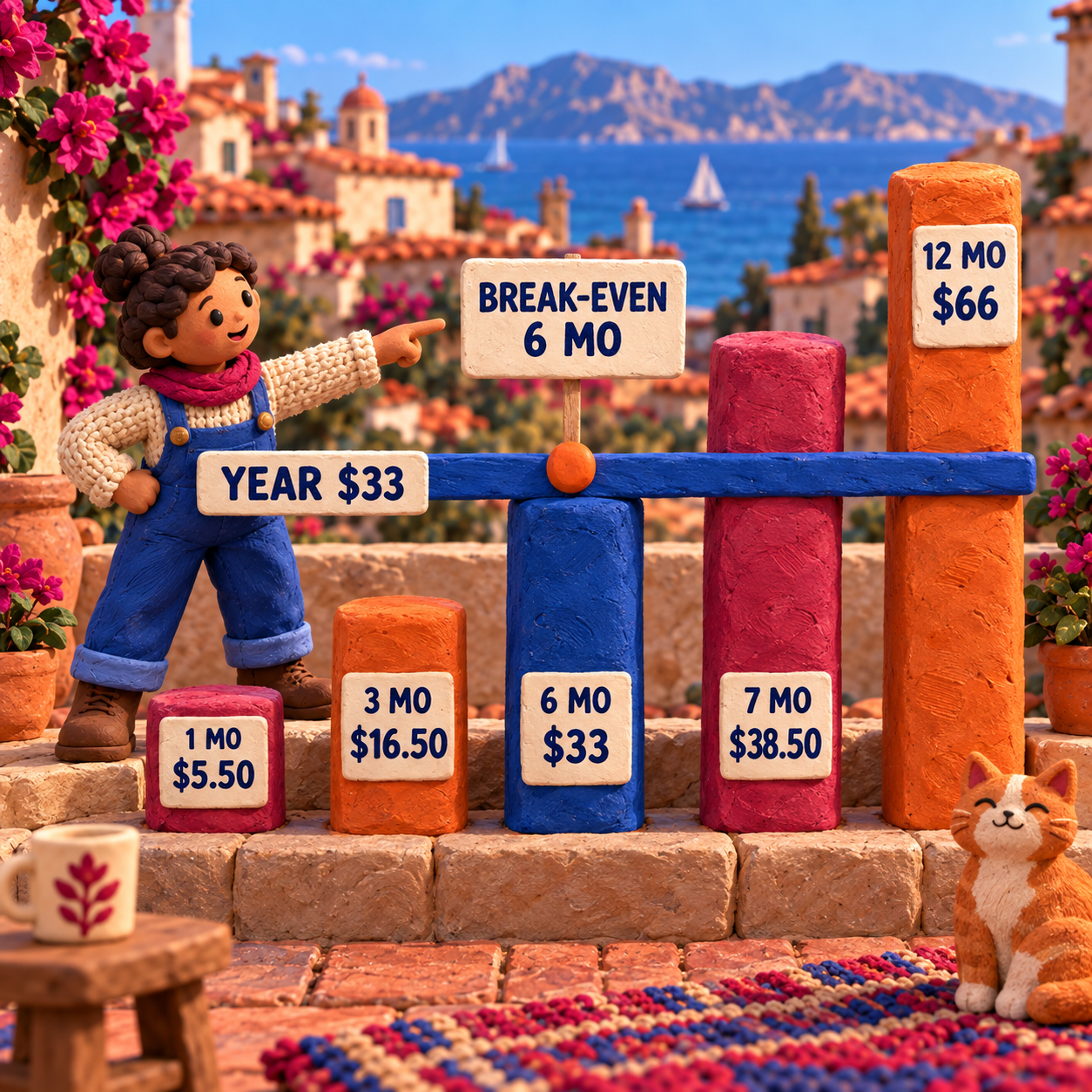
There is one useful crossover inside Stitch Fiddle's live checkout. At $5.50 per paid month, one month costs $5.50, three cost $16.50, six cost $33, seven cost $38.50, and twelve cost $66. The $33 annual option ties six monthly payments. Monthly is cheaper for one to five paid months, the plans meet at six, and annual wins from the seventh paid month.
Spread the annual price across production output and it becomes $2.75 per chart at 12 charts, $1.38 at 24, and $0.69 at 48. Those are normalized workload costs, not vendor promises about productivity.
Print and Download: Stitch Fiddle Wins the Handoff
Stitch Fiddle wins any handoff that leaves the browser. Its download guide documents printable PDF, layered SVG, EPS, office formats, and raster images. A layered SVG is the strongest design asset here because a publisher can adjust text, grid lines, symbols, and legend elements without softening the chart.
Chart Minder's current save-and-print guide documents PNG. That can be perfectly usable when exported at the final display size, placed once in a pattern PDF, or printed for personal use. The Free image keeps a watermark unless the site receives credit elsewhere; Pro raises quality and removes the watermark by default.
For the 4-inch by 2.4-inch moth, a crisp PNG at final size can be enough. For a pattern sold in several page sizes, a chart enlarged for accessibility, or a brand system that needs editable line weights, Stitch Fiddle's vector path is the safer master.
Switching Costs and Who Should Not Switch
Switching between these tools is usually a rebuild because the documented common output is an image, not a shared editable project format. A PNG can guide recreation, but it cannot carry editable cells, gauge settings, palette relationships, repeat logic, or sharing permissions into the other editor.
Preserve five things before moving: the original source image, the exact 24-by-18 grid, the four-colour yarn mapping, the 24-stitch by 30-row gauge, and a final proof image. Recreate one complete motif, compare the cell count and physical dimensions, then decide whether the rest of the library is worth moving.
Do not switch from Chart Minder merely because Stitch Fiddle has more output formats. If the chart is already public, the PNG is sufficient, and gauge preview is central to the drawing process, migration adds work without improving the deliverable. Do not switch from Stitch Fiddle to Chart Minder Free when privacy or an editable vector master matters.
Colourwork is the boundary of this decision. Designers choosing a tool for lace, cables, count validation, and synchronized written rows should use the separate Chart Minder vs Stitchmastery comparison; importing that publishing decision here would blur two different jobs.
A Reproducible Colourwork Decision Recipe
The safest choice is made with one representative motif before a full pattern library moves.
Lock the physical brief
Set the moth to 24 columns by 18 rows and record a blocked gauge of 24 stitches and 30 rows per 4 inches. The target is 4 inches by 2.4 inches, not a visually square thumbnail.
Simplify the source first
Choose a high-contrast JPG or PNG and decide that six sampled shades must become four yarn colours. Keep the source image beside the chart so lost edges are deliberate rather than accidental.
Import at the final cell count
In either tool, create the chart at 24 by 18. This is especially important in Stitch Fiddle because its help recommends re-importing when an image-based chart needs a new size.
Apply the blocked gauge
Enter 24 stitches and 30 rows per 4 inches. In Chart Minder, inspect measurements and stitch view. In Stitch Fiddle, inspect the gauge-proportioned grid. Confirm that the moth reads at 4 inches by 2.4 inches.
Reduce the palette
In Stitch Fiddle, merge the two shadow shades and the two warm highlights. In Chart Minder Free, add or remove palette colours and repair cells manually; use the Pro eyedropper and Find and Replace only after confirming the checkout price.
Choose visibility before saving
Leave Stitch Fiddle private and grant named access only when collaboration is needed. Treat a Chart Minder Free save as public; move to Pro before uploading confidential or licensed art.
Proof the actual handoff
Export the file the next person needs. Test Chart Minder's PNG at final size, or use Stitch Fiddle's PDF or SVG path for a production master. Print once, check the legend and grid in grayscale, then knit and block a representative swatch.
Frequently Asked Questions
What are some free alternatives to Stitch Fiddle?
Chart Minder is the closest free browser alternative in this comparison for a public colourwork, lace, cable, or image-derived chart. Its Free tier includes the scanner, editor, gauge, tracking, cloud storage, and PNG download, but charts are public and stronger cleanup, privacy, and output controls require Pro.
What is the best knitting design software?
Stitch Fiddle is the better choice of these two for private browser-based pattern production and vector or PDF output. Chart Minder is the better free choice for rapid public visual drafting. Desktop publishing systems belong to a different shortlist.
Is Stitch Fiddle good?
Yes. Stitch Fiddle is good for photo-to-chart work, private collaboration, palette cleanup, gauge-aware grids, written instructions on supported chart types, and production exports. It is a weaker fit when custom stitch-symbol design is mandatory.
Is there a free version of Stitch Fiddle?
Yes. Stitch Fiddle Free stores up to 15 charts and supports grids up to 300 by 300. Charts are private by default, while Premium expands storage and grid size and opens the stronger production exports.
How much does Stitch Fiddle cost?
Stitch Fiddle Premium was $5.50 for one month or $33 for one year on 17 September 2026. The annual payment equals $2.75 per month and beats month-by-month payment once Premium is needed for seven or more months.
What is the best app for designing crochet patterns?
Stitch Fiddle covers a wider range of crochet chart types, including colourwork, corner-to-corner, filet, overlay mosaic, and freeform charts. Chart Minder is compelling for square-grid colourwork, but neither browser tool should be chosen without matching its chart type to the crochet technique.
What is the best website for free crochet patterns?
Neither tool is primarily a complete-pattern website. Chart Minder has a public chart library, while Stitch Fiddle is an editor and sharing platform. A chart library should not be mistaken for tested garment instructions.
Is there an AI tool that can create crochet patterns?
An image converter can translate pixels into chart cells, but it cannot certify gauge, fit, stitch structure, yarn behaviour, written instructions, or the blocked result. Use automatic conversion as a draft and keep the craft proof deterministic and physical.
Is there a free crochet app that doesn't require a subscription?
Both tools have free browser tiers that do not require a paid subscription. Stitch Fiddle caps saved charts at 15; Chart Minder keeps Free charts public. Choose the free boundary that matches the work's privacy and output needs.
- Last Updated
- Sep 17, 2026
- Category
- Design
Prefer this site in Google


Mark omidsaffari.com as preferred and Google lifts it in Top Stories, AI Overviews and AI Mode for you.

Lace8 Pricing (2026): Licence, VAT and Add-Ons
Understand the Lace8 licence, VAT and optional motif packs so an add-on listing does not become your software budget.Sep 17, 2026Design
Treadl vs AdaCAD
Compare Treadl and AdaCAD for shared weaving projects, parametric drafts and WIF handoffs, with a clear choice for each workflow.Sep 17, 2026Design
VArtGlass Stained Glass Software Pricing
Decode VArtGlass trial access, monthly and annual plans, free patterns and the costs to check before preparing stained glass files.Sep 17, 2026Design
Best Software for Bobbin Lace Patterns
Compare bobbin lace design tools by repeat editing, pin spacing, printable prickings, learning effort and the cost of making usable patterns.Sep 17, 2026Design
How to Add Bridges to a Stencil in Inkscape
Keep the centers of letters and enclosed shapes attached. Add stencil bridges in Inkscape, inspect the paths and check the design before cutting.Sep 16, 2026Design
MakeBead Export Cost
MakeBead says PNG and PDF exports are free. Check the watermark, account requirements and file limits before preparing a pattern to print.Sep 16, 2026Design
Best AI Tools for Scroll Saw Portrait Patterns
Compare AI portrait drafts and pattern converters by facial detail, connected pieces, editable files and full-size print output.Sep 16, 2026Design