Glass Eye 2000 Review
Review Glass Eye 2000 for stained glass drawings, piece labels and full-size patterns, with edition limits, trial access and compatibility checks.

The Glass Eye 2000 review verdict is simple: the $150 Standard license is worth it when your goal is a numbered, full-size paper cutting packet on Windows. Pay $450 for Professional Plus only when arbitrary glass-image direction or AutoTrace is central; skip it for a native Mac, tablet, or cloud workflow.
Glass Eye 2000 Review: What It Is and the Short Verdict
Glass Eye 2000 is specialist Windows CAD software, meaning a drawing program built around precise geometry, for stained-glass patterns. Its useful output is not a pretty screen preview. It is a scaled design with closed pieces, labels, material information, and full-size sheets that can reach the workbench.
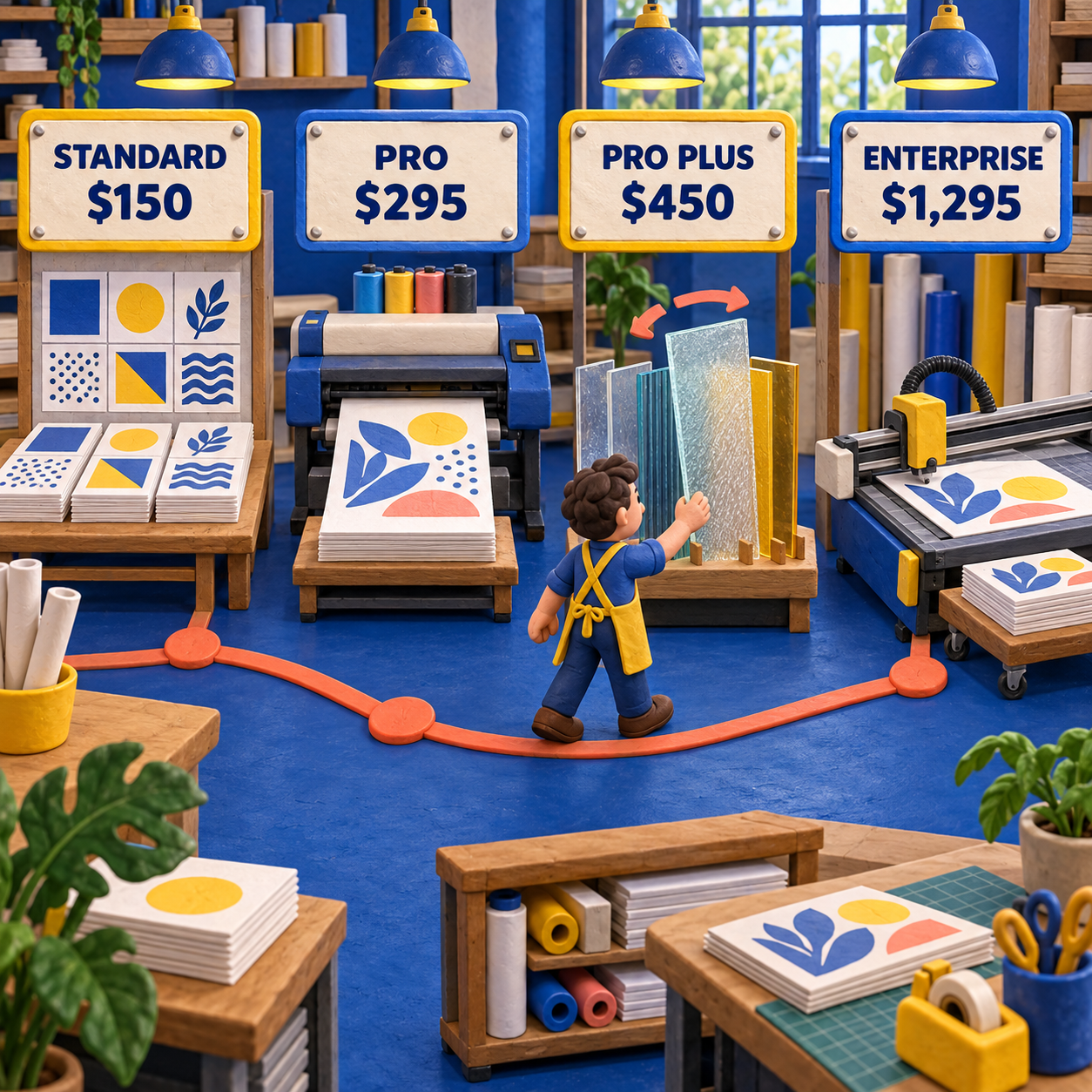
That focus makes Glass Eye 2000 unusually capable at the last mile between drawing and fabrication. Standard can draw, resize, number pieces, calculate materials, and tile a full-size print. Professional adds a much larger glass library, richer numbering, selected-element output, scale-factor printing, and printer calibration. Professional Plus adds AutoTrace and free-angle glass-image rotation. Enterprise adds plotter and cutter output.
The prices, edition limits, trial terms, version, and compatibility claims below were verified against Dragonfly Software's live pages on 17 September 2026. This was a documentation review, not an installed Windows test, and no physical panel was printed, cut, or assembled for it.
The buying call turns on one output. If the job ends with paper sheets and a Windows printer, Standard is the value tier. If the job needs a calibrated print, selected-element output, or flexible numbering, Professional is easier to justify. If glass grain must point at an arbitrary angle or a scan must become editable lines automatically, Professional Plus is the first matching tier. Enterprise only makes sense when the packet feeds a plotter, cutter, or blaster.
- Standard already reaches a numbered, full-size paper pattern.
- The edition ladder corresponds to production outputs instead of storage quotas.
- Piece labels, material totals, printer calibration, and cutter support are native stained-glass concerns.
- The license prices avoid a recurring subscription.
- The current shipping version is 3.1 from 2014, with Enterprise at 3.3.
- There is no documented native macOS, browser, or tablet edition.
- Professional Plus vector import is unsupported on Windows 8, 10, and 11.
- The software can organize a pattern but cannot certify that every piece is practical to cut.
Who Glass Eye 2000 Is For, and Who Should Skip It
Glass Eye 2000 is for a maker or studio that treats the drawing as production information, not only as a color concept. The right user needs a repeatable path from dimensions to labels to full-size output and is comfortable working on Windows.
Choose Standard when you draw original panels, resize existing patterns, number pieces, estimate materials, and assemble tiled sheets from an ordinary printer. That is enough for many hobbyists and small commission workflows. The practical wall is not full-size printing. Standard already has it. The wall appears when you need advanced control over labels, output, or glass imagery.
Choose Professional when the printed packet needs printer calibration, a deliberate scale factor, selected-element output, or by-location and manual numbering. Its library of more than 3,700 glass images also matters when client approval and glass planning happen on screen. Professional is the sensible studio tier because it improves the packet without charging for automation you may not use.
Choose Professional Plus only when AutoTrace, precise keyboard entry, or arbitrary rotation of the glass image inside a piece changes the work. A directional streak in a sky, feather, leaf, or robe can look wrong when limited to quarter turns. That craft requirement, not the prestige of a higher edition, is the reason to pay $450.
Choose Enterprise when a plotter, cutter, or blaster is part of the output chain. Piece separation, color-based nesting, offset contours, and machine formats are expensive extras if the shop still cuts from paper. At $1,295, Enterprise is not a better drawing purchase. It is a machine-output purchase.
Skip Glass Eye 2000 when the computer requirement is native macOS, a tablet, or a browser. VArtGlass fits that segment more cleanly. Skip it when the bottleneck is converting photos into editable centerlines quickly rather than maintaining a mature Windows production system. Pattrn-AI fits that segment.
From a Drawing to a Usable Cutting Packet
Glass Eye 2000 earns its price when the same design survives four transformations: reference to editable lines, lines to numbered pieces, pieces to directed glass, and screen dimensions to a measured full-size print. A cutting packet is the physical set of labeled, scaled sheets used to plan and cut the panel. If any one transformation breaks, the attractive preview is not production-ready.
1. Draw or Import, Then Resize the Geometry
Glass Eye 2000 Standard can start from blank geometry or an imported BMP or JPEG reference. Its line, curve, circle, polygon, grid, crosshair, ruler, alignment, reflection, and resizing tools are enough to build a panel deliberately. The key distinction is between a raster image, which is made of pixels, and editable design lines, which preserve geometry when the pattern changes size.
An imported photo is therefore a reference, not automatically a pattern. Standard lets you draw on top of it. Professional Plus and Enterprise can use AutoTrace Background to convert a suitable line drawing into editable design lines. That saves tracing time, but it does not remove the need to simplify awkward shapes or close the seams.
A Glass Patterns Quarterly example reprinted by Dragonfly shows the documented before and after. The editors began with a clean black-and-white line drawing, ran AutoTrace, and received connected editable lines. They then moved lines, applied glass, numbered pieces, and reviewed material usage. The same account says fuzzy, speckled, or colored inputs needed cleanup first. It is a useful workflow demonstration, but it is an attributed historical example, not a speed result reproduced in this review.
Resizing is less glamorous and more important. A beautiful pattern at the wrong finished dimensions is unusable. Glass Eye 2000 can resize the design, and its feature matrix includes a flaw finder and straightening tool. The craft check remains yours: look for accidental gaps, slivers, deep inside curves, and tight junctions after resizing, because a shape that looks acceptable on screen can become fragile or impossible at the intended scale.
2. Turn Closed Regions Into Piece Labels
Glass Eye 2000 can place a unique number on each piece, which removes a repetitive bench task and makes the screen design correspond to the paper packet.
The piece-labeling page says labels update on screen as the design changes and can use a chosen font. The detailed matrix separates the editions more carefully: Standard lists numbering by color, while Professional and higher add by-location and manual numbering. That makes Professional worth considering when the shop has an established marking convention or needs exceptions to automatic placement.
Labels are only as trustworthy as the geometry beneath them. If two boundaries do not meet, a region may fail to behave like one piece. If a narrow shard is technically closed but cannot be cut reliably, a perfect label does not rescue it. Treat successful numbering as a topology check, not a cutability certificate.
3. Set Glass Direction Before You Approve the Design
Glass Eye 2000 divides glass direction at a surprisingly important tier boundary: Standard and Professional only rotate the glass image in 90-degree steps, while Professional Plus and Enterprise can position and rotate it to any angle.
This matters when the image inside a piece represents directional grain, streaks, or texture. A vertical grain can fight a diagonal leaf even if the glass color is right. With Standard or Professional, quarter-turn rotation may be enough for regular textures. With a composition whose movement depends on an exact angle, Professional Plus is the first honest fit.
The preview remains a planning aid. A library image cannot promise that the physical sheet in stock has the same variation, transmission, or usable region. Mark the intended direction on the packet and confirm it against the sheet before cutting. That final step belongs to the maker, not the software.
Stained Glass Pattern Printing: Standard Handles Full-Size Tiles
Glass Eye 2000 can print at actual size in every edition, and it automatically tiles a design across multiple sheets when the panel exceeds the paper.
That fact changes the entry-tier decision. You do not need Professional merely to produce a full-size pattern on an ordinary Windows printer. Standard can do it. Professional earns the extra $145 when you need printer calibration, scale-factor output, automatic portrait or landscape choice, or printing only selected design elements.
The final packet should be verified off-screen. Assemble the tiled sheets, check the joins, and measure the printed reference against the intended finished size. Printer drivers, page scaling, margins, and assembly errors can all alter a physical result even when the design file is correct. No physical print was produced in this review, so that recommendation is a production control, not a claimed test result.
Start with a known reference
Import a clean line drawing or draw directly. Use manual tracing in Standard or Professional; use AutoTrace Background only in Professional Plus or Enterprise when the source is suitable.
Set the finished dimensions
Resize the complete design before judging narrow pieces or tight curves. Scale changes fabrication difficulty.
Close and simplify the seam network
Use the flaw-finding and straightening tools, then inspect every region. Remove accidental gaps, slivers, and cuts the glass cannot tolerate.
Apply labels and material data
Use automatic numbering, then choose Professional or higher if by-location or manual numbering is required. Review piece counts and area by color in the materials calculator.
Set directional glass
Use quarter turns in Standard or Professional. Use Professional Plus or Enterprise when the image must sit at an arbitrary angle inside the piece.
Print, assemble, and measure
Print at actual size, assemble the tiled pages, and verify the physical dimensions before any glass is cut.
Glass Eye 2000 Pricing: Every Edition and the Value of Each Upgrade
Glass Eye 2000 pricing is a fixed license ladder from $150 to $1,295, with each jump tied to a different production output.
The optional printed User's Guide costs $20 and is included with Enterprise. Dragonfly says feature enhancements and bug-fix updates remain free while the customer owns the product, but it reserves the right to charge for a substantial functionality, library, or operating-system upgrade. Treat the listed price as the current license cost, not a promise that every future major upgrade will be free.
Cost per accepted output makes the tier gaps concrete. Across 25 cutting packets, the license component is $6.00 each for Standard, $11.80 for Professional, $18.00 for Professional Plus, and $51.80 for Enterprise. This is software allocation only. It excludes design time, paper, ink, glass, labor, and any future paid upgrade.
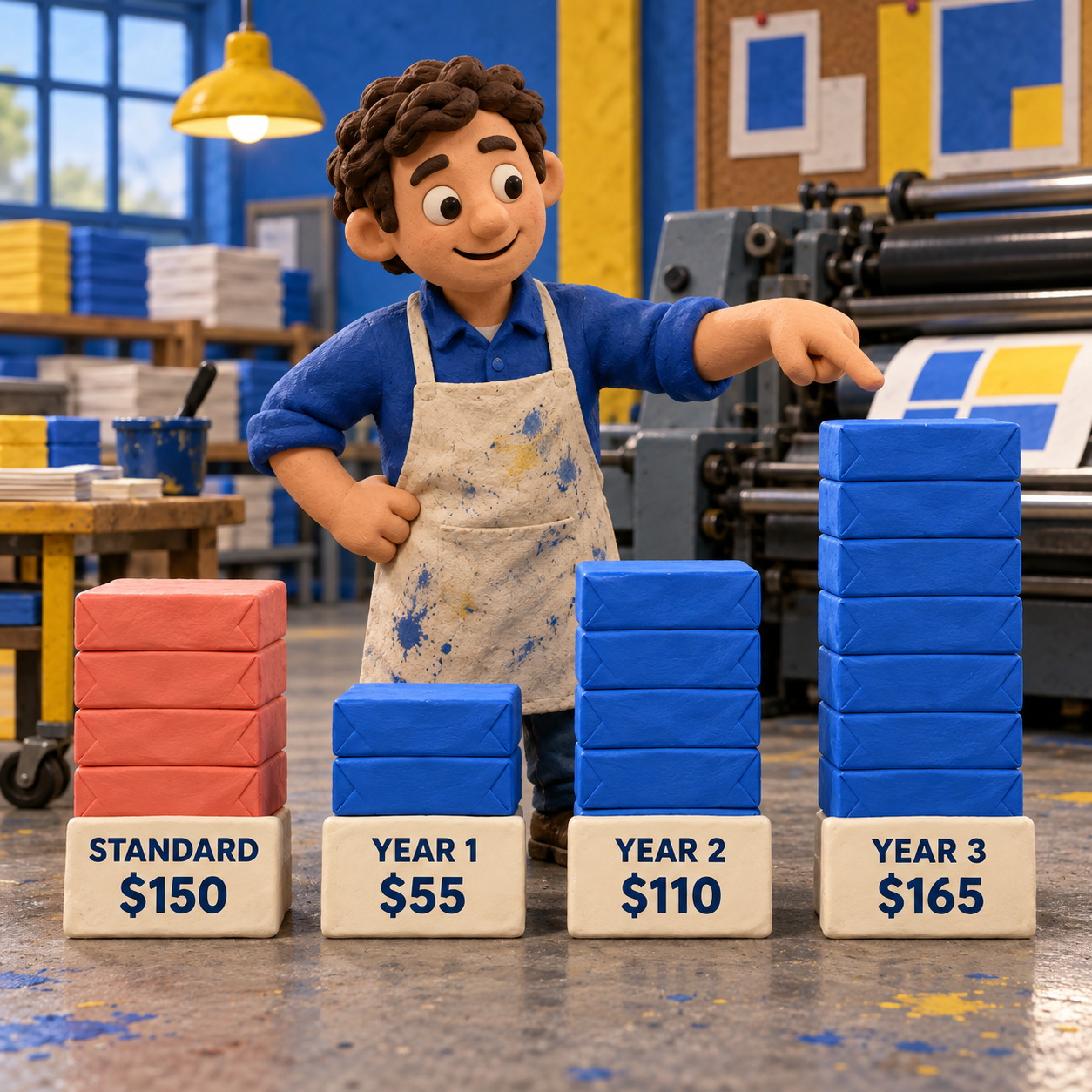
Compared with VArtGlass at $55 per year, Standard's $150 equals 2.73 annual payments. Two VArtGlass years total $110; the third reaches $165 and passes the Standard sticker price. Against Pattrn-AI Inspiration at $5 per month, Standard equals 30 monthly payments. Those are price crossovers, not feature equivalence. The alternatives solve different bottlenecks.
The Limitations That Decide the Purchase
Glass Eye 2000 has four limitations that matter more than its long feature list.
The current shipping version is old. Dragonfly's live update page identifies version 3.1, released on 30 December 2014, as current; Enterprise is version 3.3. An old version can still do a stable specialist job, but it changes the purchase expectation. Buy it for the documented Windows workflow, not for a modern cloud interface, mobile collaboration, or rapid integration cadence.
Professional Plus has a modern-Windows vector restriction. The live edition matrix says EMF, WMF, DWG, and DXF file types are unsupported in Professional Plus on Windows 8, 10, and 11. That is the sharpest hidden limit in the product. A buyer could pay for the CAD-style input tier and discover that the desired vector route is the part that does not work on the current operating system. Enterprise version 3.3 or higher is required for its modern-Windows path.
Mac support means Windows virtualization. Dragonfly says all editions run on Macs through Boot Camp, Parallels, or VMware Fusion with Windows installed. It does not document a native macOS application, a browser version, or a tablet application. The phrase "for Windows and Mac" should therefore be read as a Windows program that can run inside a Mac setup capable of hosting Windows.
A valid file is not a validated build. Numbered pieces, glass previews, material totals, and full-size pages can make a packet coherent. They cannot prove that a deep inside curve can be cut, that a narrow bridge will survive, that the glass sheet matches the preview, or that the assembled print is dimensionally correct. The physical craft review remains the final gate.
There are smaller frictions too. The trial form requests a name and email. Edition support windows vary. The visual language and file assumptions come from a desktop CAD era. None is fatal for a Windows shop that values repeatable paper output, but all matter for someone expecting a current cross-device design service.
Glass Eye 2000 Trial and Compatibility Check
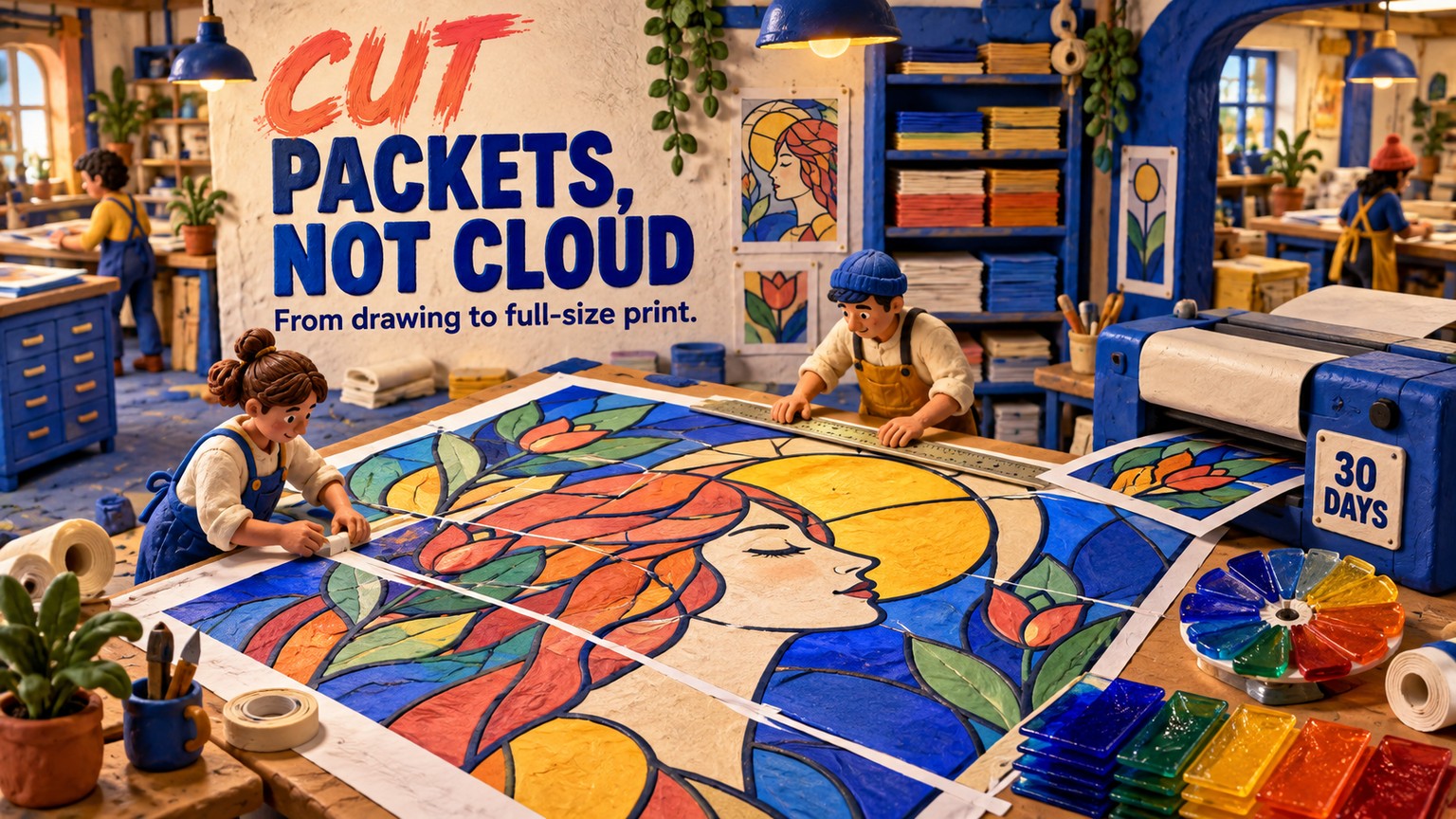
The downloadable evaluation gives 30 days to validate the complete workflow, and Dragonfly says the pattern library and resizing functions remain usable after the trial expires.
Use those 30 days to test one known panel from source to paper, not to browse menus. The current product overview says every edition runs on Windows 7 and later, including Windows 11, and occupies 64 MB. It documents Mac use only with Windows installed through Boot Camp, Parallels, or VMware Fusion. Enterprise also requires a USB port.
This run did not install the trial because no Windows runtime was available. It did not print a packet or build a glass panel. Compatibility statements here are Dragonfly's current published claims, and the workflow evaluation comes from its live capability pages, feature matrix, and attributed examples.
Before buying, verify five things on the hardware that will be used: the trial launches; the intended source file imports; a known design resizes correctly; labels and glass direction behave as required; and an actual-size tiled print measures correctly after assembly. Professional Plus buyers should also test the exact vector format they depend on, because the vendor explicitly lists four unsupported formats on Windows 8, 10, and 11.
Stained Glass Design Software Alternatives
Glass Eye 2000 should be skipped when its Windows desktop model is the wrong constraint, even if its production features are deeper.
VArtGlass for Browser and Tablet Drawing
VArtGlass is the closer alternative when you want manual craft control in a browser on a desktop or tablet.
The live VArtGlass pricing page lists $5.50 per month or $55 per year after 7 guest days and a 10-day registered trial. Its editor covers vector drawing over a photo or sketch, exact dimensions, glass textures, material calculation, PNG, JPEG, and SVG export, and full-size 1:1 tiled printing. It is the better fit when the device mix or low initial cost matters more than Glass Eye 2000's mature labeling, calibration, and cutter path.
Choose VArtGlass for a native browser workflow, deliberate manual tracing, and an inexpensive seasonal subscription. Choose Glass Eye 2000 when a Windows studio wants a fixed license, deeper piece-numbering control, a large glass library, printer calibration, or machine output.
Pattrn-AI for Photo-First Conversion
Pattrn-AI is the better alternative when the slow step is turning a photo or rough drawing into editable centerlines.
The live Pattrn-AI application bundle lists Free at $0 with 2 generations, Inspiration at $5 per month or $49 per year with 20 monthly generations, and Creator at $10 per month or $99 per year with 50 monthly generations. It is cheaper to enter and more focused on image conversion. It is not a replacement for production judgment or a cutter-oriented Windows system.
Choose Pattrn-AI when source cleanup and vector conversion dominate the workload. Choose Glass Eye 2000 when the centerline network already exists and the valuable work is labeling, glass planning, materials, calibrated printing, or downstream hardware.
The alternatives do not make Glass Eye 2000 obsolete. They clarify its niche: a mature, paper-first Windows production environment for stained glass.
Verdict: Buy the Cheapest Edition That Produces Your Output
Glass Eye 2000 is worth buying for a Windows maker who repeatedly needs more than a decorative pattern image. Standard is the best default because $150 already buys the core handoff: precise drawing, resizing, automatic labels, materials, and full-size tiled printing.
Move to Professional when calibration, selected-element output, richer glass previews, or flexible numbering affects accepted work. Move to Professional Plus when AutoTrace or arbitrary glass direction is essential, after testing the relevant file route on the intended Windows machine. Move to Enterprise only when output goes to a plotter, cutter, or blaster.
Skip the product for a native Mac, tablet, or browser workflow and take VArtGlass. Skip it for photo-first conversion and take Pattrn-AI. Do not pay $450 or $1,295 merely to own a longer feature list.
The Monday move is concrete: download the 30-day trial on the actual production PC, take one known design through resize, labels, glass direction, and full-size tiled print, then measure and inspect the assembled packet. Buy only the lowest edition that clears that test.
Frequently Asked Questions
What is the best software for making stained glass patterns?
Glass Eye 2000 is the strongest fit for a deep Windows production workflow with labels, costing, calibrated printing, and optional cutter output. VArtGlass is a better fit for browser and tablet drawing, while Pattrn-AI is a better fit for photo-first conversion. The best choice is the one that reaches your required handoff on the hardware you use.
How much does glass Eye 2000 cost?
Glass Eye 2000 Standard costs $150, Professional costs $295, Professional Plus costs $450, and Enterprise costs $1,295. The optional printed User's Guide costs $20 and is included with Enterprise. Dragonfly also offers a 30-day trial.
Is there an app that turns photos into stained glass patterns?
Yes. Pattrn-AI is built around photo and drawing conversion. VArtGlass lets you trace manually over an adjustable photo reference. Glass Eye 2000 can draw over an imported image in Standard, while Professional Plus and Enterprise add AutoTrace Background for suitable scans and line drawings.
Can I get custom stained glass made from a photo?
Yes, but the photo is only the source. It must become a simplified seam network at a defined size, then pass structural, cutability, glass-selection, and print checks before fabrication. Software can prepare the pattern; a skilled maker still has to engineer and build the panel.
How do I create my own stained glass patterns?
Start with a sketch, photo, existing paper pattern, or blank drawing. Build closed editable regions, simplify difficult cuts, set the finished dimensions, label pieces, assign glass and direction, calculate materials, and print at full size. Measure the assembled sheets before cutting.
How to turn a photo into a pattern?
Use the photo as a reference and trace the essential boundaries, or use a conversion tool and then edit its paths. In Glass Eye 2000, manual drawing over an import works in Standard; AutoTrace begins at Professional Plus. In every route, remove unnecessary detail and review the resulting pieces for practical cuts.
Get the AI Business Workflow Audit Checklist
Map the trial, accepted output, handoff, compatibility check, and true cost before adding a design tool to your workflow.
- Last Updated
- Sep 17, 2026
- Category
- Design
Prefer this site in Google


Mark omidsaffari.com as preferred and Google lifts it in Top Stories, AI Overviews and AI Mode for you.
Stitch Fiddle vs Chart Minder
Compare Stitch Fiddle and Chart Minder for photo charts, gauge, editing, privacy and print exports before choosing a browser pattern editor.Sep 17, 2026Design
Lace8 Pricing (2026): Licence, VAT and Add-Ons
Understand the Lace8 licence, VAT and optional motif packs so an add-on listing does not become your software budget.Sep 17, 2026Design
Treadl vs AdaCAD
Compare Treadl and AdaCAD for shared weaving projects, parametric drafts and WIF handoffs, with a clear choice for each workflow.Sep 17, 2026Design
VArtGlass Stained Glass Software Pricing
Decode VArtGlass trial access, monthly and annual plans, free patterns and the costs to check before preparing stained glass files.Sep 17, 2026Design
Best Software for Bobbin Lace Patterns
Compare bobbin lace design tools by repeat editing, pin spacing, printable prickings, learning effort and the cost of making usable patterns.Sep 17, 2026Design
How to Add Bridges to a Stencil in Inkscape
Keep the centers of letters and enclosed shapes attached. Add stencil bridges in Inkscape, inspect the paths and check the design before cutting.Sep 16, 2026Design
MakeBead Export Cost
MakeBead says PNG and PDF exports are free. Check the watermark, account requirements and file limits before preparing a pattern to print.Sep 16, 2026Design