WinStitch Pricing
Decode WinStitch's Premium price, local taxes, Mac bundle and optional lifetime upgrades before paying.

WinStitch pricing starts at a published £46 for Premium on one operating system, but the UK checkout verified on 20 September 2026 opened at £53.49 because a 700-day download warranty was already selected. Pay for lifetime upgrades only if you expect at least two chargeable version upgrades, and choose the Mac/Windows bundle only when both platforms are part of the real workflow.
WinStitch Pricing at a Glance
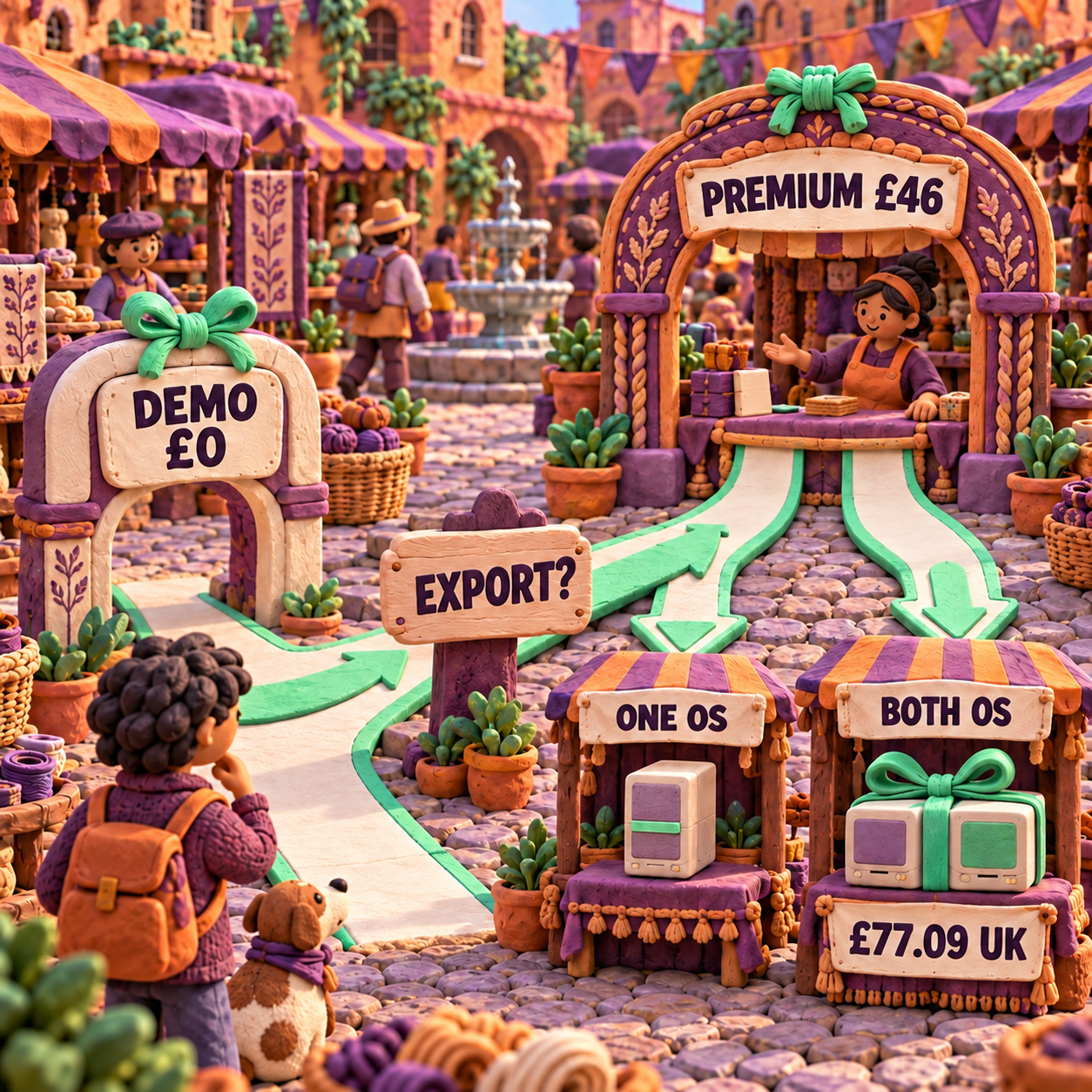
The sensible default is WinStitch Premium for one operating system at £46, with the download warranty removed and every add-on left unchecked until it solves a named need. Ursa Software's current purchase page lists the Windows and Mac Premium editions at £46 or the local equivalent. The checkout then localizes currency and tax.
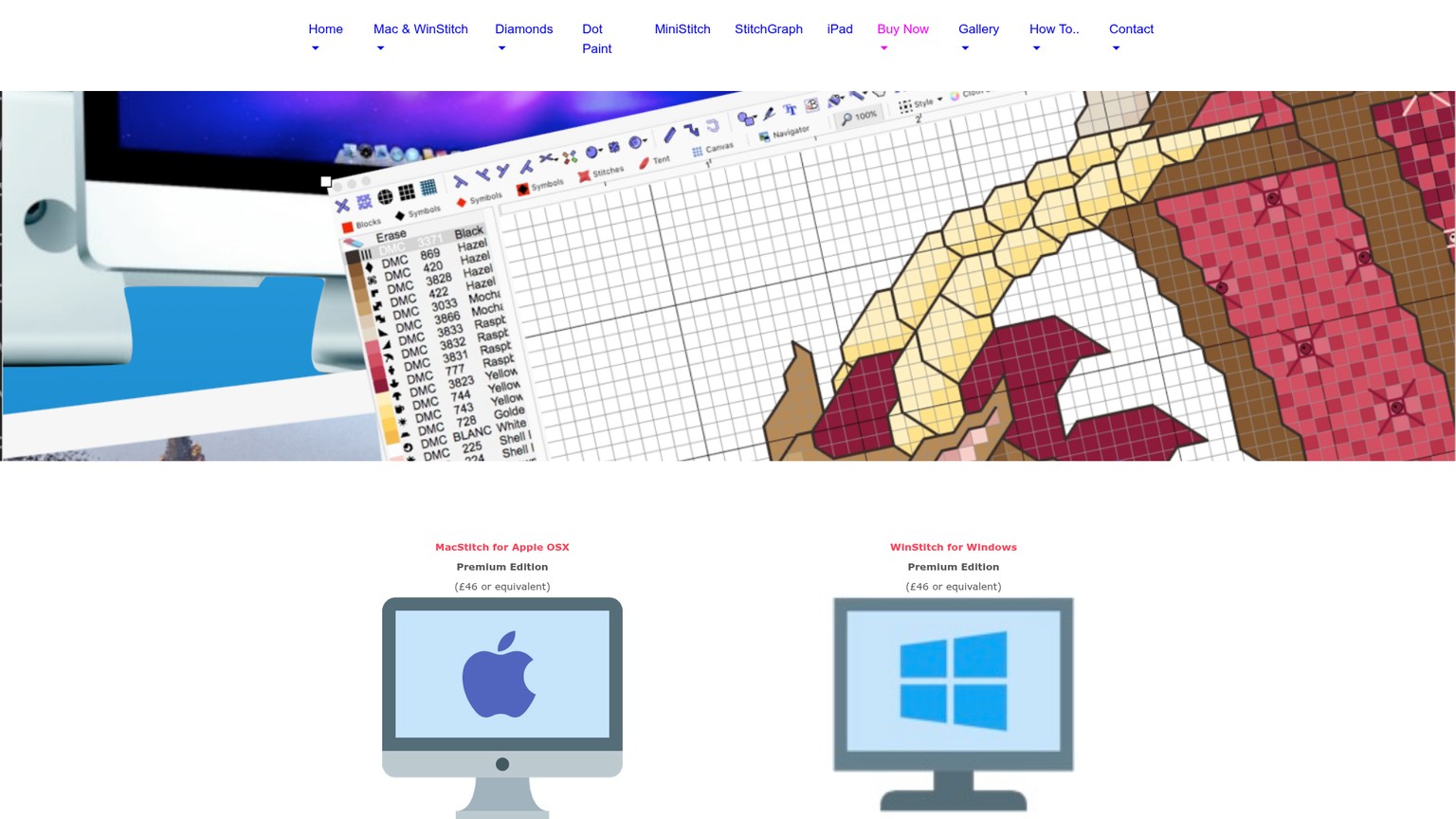
These are the current purchase routes, dated 20 September 2026. The bundle totals are localized checkout snapshots, not universal list prices.
Premium is the only edition in the current PayPro buy flow. Standard still appears on an Ursa comparison page as discontinued but available on request, which is why older summaries can make it look like a normal current tier. It is not the main buying route.
WinStitch for Windows: What You Are Buying
WinStitch for Windows is a one-time desktop purchase, not a subscription, and the current release is WinStitch 2026. Ursa lists Windows 10 and 11 or later, 64-bit, including Windows ARM. Windows S mode is the important exception because it blocks software that did not come from the Microsoft Store; the machine must be switched to Windows Home before WinStitch can run.
The full product is built for both hand-drawn patterns and image conversion. Its current Premium feature set includes advanced image import, custom thread work, knitting and crochet layouts, specialty stitches, framed previews, printing, PNG export, advanced PDF creation and one-click Pattern Keeper-compatible output. The purchase page caps a chart at 999 x 999 stitches and 254 colours.
That breadth is why Premium is the right reference price. A designer selling PDFs is not just buying a grid editor. The valuable boundary is the production handoff: readable symbols, a thread key, printable pages and a file a customer can use in Pattern Keeper. A casual stitcher who only wants to sketch one motif may not need that stack.
- A one-time base purchase rather than an automatically renewing plan
- Advanced PDF and Pattern Keeper-compatible output in the current Premium licence
- Specialty stitches, custom thread sets, knitting, crochet and diamond-painting output in one desktop tool
- A nearly complete demo that can save work for later activation
- Separate Windows and Mac products unless the bundle is purchased
- No published device-count or multi-seat entitlement on the pages reviewed
- Major version upgrades can cost extra without lifetime cover
- The default cart preselects extended download cover
- Windows S mode cannot run the downloaded app
Standard looks cheaper, but its request-only status creates friction before the work even begins. Premium is the clearer purchase when advanced PDF output, specialty stitches, image tools or a seller workflow matter. If none of those outcomes matters, the free demo or a simpler browser editor deserves the first attempt.
WinStitch Cost After Tax and Checkout Extras
The visible WinStitch cost can rise from £46 to £53.49 before you add a single creative extra. The UK-localized cart opened with a £44.57 subtotal, £8.92 of VAT at 20%, and a £53.49 total. In an Oregon-localized US checkout, the default total was $59.70 with no sales tax displayed.
The difference is the preselected extended download warranty. Ursa's checkout says it keeps the download available for 700 days. Remove it and the link stays active for 5 days. Subtracting the published base from the default total puts the after-tax UK difference at £7.49 and the Oregon difference at $12.70. That is computed from the two live prices because the cart did not isolate the warranty charge as its own clean line.
The rational move is simple: remove the warranty if you can download immediately and keep a verified backup of the installer. Keep it only when a long recovery window is worth more than the surcharge. The product page itself tells buyers to download promptly and back up the installer.
The visible optional extras were:
- Lifetime upgrades: £19.99 before UK VAT, £23.99 after 20% VAT, or $26.78 in the Oregon checkout.
- Extra Threads: £15 before UK VAT or $20.09 in Oregon, adding more than 230 thread-colour sets from less common makers.
- Lord Libidan Font Pack: £11 before UK VAT or $14.73 in Oregon. Ursa describes 35 full-cross fonts from 5 to 20 stitches high.
- Legacy chart conversion: £11.67 before UK VAT or $15.63 in Oregon for a block of up to 12 charts. Ursa says it refunds the service fee if the submitted formats cannot be converted.
- Downloadable PDF manual: £0.75 before UK VAT or $1 in Oregon. The same help material is available inside the installed app at no extra cost.
There is no usage overage, credit expiry or API/app split to model. The hidden costs are different: local tax, currency conversion, a selected warranty, optional major upgrades and add-ons that solve specialised jobs. This is also why a forum price is weak evidence. The live cart is the only total attached to your country and choices.
MacStitch WinStitch Bundle: When Two Licences Cost Less
The MacStitch WinStitch bundle earns its place only when the same designer actively works on both operating systems. The current Ursa page promises both versions in one discounted bundle, while the localized checkout supplies the number that the public page omits.
Using the default cart configuration in each location:
- Two separate UK one-platform carts cost £106.98. The bundle cost £77.09, saving £29.89, or 27.9%.
- Two separate Oregon one-platform carts cost $119.40. The bundle cost $86.05, saving $33.35, also 27.9%.
Those calculations compare like-for-like default carts, including the preselected download cover. Removing the warranty changes the totals, so repeat the comparison after cleaning the cart. The durable conclusion is not the exact currency figure. It is that the bundle beats two separate default purchases by a material margin.
Do not buy it because a second computer might appear someday. Buy it when a Windows workstation and a Mac are both in the production path now, or when a planned migration would otherwise force a second full purchase. A Windows-only designer spends less by buying WinStitch alone. A Mac-only designer should buy MacStitch alone.
The bundle wording grants both platform versions, but the public pages reviewed do not state a device count, household-sharing rule or studio seat allowance. Treat it as a platform bundle, not an assumed multi-seat licence. Ask Ursa in writing before using one purchase across several people or production machines.
That platform-first discipline also matters with app-store craft tools. The Stitchly pricing breakdown shows how a low sticker can become a second purchase when work crosses store ecosystems.
WinStitch Lifetime Upgrades Break Even at Two Paid Versions
WinStitch lifetime upgrades are worth buying when you expect to take the next two chargeable major versions. The UK standalone lifetime checkout was £19.99 before VAT and £23.99 after 20% VAT. A registered Premium owner on version 2021 or later can currently upgrade to the 2026 version for £14.
The calculation is direct: £23.99 divided by £14 equals 1.71. One paid upgrade is cheaper à la carte. The second pushes two upgrades to £28, so lifetime cover has saved £4.01 by that point. Ursa's own upgrade page reaches the same practical threshold and says the saving appears after two yearly releases if a new paid version arrives each year.
Eligibility matters. Ursa says an existing version must be newer than four years to add lifetime cover. Otherwise, upgrade first and add lifetime later. The current 2026 upgrade costs £25 from Standard or Lite of any year, Premium before 2021, XStitcher or named competing software. That route can make “I'll add lifetime later” more expensive than it sounds.
Lifetime does not mean the current installer will remain compatible forever. It means normally chargeable future versions are included and delivered by download. That distinction is valuable on desktop software because operating-system changes can make an old build impractical even when the original licence never expires.
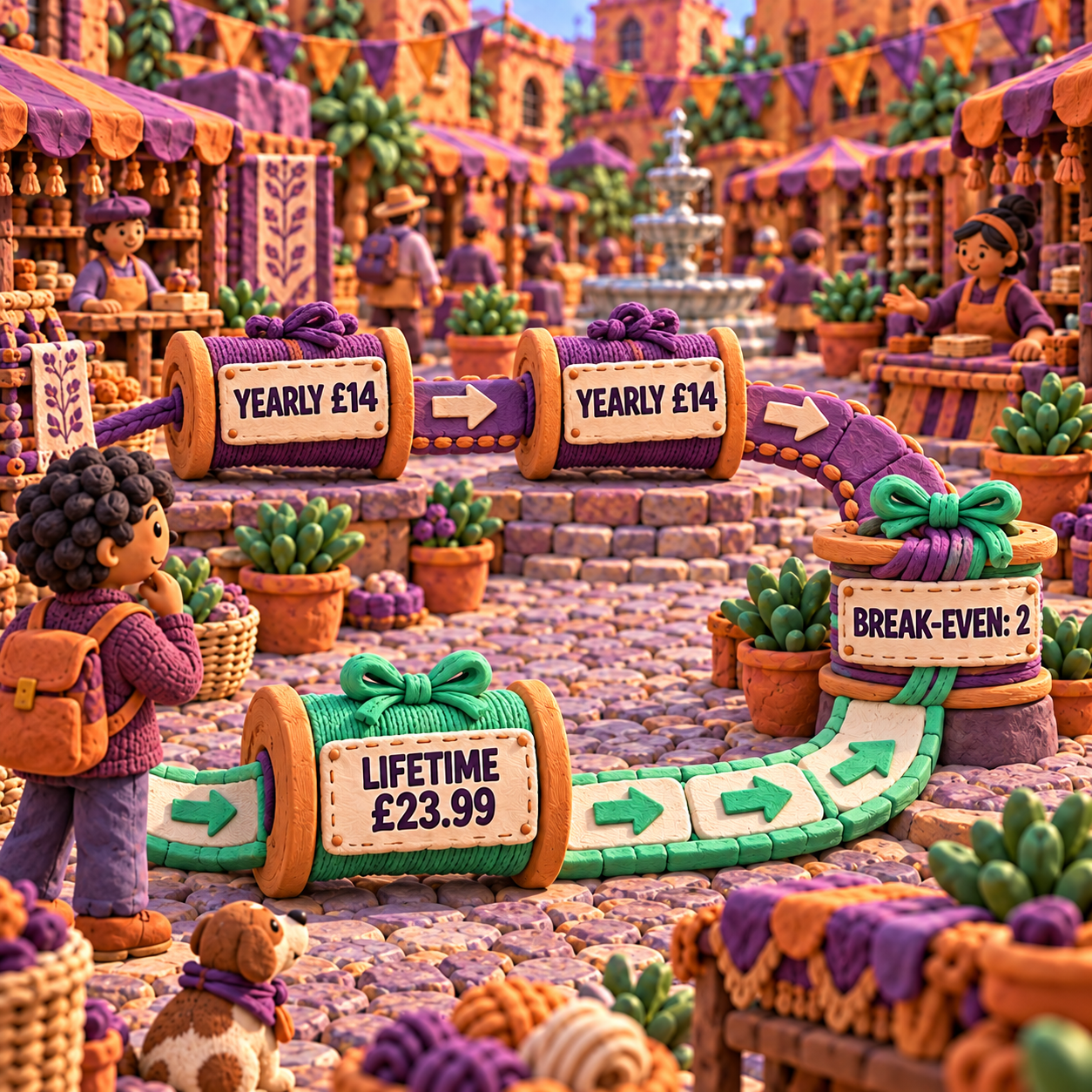
Skip lifetime cover if the current 2026 release already completes a short, fixed project and you are comfortable freezing the production machine. Buy it when the chart library is a continuing business asset, operating-system updates are unavoidable, or access to future releases matters more than the £9.99 saved by buying only one £14 upgrade.
Free Demo, Licence and Refund Boundaries
The free demo is generous enough to test the workflow, but it is not a free production tier. Licence scope and refunds are less explicit, so those need deliberate checks before a studio relies on the purchase.
WinStitch Free Download: What the Demo Allows
Ursa says almost 99% of MacStitch and WinStitch features are available in the demo. You can create, import, amend and save your own charts. You can also open the supplied sample charts and print or export them.
The boundary is output ownership. The demo cannot print or export a chart you create or amend, and it cannot save motifs. That makes it useful for learning the interface, checking machine compatibility and building a representative project that can be used after purchase. It does not produce the customer PDF or printable chart that makes the work commercially usable.
The person who never needs to pay is the evaluator who only wants to learn, inspect a conversion on screen, or prepare a saved project for a later purchase. Anyone who needs to print, export or deliver an original chart reaches the paid boundary.
Licence Scope Needs Written Confirmation for Multiple Machines
The current purchase page clearly separates Windows, Mac and the dual-platform bundle. The checkout also accepts a named licensee. It does not publish how many devices one licence may activate, whether household sharing is allowed, or how a multi-person studio should be licensed.
Do not turn a one-time product price into a per-seat claim without that term. Cost math in this guide therefore treats £46 as one purchased platform licence, not as an unlimited household or studio seat. If two people need the program, ask Ursa for the entitlement before multiplying or sharing keys.
The product page does position advanced PDF export for people selling patterns online. That supports a seller workflow, but it does not answer device sharing. Output rights and activation rights are separate questions.
Refunds Are Reviewed, Not Promised
PayPro Global's refund policy makes refund requests available for review within 30 days of purchase. It gives the software vendor a chance to resolve the issue before PayPro reviews unresolved requests. That is a process, not an unconditional money-back guarantee.
For digital goods, the policy also says the EU and UK 14-day withdrawal right does not apply once access or download has begun and the buyer has consented to immediate delivery. Use the demo as the compatibility test, then treat the purchase as a commitment once the download starts.
The chart-conversion add-on has a narrower promise: Ursa says it will refund that service fee if it cannot convert the submitted charts. That promise does not extend to the main software purchase.
The same distinction between a demo, a perpetual key and future upgrades appears in the Stitchmastery software cost analysis. A one-time licence removes recurring billing; it does not automatically settle future versions, recovery or device scope.
Cost Per Finished Chart
WinStitch becomes inexpensive per outcome when the same £46 licence produces a real catalogue. Allocate the base purchase across finished charts and the cost falls quickly:
- One finished chart carries the full £46 software cost.
- Ten finished charts allocate £4.60 each.
- Twenty-five finished charts allocate £1.84 each.
- Fifty finished charts allocate £0.92 each.
That is allocation, not a promise about quality or time. A chart is only a finished outcome when its symbols, key, page breaks and thread choices have been proofed. An untouched image conversion is not made sale-ready by dividing the licence price across it.
The legacy conversion service has its own volume effect. The £11.67 pre-VAT block falls to about £0.97 per chart when all 12 slots are used. The $15.63 Oregon price falls to about $1.30 per chart. Submit one chart and it carries the whole fee, so consolidate compatible legacy files before ordering.
For an occasional personal pattern, a paid browser export can remain cheaper. For a seller producing a continuing catalogue, the one-time desktop licence can beat repeated export charges. The flip is output volume, not a vague preference for owning software.
WinStitch Against the Alternatives
WinStitch sits between the cheapest Windows desktop licence and the more flexible browser products. Compare the same deliverable, not the headline plan: printable PDF, commercial rights, device access and the specialty stitches the work requires.
Stitchmate
Stitchmate is a browser editor with free creation and PNG export, then one-time PDF purchases and passes. It keeps up to 10 active free patterns, sells one paid PDF pattern for $5.99, five for $12 and ten for $20, and offers Personal access at $14.99 for 30 days or $99 for life. Commercial Seller access costs $24.99 for 30 days or $149 for life.
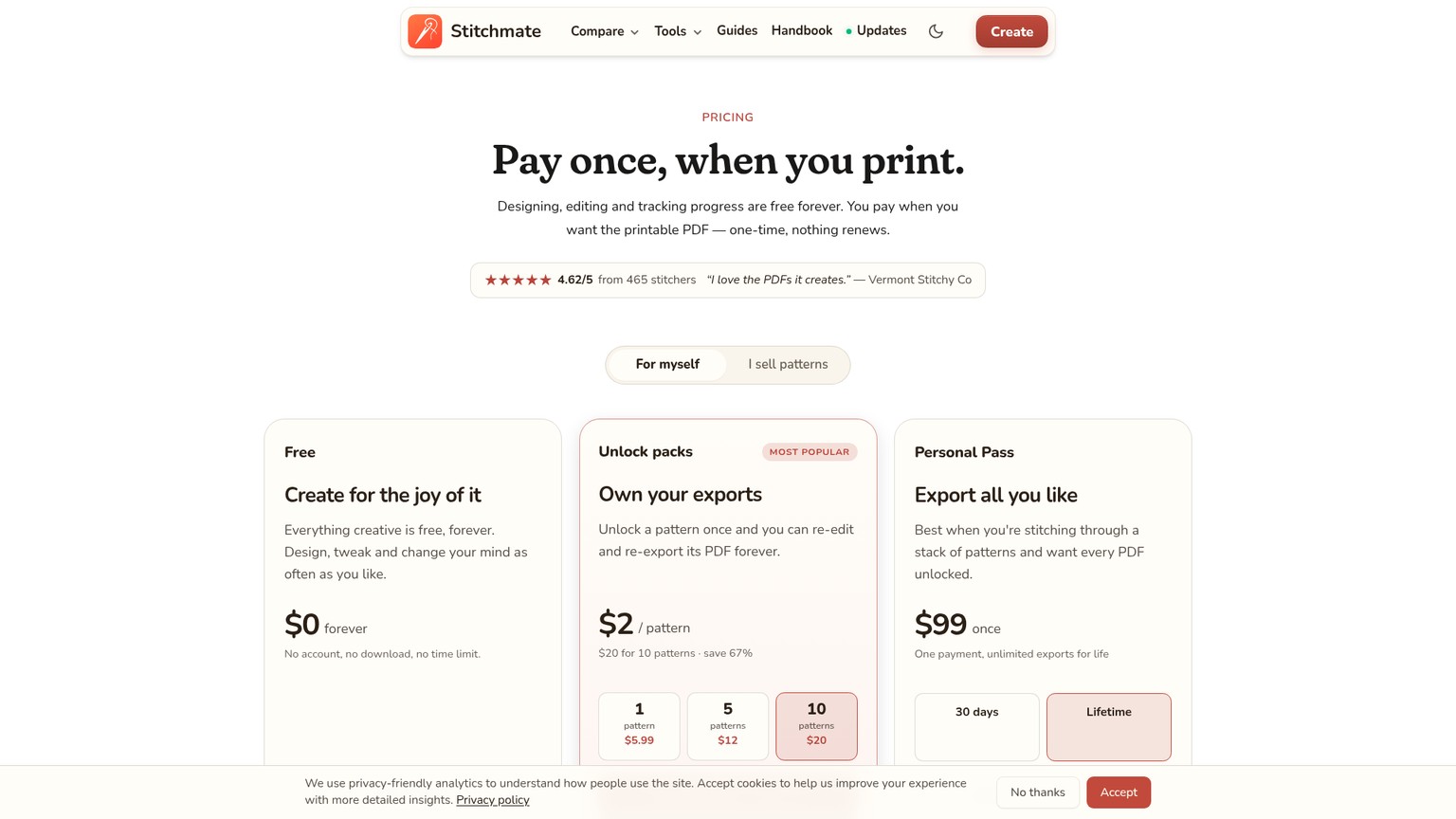
Its advantage is access across devices and a low entry price for occasional output. Its wall is licensing and volume: the free tier does not deliver a full printable PDF, and selling requires the Seller option. A ten-pattern pack is $27 below WinStitch's $47 US list price, so Stitchmate is the cheaper price-only choice for a small personal batch. Two 30-day Seller Passes total $49.98, already $2.98 above the WinStitch list price, although the products do not have identical craft features.
Pick Stitchmate when browser access, mobile devices or small-batch PDF purchasing decides the workflow. Pick WinStitch when specialty stitches, custom thread sets, knitting or crochet output and a local desktop archive matter more.
PCStitch
PCStitch is a Windows desktop cross-stitch editor with a free evaluation download and paid Standard and Pro licences. Its current pricing page lists Standard at $39.95 and Pro at $49.95.
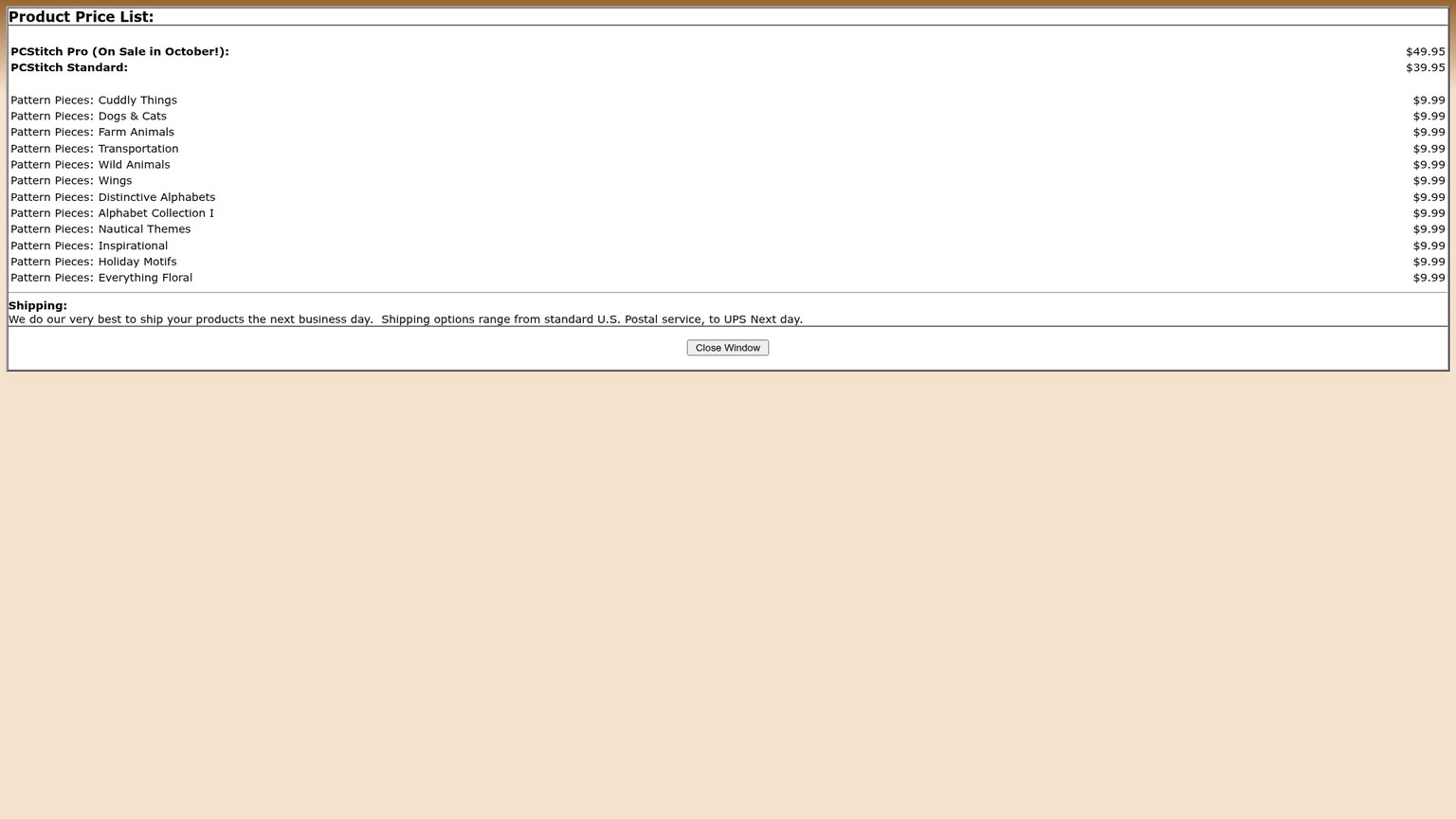
Against WinStitch's $47 US list price, PCStitch Standard is $7.05 cheaper and PCStitch Pro is $2.95 more. This is the closest sticker-price comparison because both are one-time Windows desktop purchases. The choice should turn on the exact output and file compatibility needed, not a single-digit saving. WinStitch's published Premium case is strongest when Pattern Keeper output, its specialty stitches or its broader craft modes are required.
PCStitch is a poor substitute for a Mac buyer because it is a Windows product. WinStitch is also a poor Mac purchase; that buyer needs MacStitch or the cross-platform bundle.
Xstitchify
Xstitchify is a browser editor that runs on iPad, iPhone, Android and desktop. Its free plan includes five PDF downloads after signup. Standard costs $9.99 monthly or $69.99 annually, while Pro costs $24.99 monthly or $179.99 annually.
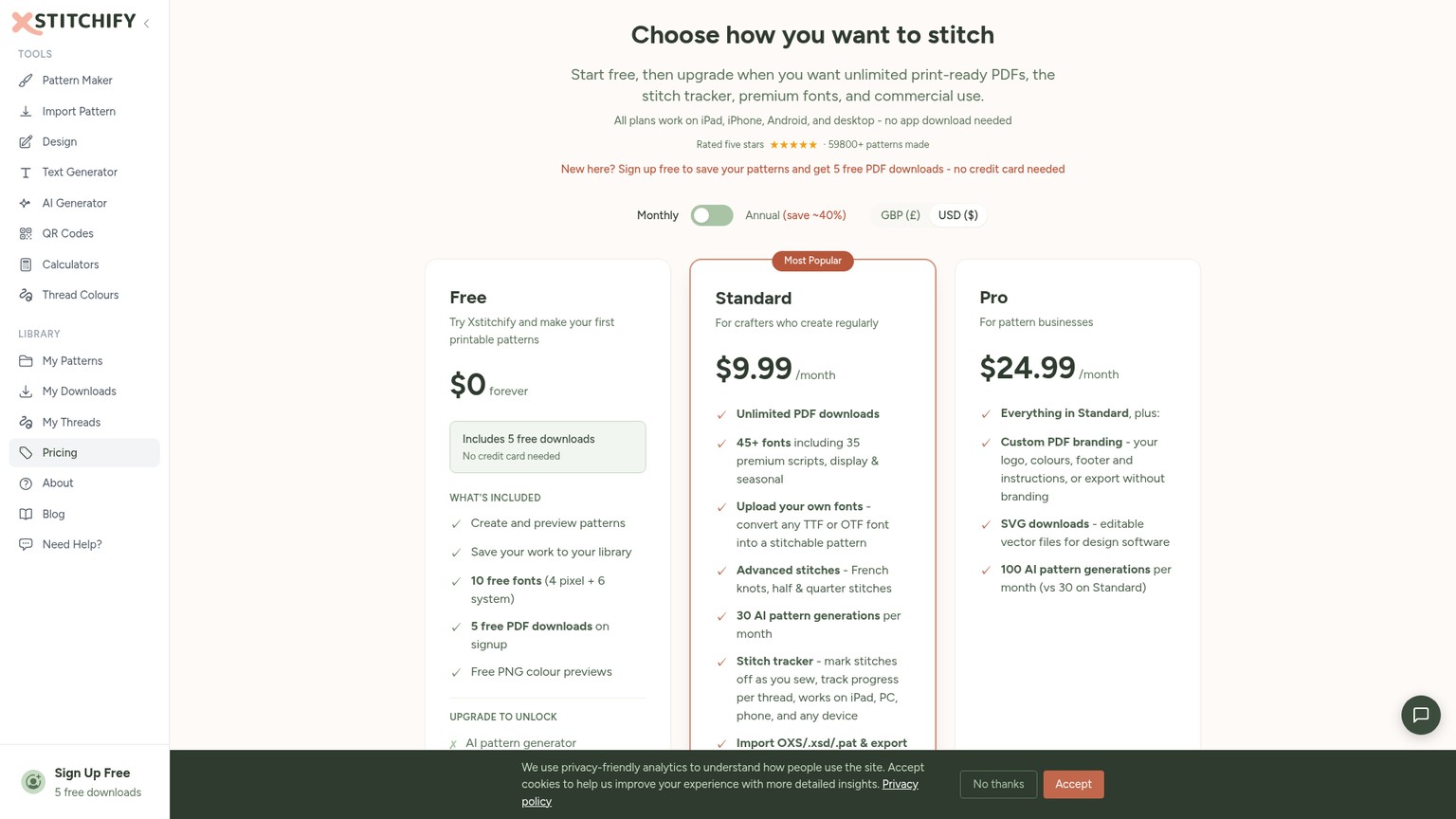
Standard's first annual payment is $22.99 above WinStitch's $47 US list price. The premium buys a different shape of product: cross-device browser access, cloud storage and subscriber features rather than a local Windows installer. One-off packs cost $9 for 30 credits, $19 for 75 and $39 for 200, and the credits do not expire, but they do not include subscriber-only commercial and workflow features.
Pick Xstitchify when iPad or mixed-device access is non-negotiable. Pick WinStitch when a one-time local Windows purchase and its mature specialty tools matter more than cloud convenience.
The decision rule is blunt: choose WinStitch when the work is Windows-centred, recurring and specialty-output heavy; choose a browser alternative when device freedom or occasional export is worth more than desktop ownership. Choose PCStitch only after its exact feature and file boundary wins, because its price is too close to decide the purchase by itself.
A Purchase Recipe That Protects the Craft Bar
The safest purchase test uses one representative chart and separates interface fit from conversion quality. Price is proved at checkout; craft is proved by cleaning and proofing the same brief.
Install the demo on the production machine
Use the actual Windows computer that will hold the chart archive. Confirm that Windows is not in S mode, open the current 2026 demo and make sure its file access works before buying.
Build the real brief once
Import a rights-cleared source image or draw the kind of pattern you intend to produce. Use the intended cloth setup, thread family, specialty stitches and output structure. Save the project so activation can continue from the same source.
Walk the before and after
Treat the automatic first pass as the before state. Inspect isolated colour changes, awkward symbols and unnecessary palette entries, then use the editor's palette tools, search and replace, onion-skin reference and manual drawing tools to create the cleaned after state. This checks whether the workflow suits your hand; it is not a cross-tool conversion benchmark.
Proof output with a supplied sample
The demo cannot export your own chart, so use an unmodified supplied sample to inspect print and export controls. Confirm the PDF structure, key and page logic you need. Purchase only if the blocked original-chart export is the last missing step.
Clean the cart
Remove extended download cover if a 5-day link plus your own backup is sufficient. Add lifetime upgrades only when two future paid versions are likely. Add Extra Threads or conversion only for named brands or files already in hand.
Confirm the licence and keep a recovery copy
Ask Ursa about device or seat entitlement if more than one person or machine will use the purchase. Download promptly, retain the installer and licence details, and document where the master chart files live.
A first-pass conversion is mood-board-only until the palette, isolated stitches, symbols and page output have been checked. Ship-ready means the chart can leave the editor with a legible key, deliberate thread choices, clean printable pages and the correct customer format. The software can provide those controls; it cannot make the craft judgment for you.
Frequently Asked Questions
What is the best cross stitch software for Windows?
WinStitch is the strongest fit when a Windows designer needs specialty stitches, custom thread sets, advanced PDF output and broader knitting, crochet or diamond-painting options. PCStitch is the closest one-time Windows price alternative, while browser tools are better when mobile access matters more than desktop depth.
What is the best cross stitch app for Mac?
MacStitch is the direct Mac counterpart to WinStitch and carries the same published £46 Premium price. Choose it for a local desktop workflow; choose Stitchmate or Xstitchify when iPad and mixed-device browser access is the deciding requirement.
How much is Mac stitch?
MacStitch Premium is listed at £46 or the local equivalent. The combined MacStitch and WinStitch default checkout was £77.09 in the UK and $86.05 in Oregon on 20 September 2026, with local tax and the selected download warranty affecting the total.
Is PCStitch free?
PCStitch provides a free evaluation download and a separate free viewer, but the full editor is paid. The current official prices are $39.95 for Standard and $49.95 for Pro.
How much does WinStitch cost?
WinStitch Premium has a published base price of £46 or local equivalent for Windows. Ursa's comparison page lists $47 plus US tax, while the default Oregon checkout opened at $59.70 because extended download cover was selected.
What is the best cross stitch app?
There is no universal winner. WinStitch suits deep Windows desktop work, MacStitch serves the same role on macOS, Stitchmate makes occasional and commercial browser access modular, and Xstitchify prioritises mixed-device cloud work.
Is there a free cross stitch designer available?
Yes. WinStitch's demo allows design, import, editing and saving but blocks output of original work. Stitchmate offers free browser design and PNG export, while Xstitchify includes five free PDF downloads after signup.
Which online cross stitch store is the best?
A software price cannot establish the best pattern or materials store. Compare the exact catalogue, designer rights, file format, shipping cost and return terms for the purchase you need; WinStitch is a design tool, not an online cross-stitch shop.
Is there a free cross stitch pattern keeper available?
Ursa's XStitch Markup is a free iOS companion with no ads or in-app purchases. It can open WinStitch and MacStitch charts plus PCStitch files through version 7 for on-screen marking, but it is not a pattern-design app. Stitchmate also includes free browser progress tracking.
Is WinStitch free?
The WinStitch demo is free and exposes almost 99% of the feature set, but it cannot print or export a chart you create or amend and cannot save motifs. It is an evaluation route, not a permanent free production plan.
Does WinStitch offer a student discount?
No student or education discount was listed on the purchase, product, upgrade, FAQ or checkout pages checked on 20 September 2026. Ask Ursa before paying if a private education offer would change the decision.
What is WinStitch's refund policy?
PayPro Global accepts refund requests for review within 30 days, but approval is not automatic. Its digital-goods terms say access or download can waive the EU and UK 14-day withdrawal right, so use the demo before beginning the paid download.
Has WinStitch's price changed?
Ursa currently has conflicting live pages. The current PayPro-linked page lists £46 or local equivalent, while an older FastSpring page still says £39 UK or $45 plus tax. Use the current purchase page and localized checkout rather than the older figure.
The Monday Move
Download the current demo onto the Windows machine that will own the archive. Build and save one representative pattern, clean its palette and symbols, then inspect output controls with an unmodified sample. Open the live cart only after that test, remove the 700-day warranty if your own backup makes it unnecessary, and compare one-platform and bundle totals after tax. Add lifetime cover only when two paid upgrades are plausible, and get device entitlement in writing if the licence will cross people or machines.
Get the AI business workflow audit checklist to map platform ownership, licence scope, file handoff and backup before adding a paid creative tool.
- Last Updated
- Sep 20, 2026
- Category
- Design
Prefer this site in Google


Mark omidsaffari.com as preferred and Google lifts it in Top Stories, AI Overviews and AI Mode for you.

ngram vs Demosmith
Compare ngram and Demosmith for product videos, browser capture, revisions and usable exports, with costs matched to the same job.Sep 19, 2026Design
How to Tile Sewing Patterns in Seamly2D
Export a Seamly2D pattern as tiled pages, set the printer scale, align the sheets and check a test square before cutting fabric.Sep 19, 2026Design
WeavePoint vs Fiberworks
Compare WeavePoint and Fiberworks on computer support, draft editing, WIF exchange, print output and the licence needed for your loom.Sep 19, 2026Design
Stitchmastery Knitting Software Cost
Check Stitchmastery's licence price, two-computer allowance, VAT, demo limits and upgrade terms before buying or moving an installation.Sep 19, 2026Design
Best Software for Overlay Mosaic Crochet Charts
Compare overlay mosaic crochet chart software by symbols, written rows, exports and the checks needed before you crochet.Sep 19, 2026Design
Stitchworks Crochet Charts Review
Review Stitchworks Crochet Charts for crochet symbols, rows, rounds and PDF or SVG export, including its archived status and current compatibility limits.Sep 19, 2026Design
How to Add Seam Allowance in Valentina
Add seam allowance in Valentina, adjust individual edges and fold lines, then check notches and the exported cutting outline.Sep 19, 2026Design