Fiberworks Bronze vs Silver
Choose Fiberworks Bronze or Silver by price, drafting features, shaft limits, and operating system. Keep Silver Plus loom control separate.

- FFiberworks Bronze
- FFiberworks Silver
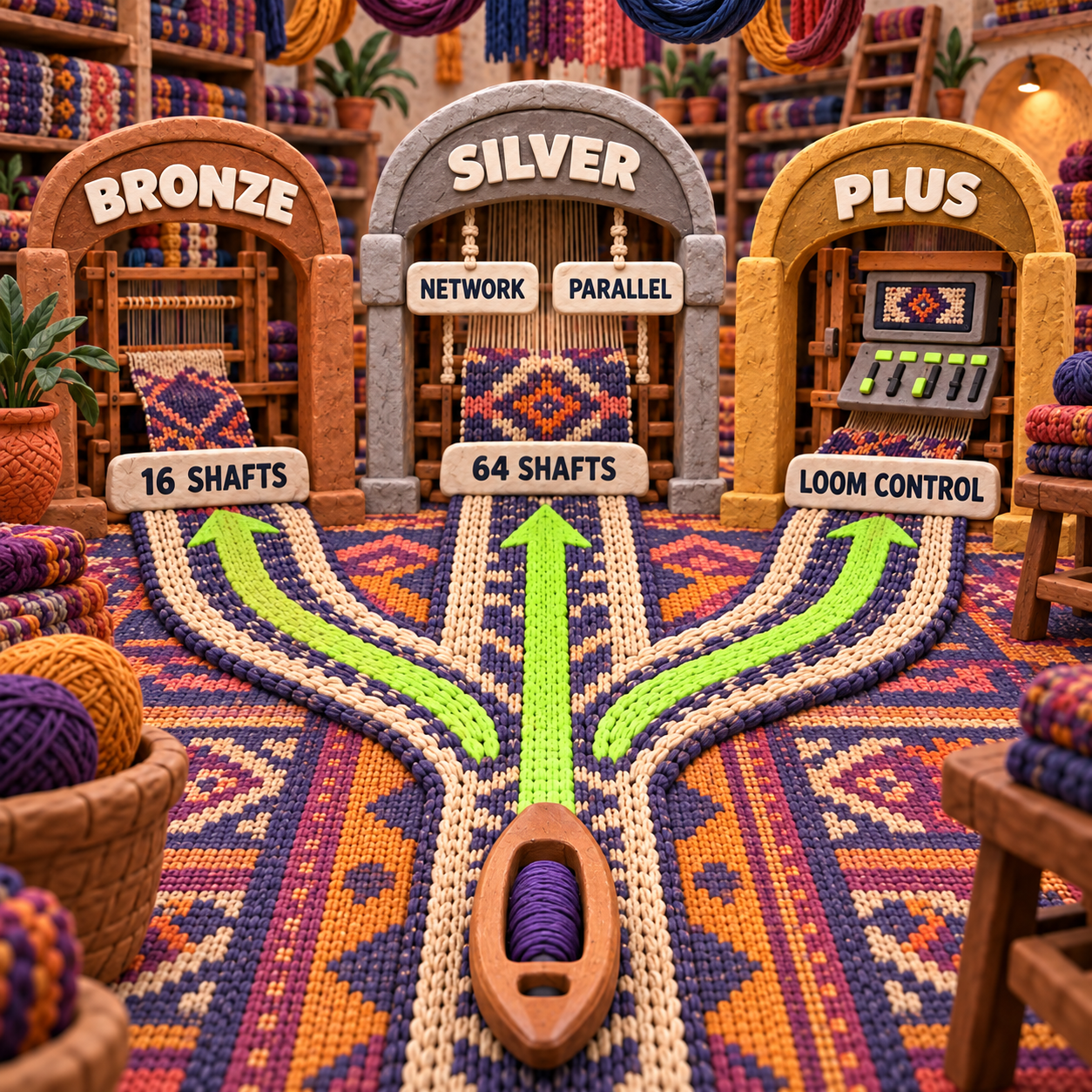
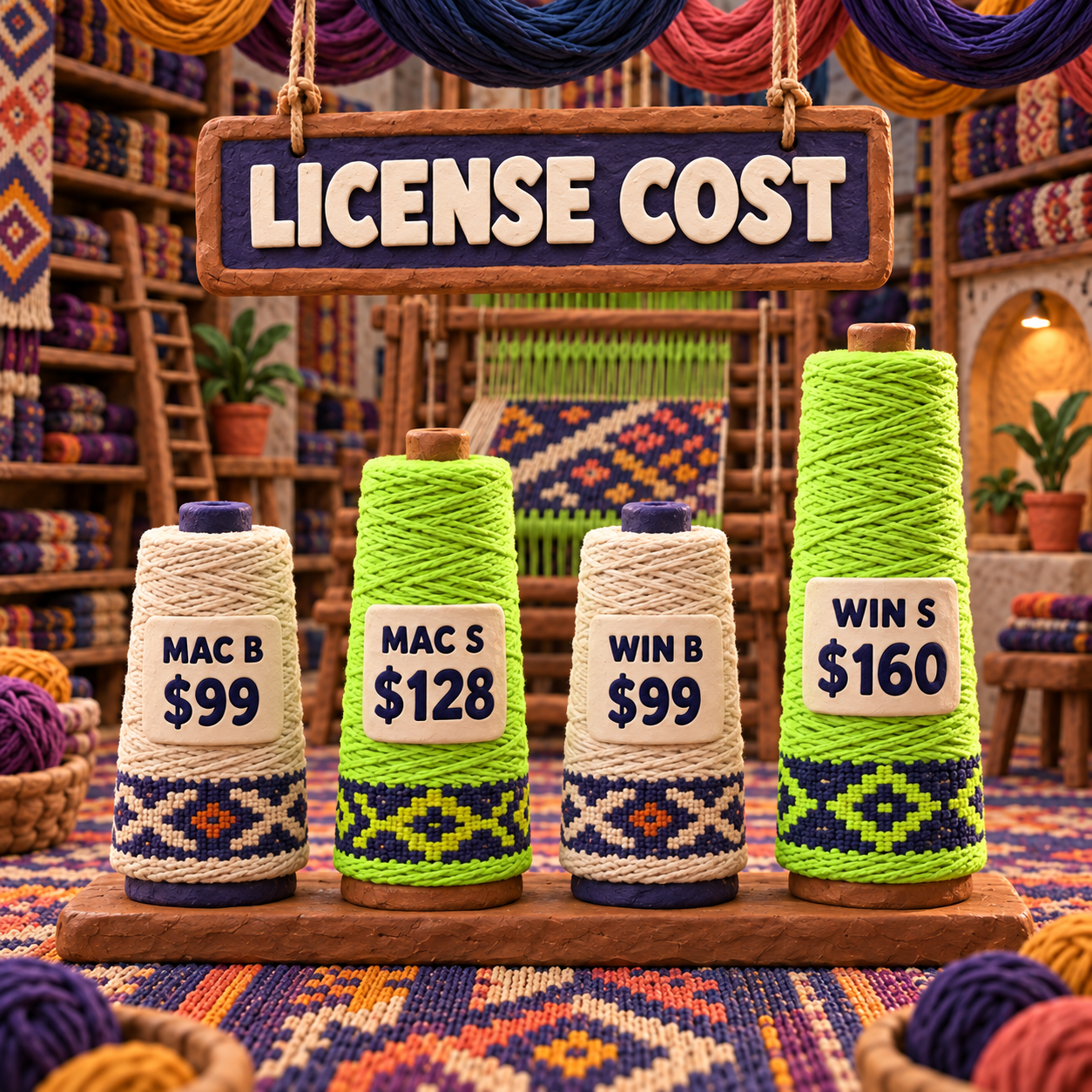
Fiberworks Bronze vs Silver has a simple default: buy Bronze for conventional drafts within 16 shafts; pay for Silver when you need more than 16 shafts, Network Drafting, Parallel Repeat, or the Windows Sketchpad. New US download licenses were US$99 for Bronze, US$128 for Mac Silver, and US$160 for Windows Silver when verified on September 18, 2026, so the Silver premium is $29 on Mac and $61 on Windows.
Fiberworks Bronze vs Silver: Which One Should You Pick?
Pick Fiberworks Bronze if your work stays within 16 shafts and 32 treadles and you do not need Network Drafting or Parallel Repeat. Pick Fiberworks Silver as soon as one active design needs those tools, more shaft capacity, or the Windows Sketchpad. Loom control is not a reason to choose ordinary Silver; it is a separate Silver Plus and operating-system decision.
The reader situations are more useful than the edition names:
- A four-to-12-shaft weaver making conventional twills, color-and-weave drafts, liftplans, or WIF files: Bronze is enough unless a named Silver-only operation enters the brief.
- A weaver working at 17 to 64 shafts: Silver is mandatory on the published capacity limits.
- A 12-shaft weaver using Network Drafting or Parallel Repeat: Silver wins even though Bronze has enough shafts. The operation, not the loom size, flips the decision.
- A Windows designer who needs Sketchpad: Silver. The independent cross-platform chart marks Sketchpad as a Windows Silver feature and absent from both Mac editions.
- A computerized-dobby owner: stop at the controller question. On Windows, inspect Silver Plus compatibility. On current Mac 2.0.2, Fiberworks says there is no Silver Plus option.
That rule avoids the common purchase error: paying for a level because it sounds more professional. A production draft is a set of structural decisions, not a status badge. Buy the lowest edition that completes those decisions without a workaround.
Fiberworks Bronze: Best for Conventional Drafts
Fiberworks Bronze is the value winner for a conventional manual-loom workflow. It costs US$99 as a new download license on either Mac or Windows, and the published comparison still gives it the core tools needed to build, inspect, exchange, and print a draft once the program is validated.
The official edition chart lists Float Search, Pickup Color Tool, automatic multipage printing, liftplan mode, and WIF opening and saving in Bronze as well as Silver. WIF, or Weaving Information File, is an exchange format for editable weaving-draft structure. Those shared functions cover far more work than the word entry-level suggests.
Bronze's clean limit is 16 shafts and 32 treadles. Fiberworks' current Windows download page describes it as best suited to four-to-12-shaft work, leaving some headroom below the published maximum. That makes Bronze the sensible choice for a weaver whose representative drafts fit the ceiling and whose repeats are conventional.
The limitation is structural, not cosmetic. Bronze omits Network Drafting, which builds a threading from a network of permissible pattern lines, and Parallel Repeat, which derives related threading sequences at an offset. If either operation is part of the design method, recreating the result manually is not a saving. It is the work Silver was bought to remove.
- US$99 on both current desktop platforms.
- Published ceiling of 16 shafts and 32 treadles.
- Shares core draft entry, color, float-search, liftplan, printing, and WIF functions with Silver.
- The installer can be downloaded and explored before purchase.
- No Network Drafting or Parallel Repeat.
- No loom-control activation.
- The capacity ceiling becomes firm as soon as a draft exceeds 16 shafts or 32 treadles.
- Save and Print are unavailable until the license is validated.
Winner for price and conventional drafting: Bronze. A buyer who cannot name a Silver-only requirement should keep the $29 Mac premium or $61 Windows premium.
Fiberworks Silver: Pay for a Named Capability
Fiberworks Silver is the capability winner, but only four differences deserve to drive the purchase: 64-shaft capacity, Network Drafting, Parallel Repeat, and the Windows Sketchpad. Everything else should be checked against the same representative draft instead of counted as a longer feature list.
The current Windows release is Silver 4.2.4.2, and Fiberworks describes it as a drawdown and design program for up to 64 shafts. The current Mac release is 2.0.2, where one application is validated as either Bronze or Silver. The independent Seguin Looms matrix records the same 16-versus-64 shaft split, the same 32-versus-64 treadle split, and the same Bronze-no, Silver-yes result for Network Drafting and Parallel Repeat.
Silver's Mac and Windows editions are not identical. Seguin lists six drawing tools in Mac Silver and five in Windows Silver, against four in Bronze on either platform. It also places Sketchpad in Windows Silver only. A Mac buyer should not pay for Silver because a Windows screenshot shows a tool that the Mac comparison does not include.
Fiberworks Edition Comparison: One Matched Draft
A 12-shaft brief shows why shaft count alone is a poor buying rule. Use one cloth concept in two states:
- Before: a conventional 12-shaft twill uses ordinary threading and treadling repeats, a color plan, float search, and WIF exchange. It sits below Bronze's published 16-shaft ceiling, and none of those requirements names a Silver-only function. Bronze wins.
- After: keep the same 12 shafts, but require a network-derived threading and a Parallel Repeat variation. Capacity has not moved. The documented operation has. Bronze no longer matches the brief, while Silver does.
This is a matched-brief capability audit against the live download pages and published edition matrices. It is not a claim that the applications were run side by side, that a file was saved and reopened, or that a loom was controlled in this run. No speed score is attached because a feature-presence check cannot establish execution speed.
The documentation has one important age gap. Fiberworks marks its detailed Mac comparison page October 8, 2011. The current download pages separately confirm Mac 2.0.2, Windows 4.2.4.0 and 4.2.4.2, Silver's 64-shaft Windows ceiling, and the present operating-system paths, but the current Mac page does not republish every old comparison row. The shaft, treadle, Network Drafting, and Parallel Repeat differences are also present in Seguin's newer cross-platform matrix; smaller legacy rows should be verified in the downloaded Help before they decide a purchase.
- Published ceiling of 64 shafts and 64 treadles.
- Network Drafting and Parallel Repeat are documented on Mac and Windows.
- Windows Silver includes Sketchpad according to the cross-platform comparison.
- Bronze functions remain available, so the upgrade adds a design ceiling rather than replacing the basic workflow.
- Costs $29 more than Bronze on Mac and $61 more on Windows for a new license.
- Current Mac Silver has no Silver Plus activation for loom control.
- Sketchpad is not documented for Mac Silver.
- Some detailed feature rows live in older comparison documentation rather than the current download pages.
Winner for complex structures and headroom: Silver. The premium is justified by an active requirement, not by a future project that may never arrive.
Fiberworks Bronze vs Silver Price and Normalized Cost
Fiberworks Bronze is always cheaper in cash; Silver has to recover its premium through avoided work or rework. Prices were verified against Fiberworks' live official pages on September 18, 2026 and corroborated by Seguin Looms' price list, which was modified September 4, 2026.
On Mac, Bronze is US$99 and Silver is US$128. On Windows, Bronze is US$99 and Silver is US$160. These are one-time download-license prices, not per-draft charges.
Normalize both editions to the same workload of 25 completed drafts:
- Mac: Bronze costs $3.96 per draft; Silver costs $5.12. Silver's premium is $1.16 per draft.
- Windows: Bronze costs $3.96 per draft; Silver costs $6.40. Silver's premium is $2.44 per draft.
There is no usage-volume crossover. At 10, 25, or 100 drafts, Bronze remains $29 cheaper on Mac and $61 cheaper on Windows because neither license is usage-priced. More drafts shrink the per-draft amount, but they do not reverse the cash ranking.
The useful crossover is productivity. Mac Silver becomes the lower total-cost choice when its Silver-only functions prevent more than $29 of design time or rework across the license's life. Windows Silver flips after more than $61. Replace those dollar thresholds with the value of your own time; no invented hourly rate is needed.
Fiberworks Silver vs Silver Plus: Loom Control Is Separate
Fiberworks Silver is the design edition; Silver Plus is the loom-control activation, and the current answer changes by operating system. Buying Silver does not by itself promise that a computer-assisted loom can be driven.
On Windows, Fiberworks 4.2.4.2 is one program that can be validated as Silver or Silver Plus. The current Windows page says Plus adds operation for ARM, AVL, Leclerc, Louet, Macomber/Dobbytron, Noble, Seguin, and Toika looms. The posted US download price is $200 for Silver Plus on supported non-AVL looms and $250 with AVL coverage, compared with $160 for standard Silver.
The named loom family is only the first check. Controller generation, connection hardware, and operating-system compatibility can still block a setup. If loom control is the purchase reason, the WeavePoint 9 loom-control review shows why exact controller matching deserves its own gate.
Fiberworks Mac Bronze or Silver
On current Mac 2.0.2, choose only between Bronze and Silver for design work. Fiberworks' live Mac page says the release runs on macOS 11 through 26, provides native Intel and M-series builds, and has no Silver Plus option.
Seguin's current download page separates the legacy path: Mac Silver Plus 1.3 and 1.4 remain available for treadling tracking or computer-assisted loom compatibility, while those functions are no longer supported in version 2. That is not a routine edition upgrade. It is a choice to maintain an older software and operating-system path for a specific loom workflow.
The practical call is blunt. A current Mac design buyer chooses $99 Bronze or $128 Silver. A Mac loom-control buyer should not infer support from the words Silver Plus on an older price table. Confirm the exact legacy release, macOS version, loom, and connection with the vendor before spending or changing a working setup.
Winner for current drafting: ordinary Silver. Winner for loom control: no universal winner until the operating system and controller are named.
Switching From Bronze to Silver
Existing Bronze users should switch only for a live blocked feature, because the upgrade costs more than the new-license price difference. The official US upgrade is $40 from Mac Bronze to Mac Silver and $64 from Windows Bronze to Windows Silver. By comparison, a new buyer's edition gap is $29 on Mac and $61 on Windows.
The data move is lighter than switching brands. Fiberworks' published comparison lists WIF and DTX opening and saving in both editions, and Silver retains Bronze's functions. Still, work on copies of representative files. Current public pages do not certify that every note, print layout, palette, or application-specific state survives every version jump.
Workflow migration has three costs: obtaining the new validation, learning the Silver-only commands, and rechecking the drafts that justify the upgrade. The license code is the smallest part if a production file changes unexpectedly.
Do not switch when all current drafts remain within 16 shafts and 32 treadles, no brief calls for Network Drafting or Parallel Repeat, and the current Bronze files already hand off cleanly. Switch when the next named job fails that rule. If the real requirement is a broader tool search rather than an edition upgrade, use the weaving-draft software roundup before committing to a migration.
Make the Trial Prove the Drafting Decision
The free download is useful for interface and capability inspection, but it is not a complete production proof because Save and Print stay disabled until validation. Fiberworks says the Mac trial has no time limit; Windows exposes most features without prepayment. That gives you room to inspect the relevant command before buying, not permission to claim an exported roundtrip was tested.
Choose the current operating-system path
Use Mac 2.0.2 for macOS 11 through 26. Use Bronze 4.2.4.0 or Silver 4.2.4.2 on the listed Windows path. If loom control is involved, stop and verify Plus and controller compatibility separately.
Open one representative draft copy
Choose a WIF whose threading, tie-up, treadling or liftplan, colors, and floats you already understand. A blank file hides the import and interpretation risks that matter later.
Exercise only the deciding requirement
If the brief is conventional and within 16 shafts, confirm Bronze exposes the needed core workflow. If the brief requires Network Drafting, Parallel Repeat, more than 16 shafts, or Windows Sketchpad, locate that exact Silver capability. Do not let unrelated features move the decision.
Treat validation as the production boundary
The unvalidated program cannot prove Save or Print. After purchase, save a copy, reopen it, and compare the structural draft before dressing the loom. No saved roundtrip was performed in this run.
The craft bar is the reopened, editable draft, not the screen preview. A convincing drawdown can guide color and proportion, but it remains mood-board-only until the saved structure, floats, shaft fit, tie-up, and treadling or liftplan survive the handoff you intend to use.
Frequently Asked Questions
Fiberworks Bronze vs Silver cost?
Bronze is US$99 on Mac or Windows. Silver is US$128 on Mac and US$160 on Windows, so a new Silver license adds $29 on Mac or $61 on Windows. Existing Bronze owners pay the posted upgrade price instead: $40 on Mac or $64 on Windows.
Fiberworks weaving software free download?
Yes. Fiberworks lets you download and try the current desktop programs before purchase. The Mac pricing pages say trial use has no time limit, but Save and Print remain unavailable until validation; the Windows page also disables Save As.
Fiberworks for iPad?
No. The current Fiberworks Mac page explicitly says the Mac programs do not work on iPad. Choose the Mac or Windows desktop path listed by the vendor.
What is Fiberworks Silver Plus?
Silver Plus is the loom-control activation, not a higher design tier. It remains a current Windows option in version 4.2.4.2. Current Mac 2.0.2 has no Silver Plus option; Mac loom control depends on an earlier 1.3 or 1.4 path and exact compatibility confirmation.
- Last Updated
- Sep 18, 2026
- Category
- Design
Prefer this site in Google


Mark omidsaffari.com as preferred and Google lifts it in Top Stories, AI Overviews and AI Mode for you.

Best Software for Overlay Mosaic Crochet Charts
Compare overlay mosaic crochet chart software by symbols, written rows, exports and the checks needed before you crochet.Sep 19, 2026Design
Stitchworks Crochet Charts Review
Review Stitchworks Crochet Charts for crochet symbols, rows, rounds and PDF or SVG export, including its archived status and current compatibility limits.Sep 19, 2026Design
How to Add Seam Allowance in Valentina
Add seam allowance in Valentina, adjust individual edges and fold lines, then check notches and the exported cutting outline.Sep 19, 2026Design
EnvisioKnit Review
Review EnvisioKnit for knitting pattern design: chart editing, mirrored stitches, written instructions, export files and current computer support.Sep 19, 2026Design
Best Software for Leather Patterns
Compare leather pattern software for stitching holes, PDF tracing, cut files and accurate printing, including Leathercraft CAD 4.1.1.Sep 18, 2026Design
Best Software for Diamond Painting Patterns
Compare diamond painting pattern software for photo cleanup, color counts, symbols and printing at the right size for your drills.Sep 18, 2026Design
WeaveIt Pro vs pixeLoom
Compare WeaveIt Pro and pixeLoom for prices, current Windows and Mac builds, WIF handoffs, trial limits and Dobby package costs.Sep 18, 2026Design